Creative Communities of the World Forums

The peer to peer support community for media production professionals.

Activity Forums Adobe After Effects Expressions Position based on dropdown selection

  • Position based on dropdown selection

    Posted by Moises Lanzini Stobbe on December 20, 2023 at 2:43 pm

    Hey all, I’ve been trying for some time to automate an object in the screen, since it have predefined position that it can be on screen, my first thought was to parent it to a null with a dropdown menu and an expression on the position so that it uses ease() to get from the current position to the next selected position.

    I mostly succeeded, but when the next dropdown menu keyframe is nearer than the previous one it resets to the default null position, but when the next keyframe if reached it animates correctly from the previous position to the next, and then jumps back to the center and repeats this behavior.

    Am I approaching this wrong? Is there an easier way?

    This is the current expression I have right now, some variables have portuguese words

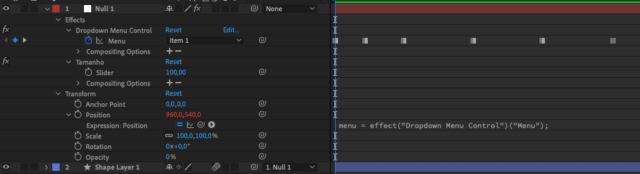
    menu = effect("Dropdown Menu Control")("Menu");
    var proximoKeyframe = menu.nearestKey(time);
    if(proximoKeyframe.time > time) {
    	proximoKeyframe = menu.key(menu.nearestKey(time).index - 1);
    }else {
    }
    temp = valueAtTime(proximoKeyframe.time);
    pos1 = [960, 800];
    pos2 = [150, 150];
    pos3 = [1340, 700];
    var posDestino;
    var previousPos;
    transitionDuration = framesToTime(10); // Duração da transição em frames
    if (menu.numKeys > 0) {
    	nearestMarkerIndex = menu.nearestKey(time).index;
    	nearestMarkerTime = menu.nearestKey(time).time;
    	previousMarker = menu.key(nearestMarkerIndex - 1);
    	temp = valueAtTime(menu.key(previousMarker).time - 0.1);
    	switch(menu.key(previousMarker).value) {
    		case 1:
    			previousPos = pos1;
    			break;
    		case 2:
    			previousPos = pos2;
    			break;
    		case 3:
    			previousPos = pos3;
    			break;
    	}
        if (time >= nearestMarkerTime) {
    		switch(menu.value) {
    			case 1:
    				if(pos1 != temp) {
    					posDestino = pos1;
    				}
    				break;
    			case 2:
    				if(pos2 != temp) {
    					posDestino = pos2;
    				}
    				break;
    			case 3:
    				if(pos3 != temp) {
    					posDestino = pos3;
    				}
    				break;
    			default:
    				posDestino = previousPos;
    				break;
    		}	
        } else {
    		previousPos;
    	}
    } else {
    	previousPos;
    }
    ease(time, nearestMarkerTime, nearestMarkerTime+transitionDuration, previousPos, posDestino);


    Brie Clayton replied 2 years, 8 months ago 3 Members · 5 Replies
  • 5 Replies
  • Dan Ebberts

    December 21, 2023 at 7:28 am

    I think if you provide more details on how you want it to work, you might get more action. If you could answer questions like when exactly does the animation take place, and what happens before the first keyframe, that would be helpful.

  • Moises Lanzini Stobbe

    December 21, 2023 at 11:28 am

    Sorry about that, I really didn’t go much into what it should do.

    Basically I want the ease() animation to happen at the time of each keyframe in the dropdown menu, it should start at the keyframe time, and end after 10 frames (0.33 seconds, since my comp is 30fps). The ease() should also be from the current position (stored as pos1, pos2 and pos3) to the next one selected by the new keyframe.

    Here’s how I am trying to make it work:

    • dropdown is currently at “item 1”, so current position is as stored in “pos1”
    • create keyframe in the dropdown changing it to “item 2”
    • when the playhead reaches the keyframe, it eases from “pos1” to “pos2” for 10 frames
    • now the position is “pos2”

    In the screenshot I have several test keyframes to try out the expression, it mostly works, but when the playhead is nearer to the next keyframe, than the “current” one the position changes suddenly to [960, 540] (literally happens from one frame to the next), which is the default position of the null before the expression was applied, but it should stay at the last keyframe stored position until the next keyframe is reached and a new ease() happens.

    I think my issue is related to using only nearestKey(), since it is expected to simply tell what is the nearest keyframe to the current time, and that would mean that when you are halfway between keyframes, the next one is closer, but I can’t see why the code is changing the position and not holding it.

    I’d be happy to provide any further details if needed 🙂

  • Dan Ebberts

    December 21, 2023 at 4:29 pm

    This should be close:

    menu = effect("Dropdown Menu Control")("Menu");
    transitionDuration = framesToTime(10);
    positions = [[960, 800],[150, 150],[1340, 700]];
    val = positions[menu.value - 1];
    if (menu.numKeys > 0){
    n = menu.nearestKey(time).index;
    if (time < menu.key(n).time) n--;
    if (n > 1){
    t1 = menu.key(n).time;
    t2 = t1 + transitionDuration;
    v1 = positions[menu.key(n-1).value - 1];
    v2 = positions[menu.key(n).value - 1];
    val = ease(time,t1,t2,v1,v2);
    }
    }
    val
  • Moises Lanzini Stobbe

    December 21, 2023 at 4:34 pm

    That works perfectly, I was overcomplicating everything, I think I stuck to what I had already done so much that it blinded me to better ways to do it!

    Thanks so much!

  • Brie Clayton

    December 21, 2023 at 5:41 pm

    Thank you for this solve, Dan!

We use anonymous cookies to give you the best experience we can.
Our Privacy policy | GDPR Policy