

Activity › Forums › Adobe After Effects › What’s the best way to remove an object in a 1 hour interview
-
What’s the best way to remove an object in a 1 hour interview
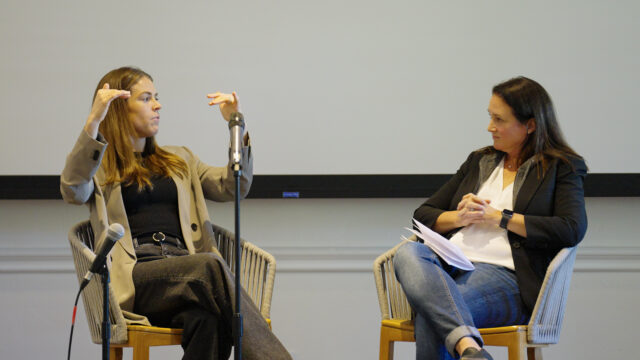
Posted by Tam Duong on October 21, 2023 at 10:28 pmI need to remove the microphone in front of the speaker on the left, and this is a 1 hour long interview (silly mistake I know). What would be the best way to approach this?
 John Cuevas replied 2 years, 10 months ago 4 Members · 3 Replies
 -
3 Replies
-

Osman Muhammad
October 22, 2023 at 9:12 pmThe best way to remove an object like a microphone from a 1-hour interview video is to use video editing software with a feature for object removal or masking. Adobe After Effects and Adobe Premiere Pro offer effective tools for this task. You may need to manually track and mask the microphone throughout the video, which can be time-consuming, but it’s the most precise way to achieve the desired result.
-

Graham Quince
October 24, 2023 at 1:13 pmI’m not sure there is a good way to remove either of those microphones. You’ll create a lot of work for yourself and over the course of an hour anything you do will probably show up in a few frames -which will immediately distract the viewer. Imagine some blurring or arm warping just long enough to get the viewer’s attention. Content aware fill would be the tool to try, possibly with Photoshop’s generative AI to fill in the background. You might also be able to use the wire removal effect as well.
If you are under pressure to hide the mic, I’d suggest disguising it with graphics or a CG prop. To be honest though, the staging of the whole scene suggests that viewers will understand this is an interview. If the director/producer says they care about how the set looks, they really should have thought of that before. Personally, just from the still, the blue product label on the screen in the background is more distracting.
-

John Cuevas
October 24, 2023 at 2:01 pmUnless the camera is stationary, you are looking at huge task. If it’s stationary, you could create a chair, floor & wall to take cover up most of the microphone(cloning). The part above the chair will be problematic because your speaker is moving, which will cause the jacket to move. If the jacket stays relatively still you could clone that and lay it over the microphone and when she moves, do your best to clone the jacket as it moves.
You could try generative AI in photoshop or After Effects as a starting point, and then manually fix frames that don’t match up. But for a hour long interview, you are looking at a ton of work. You have over 85,000 frames to fix.
Reply to this Discussion! Login or Sign Up