Creative Communities of the World Forums

The peer to peer support community for media production professionals.

Activity Forums Maxon Cinema 4D 3D animated object moves instead of remaining stationary on the floor

  • 3D animated object moves instead of remaining stationary on the floor

    Posted by Maxi Penide on September 24, 2023 at 12:54 am

    Hello everyone, I appreciate any help you can give me.
    I don’t understand why my animation instead of remaining stationary on the floor, it moves (as if flying). I don’t understand what the problem is or where in the process I am making a mistake. I leave the steps I took until I got to IMPORT the animation to AFTER EFFECTS

    I uploaded a 3D model of Deadpool character to MIXAMO and added an animation to it.

    I have exported that animation in FBX format to CINEMA 4D to make some adjustments. Then from C4D EXPORT to AFTER EFFECTS (ELEMENT 3D) in OBJ WAVEFRONT format

    Maxi Penide replied 2 years, 10 months ago 3 Members · 3 Replies
  • 3 Replies
  • Kouraib Abdmalek

    September 24, 2023 at 8:28 am

    Hi Maxi,

    I think it requires further information about your scene to clarify the problem, but I suggest that you bake your animation as Alembic, as this will avoid a lot of problems when exporting animation from cinema 4D to another program.

    Hope that will help

  • George Charoupas

    September 24, 2023 at 1:55 pm

    Hello Maxi,

    Modern versions of After Effects support c4d files natively, so you don’t have to convert anything. You just need Cineware and to install the Cinema 4D addon in After Effects.

    You can check this

    https://helpx.adobe.com/after-effects/using/c4d.html

    for more help on how to do it.

  • Maxi Penide

    September 25, 2023 at 10:10 am

    Hello! Thank you very much for the answers. I have followed your recommendations and I have also looked elsewhere for a solution and I have found it.

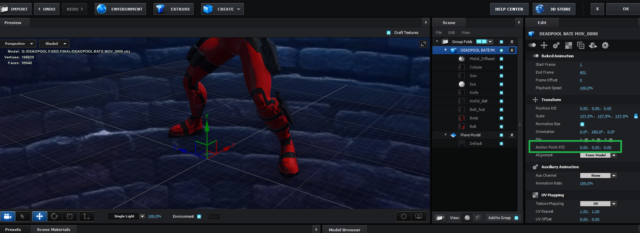
    The problem was related to the ANCHOR POINT. When exporting the 3D model to ELEMENT 3D (after effects), it was exported with the anchor point to the center of the 3D character and that caused the animation to move and float on the floor without meaning. The solution was to set the ANCHOR POINT values to 0 (zero) so that it was at the same level as the floor. This caused my animation to no longer move and the character to remain stationary on the floor.

    I will also continue investigating why this happens and at what stage of the process it can be corrected so that when importing the modeling in element 3D this problem does not occur.

    But for now I consider the matter resolved, thank you very much for your help!

    @georgioscharoupas I didn’t know that information, I’ll keep it in mind!

    @kouraibabdmalek I will try your recommendation regarding bake my animation as alembic

We use anonymous cookies to give you the best experience we can.
Our Privacy policy | GDPR Policy