

Activity › Forums › Maxon Cinema 4D › select all then [[ y = 0 ]] ??
-
select all then [[ y = 0 ]] ??
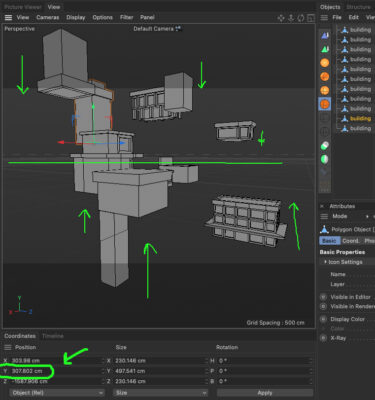
Posted by Mauricio Barrientos on August 30, 2023 at 5:15 amHello, I have several buildings at different heights,
And I would like to know how I can place them all in one fell swoop, bring them to the ground, all even.
I already managed to make the AZIS “and” place them at zero, but then it’s up to each one, by one, by one, to bring them to the ground.
Is it possible to select them all, and bring them all to zero height? :
(y=0) Mauricio Barrientos replied 3 years ago 2 Members · 5 Replies
 -
5 Replies
-

George Charoupas
August 30, 2023 at 12:48 pmHello, The easiest way to do it is:
1) Creating a big plane at 0 height (big enough so all objects can touch it)
2) Select all your objects
3) Select dynamic place
4) Move them all at y axis and all of them will stop at 0
You can watch my video how to do it. Its pretty easy.
-
George Charoupas
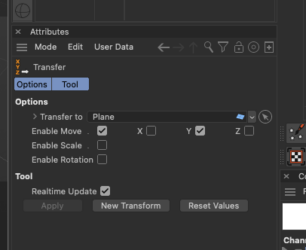
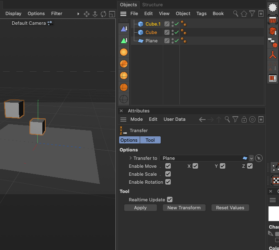
August 30, 2023 at 12:54 pmIf you have an earlier version of Cinema 4D and doesn’t have this, you can use the transfer tool.
1) Again create something and place it at 0 height.
2) Select all objects you want to move
3) Go to tools -> Transfer
4) Place the object that it is in 0 height in the “Transfer To” section
5) Deselect all options and leave only the “Enable Move” + “Y” enabled
6) Press apply and it is done. You can watch my video also for this method.
-

Mauricio Barrientos
August 31, 2023 at 4:25 pm<div>WOW !!!</div><div>
this is really awesome …
i try this morning …and really really awesome !!!!!
i try both options, and work fine on C4D trial R25 thanks
and , on complete C4D R23 … work like video i sent….
thanks really thanks
</div><div>
https://www.youtube.com/watch?v=JlPHlUvrpTQ
</div>
Some contents or functionalities here are not available due to your cookie preferences!This happens because the functionality/content marked as “Google Youtube” uses cookies that you choosed to keep disabled. In order to view this content or use this functionality, please enable cookies: click here to open your cookie preferences.
-
George Charoupas
August 31, 2023 at 9:43 pmIt’s not visible on your video, cause it is cropped. Next to enable move, do you have enabled only the y axis?
-
Mauricio Barrientos
September 1, 2023 at 12:38 ami have only this …..
but … listen .. its ok ..
coz when i open a whole new project . and export [[copy_paste]] to new project then work
fine..
its ok ..
you are awesome brother thanks really thanks..
here my website if i can do somenthing letme know:
</div>
Reply to this Discussion! Login or Sign Up