Creative Communities of the World Forums

The peer to peer support community for media production professionals.

Activity Forums Maxon Cinema 4D About viewport frame rate limit.

  • About viewport frame rate limit.

    Posted by Hoa Neo on July 10, 2023 at 1:33 pm

    Hi, I’m new to C4D

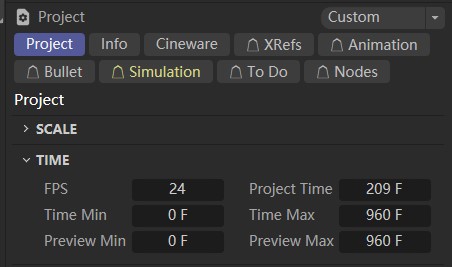
    I have set 24 fps in the project settings but when I run the hair simulation the viewport shows beyond 24 fps which prevents me from putting my final rendering effect, any ideas?

    Any reply is greatly appreciated!

    Kouraib Abdmalek
    replied 2 years, 10 months ago
    3 Members · 2 Replies
  • 2 Replies
  • George Charoupas

    July 10, 2023 at 8:52 pm

    Hello,

    In your images I can see that you have selected 24 as fps. FPS, stands for Frames per Second. Which means that your video (if you export one) will have 24 images for every second. However this doesn’t mean that your video will be only 24 frames ~1 sec. I am also seeing that your project time is set 209frames and your viewport max at 960Frames. If you want your viewport to only show 24 frames change your viewport max at 23f (given the start is 0 frame the final result is 24 frames). Let me know if that was your primary problem.

  • Kouraib Abdmalek

    July 11, 2023 at 10:17 am

    Hi Hoa Neo,

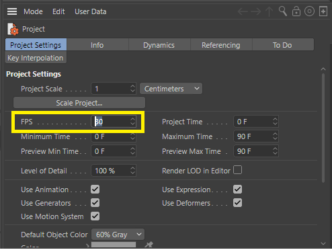
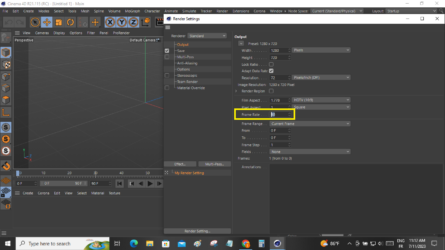
    please when you open the program go to project setting and change the fbs to 25 then go to render setting and change the frame rate to 25 as in the screenshots below.

    hope this helps

    thanks

We use anonymous cookies to give you the best experience we can.
Our Privacy policy | GDPR Policy