-
Switch Cameras with a Dropdown menu in After Effects?
Hi folks.
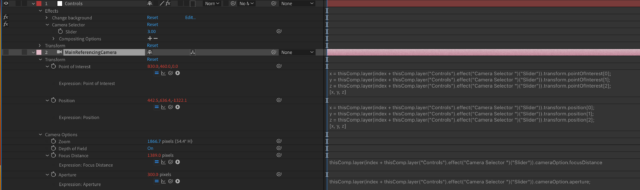
I’m trying to make a setup where I can add multiple cameras in a single composition (no precomps) and create a dropdown menu to switch between those cameras after-the-fact.
I’m making a template in After Effects that will be used in Premiere through the Essential Graphics window. I want to make it really easy to use, only a few settings to choose from.
I want an editor using Premiere to have access to these multiple camera angles by use of a dropdown menu in the template.I’m already doing this with other objects in the scene, using an if else expression linked to a dropdown menu to change the opacity of various layers so they switch on and off. This works well in the template but I don’t know how to do the same thing with cameras.
Cameras don’t have an opacity property for example, so how do I set them to toggle on/off – other than the eye/visibility tags or trimming the layer in the comp?
Is there another way to do this without using expressions in the essential graphics window in After Effects perhaps? Appreciate any help.