

Activity › Forums › Adobe After Effects Expressions › Parent single path to two other paths and blend between them with slider control
-
Parent single path to two other paths and blend between them with slider control
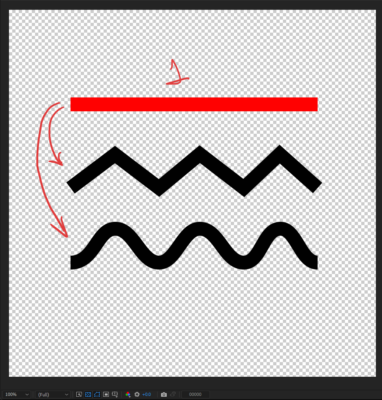
Posted by BayarUgrakh Batzorig on August 8, 2022 at 1:56 pmParent one path to two other animated paths and morph between them with slider control would be nice.
 BayarUgrakh Batzorig replied 4 years, 1 month ago 2 Members · 2 Replies
 -
2 Replies
-

Dan Ebberts
August 8, 2022 at 7:24 pmThis is pretty limited and not well tested. If the two paths don’t have the same number of points, it doesn’t do anything. It assumes that the slider is on the layer with the expression.
path1 = thisComp.layer("Shape Layer 1").content("Shape 1").content("Path 1").path;
path2 = thisComp.layer("Shape Layer 2").content("Shape 1").content("Path 1").path;
s = effect("Slider Control")("Slider");
p1 = path1.points();
p2 = path2.points();
it1 = path1.inTangents();
it2 = path2.inTangents();
ot1 = path1.outTangents();
ot2 = path2.outTangents();
if (p1.length == p2.length){
  newP = [];
  newIt = [];
  newOt = [];
  for (i = 0; i < p1.length; i++){
    newP.push(linear(s,0,100,p1[i],p2[i]));
    if (it1.length > 0 && it2.length > 0){
      newIt.push(linear(s,0,100,it1[i],it2[i]));
    }else if (it1.length > 0){
      newIt.push(linear(s,0,100,it1[i],[0,0]));
    }else if (it2.length > 0){
      newIt.push(linear(s,0,100,[0,0],it2[i]));
    }
    if (ot1.length > 0 && ot2.length > 0){
      newOt.push(linear(s,0,100,ot1[i],ot2[i]));
    }else if (ot1.length > 0){
      newOt.push(linear(s,0,100,ot1[i],[0,0]));
    }else if (ot2.length > 0){
      newOt.push(linear(s,0,100,[0,0],ot2[i]));
    }
  }
  createPath(newP,newIt,newOt,path1.isClosed());
}else
  value;

Reply to this Discussion! Login or Sign Up