Creative Communities of the World Forums

The peer to peer support community for media production professionals.

Activity Forums Adobe After Effects Iterface value entry text overlapping itself

  • Iterface value entry text overlapping itself

    Posted by Steve Bentley on December 10, 2021 at 4:11 am

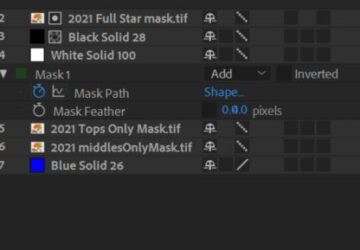
    See image below – is the value in this box 0 or 40 or 4? I know what it is because I put it there and you can see the value if you click to hilight the entry, but it just seems to be a flood of zeros filling the area and it has become a giant pain to work with. This has just suddenly happened after a week of heavy use. I’ve cleared the cache and thrown out the prefs. I don’t recall any prefs that can look after this (American English characters by the way). How to I get the hex of my text?

    I haven’t had to do it in a while (like years) but isn’t there a text or xml file with all the interface stuff described and you can change things there and then that’s what will load. I thought maybe if I could change the font it might look better. AE has been complaining about a font (there are no fonts in this project and yet it complains) so I put two and two together thinking that perhaps a system font is corrupt (and of course it’s probably the one Adobe uses.
    Graham Quince replied 4 years, 5 months ago 2 Members · 2 Replies
  • 2 Replies
  • Steve Bentley

    December 10, 2021 at 8:10 pm

    Solved – it’s that Win 10 Adobe fight. (when will adobe get their UI fixed? – it’s only been 20 years)

    Quit AE. Go to the properties of the AE executable, choose the compatibility tab, hit the change high DPI settings button, check the check boxes for Program DPI and High DPI scaling override, then choose the drop down in the High Dpi override area and choose “System”. Say ok, hit apply and restart. Fixed.

    Has anyone told Adobe that as the screens get bigger and the manufacturers make us buy into more and more unneeded rez that the fonts get smaller?

  • Graham Quince

    December 11, 2021 at 2:51 pm

    Thanks for sharing the solution.

    I feel your pain and while I haven’t had this with After Effects, I’ve certainly experienced the whole tiny font thing in other programs.

We use anonymous cookies to give you the best experience we can.
Our Privacy policy | GDPR Policy