Creative Communities of the World Forums

The peer to peer support community for media production professionals.

Activity › Forums › Adobe After Effects Expressions › Adding points to a shape layer with expressions

  • Adding points to a shape layer with expressions

    Posted by Christopher Johnstone on August 23, 2021 at 2:35 pm

    Hello I have an expression I am using that generates a sinewave L > R

    My expression so far is:

    S = effect(“Speed”)(“Slider”);

    A = effect(“Amp”)(“Slider”);

    F = effect(“Frequency”)(“Slider”);

    R = effect(“Resolution”)(“Slider”);

    W = effect(“Width”)(“Slider”);

    P = [];

    for (i=0; i<R; i++) {

    P.push([W/R*i, Math.sin(time*S+i /(R/F))*A]);}

    createPath(P, [], [], false)

    I would like to add two points to the animation one at the start, one at the end in order to generate an area under the wave animation to be used for a fill

    I would also like to change the sliders over time and fot the values at that time to be reflected in the sinewave, rather than generating a global effect.

    Hope that makes sense?

    Can you guys help?

    Cheers – C

    Christopher Johnstone replied 5 years ago 2 Members · 12 Replies
  • 12 Replies
  • Dan Ebberts

    August 23, 2021 at 8:08 pm

    Maybe you start with the first point already in the array and add the last one after the loop?

    S = effect("Speed")("Slider");

    A = effect("Amp")("Slider");

    F = effect("Frequency")("Slider");

    R = effect("Resolution")("Slider");

    W = effect("Width")("Slider");

    P = [[0,A]];

    for (i=0; i<R; i++) {

    P.push([W/R*i, Math.sin(time*S+i /(R/F))*A]);}

    P.push([W/R*i,A]);

    createPath(P, [], [], true)

  • Christopher Johnstone

    August 24, 2021 at 9:26 am

    if I wanted to translate the first point and the last point to say [0, 1080] and [W,1080] and to add them to the Sign wave – is there a way to do that? — – I am just starting with Loops and Push’s and haven’t quite got the right resourse to get them into my head.

  • Dan Ebberts

    August 24, 2021 at 12:49 pm

    I’m not sure if this is what you mean:

    S = effect("Speed")("Slider");

    A = effect("Amp")("Slider");

    F = effect("Frequency")("Slider");

    R = effect("Resolution")("Slider");

    W = effect("Width")("Slider");

    P = [[0,1080]];

    for (i=0; i<R; i++) {

    P.push([W/R*i, Math.sin(time*S+i /(R/F))*A]);}

    P.push([W,1080]);

    createPath(P, [], [], true)

  • Christopher Johnstone

    August 24, 2021 at 3:30 pm

    Dan! — you are the man yet again — had trouble understanding it at first but it works beautifully – Thank you – C

  • Christopher Johnstone

    August 24, 2021 at 3:41 pm

    one more question — I have used a loop here and I am unsure how to add “tappering” by changing slider values for the sinewave over time?

    Cheers – C

  • Dan Ebberts

    August 24, 2021 at 3:50 pm

    Sorry, I don’t know what you mean by “tappering”.

  • Christopher Johnstone

    August 25, 2021 at 3:22 pm

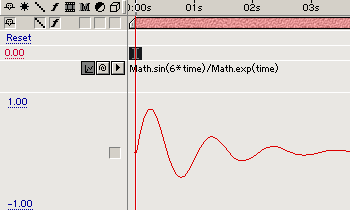
    Argh yes – I am trying to get the look of a decaying sin wave on my shape

  • Christopher Johnstone

    August 25, 2021 at 3:50 pm

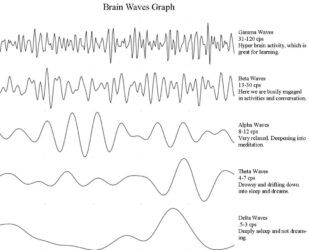
    .. and an alpha wave

  • Christopher Johnstone

    August 25, 2021 at 8:24 pm
  • Christopher Johnstone

    August 25, 2021 at 8:30 pm

    er — sorry what I mean to say (apolgies – I got deistracted earlier) — I want to show Alpha waves with options to increase frequency, width, speed, amplitude. “decay”? etc … on my shape layer … with the addition of a moveable start and end point (as you have solved already – thank you again) … hope that makes sense?? mmm

Page 1 of 2

We use anonymous cookies to give you the best experience we can.
Our Privacy policy | GDPR Policy