Creative Communities of the World Forums

The peer to peer support community for media production professionals.

Activity Forums Adobe After Effects Expressions yposition expression to control a text layers position in a list

  • yposition expression to control a text layers position in a list

    Posted by Henry Gaunt on May 28, 2021 at 9:56 am

    Hello,

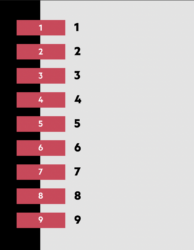
    I’m creating a list to be used in a mogrt for a client (attached screenshot).

    I have 9 seperate text layers, left justified, stacked vertically.

    The first text layer sets the position, as well as two keyframes on the xposition that animate layer on (slide on from off screen).

    The remaining text layers reference this first layer and each is 100 pixels below the layer above (index-1). The xposition also follows the layer above on a 0.1 delay.

    There is also 9 seperate redbox precomps that line up with each layer, to the left (attached screenshot).

    In the essential graphics UI the user can turn off an individual text layer which also turn off the red box precomp next to it (checkbox linked to opacity) or can rename the text layer or the redbox (source text link).

    What would be the y.position expression so if any of the layers above the current layer are turned off, all the layers shuffle up so there are no empty lines.

    Eg…

    Frog
    Cat
    Dog
    Fish
    Cow
    Rat

    And a user might turn off three text layers…

    Frog
    .
    Dog
    .
    .
    Rat

    So the expression would need to reposition the y position of remaining text layers and reference the x position animation to its new theoretical index ranking…

    Frog
    Dog
    Rat

    Hopefully that makes sense.

    My next question would be, can I add additional text layers that have their opacity default to off, but if the user needed a 10, 11 or 12 lines they could turn on the checkbox and the position of each layer would adapt so they could all squeeze into the 980 pixels height allowance – reducing the yposition between each layer as opposed to scaling them down.

    I did try if/else statements but it just turned into a blood bath.

    Thanks so much

    Henry
    Henry Gaunt replied 4 years, 11 months ago 2 Members · 5 Replies
  • 5 Replies
  • Filip Vandueren

    May 28, 2021 at 11:54 am

    I think making an array of the checkboxes first is a good idea,
    maybe something along these lines:

    For opacity (hiding text-layers):

    controls = thisComp.layer("Null 1")("Effects");
    checks = [];
    for (i=1; i <=controls.numProperties; i++) {
    if (controls(i)(1).name=="Checkbox") checks.push(controls(i)(1).value);
    }
    firstTextLayerIndex=2;
    myIndex = index-firstTextLayerIndex;
    checks[myIndex]*100;

    For position (text-layers):

    controls = thisComp.layer("Null 1")("Effects");

    checks = [];

    for (i=1; i <= controls.numProperties; i++) {

    if (controls(i)(1).name=="Checkbox") checks.push(controls(i)(1).value);

    }

    numActive = checks.reduce((a,b) => a+b ,0);

    firstTextLayerIndex=2;

    myIndex = index-firstTextLayerIndex;

    linespacing = 980/numActive;

    top = 0;

    for(i=0; i < myIndex; i++) {

    if (checks[i]) top+=linespacing;

    }

    thisComp.layer(firstTextLayerIndex).position + [0,top];

    Of course this is assuming the texts are never breaking to be more than 1 line high, that would make it a bit more complex, looping through all the sourceRectAtTimes to calculate a better top-value.

  • Henry Gaunt

    May 28, 2021 at 12:33 pm

    Thank you for the reply Filip. I appreciate your time.

    For the life of me I can’t get this to work.

    I currently have a “Null 1” with 9 checkboxes to activate/deactivate each layer.

    As a test, I pasted the opacity expression (in the text layer opacity), but get the error “couldn’t turn result into a numeric value”.

    I also pasted the position expression (in the text layer position) and it piles each text layer on top of each other at the top of the list.

    I’m obviously doing everything wrong, can you please let me know how to correctly apply these expressions?

    Thanks again,

  • Filip Vandueren

    May 28, 2021 at 2:11 pm

    Can you first check that in your project settings the JavaScript Engine is set to “JavaScript” ? Legacy extendscript would fail on the reduce() method.

    Also if your after effects is not in English, name==“Checkbox” would be a bad check.

  • Henry Gaunt

    May 30, 2021 at 12:41 pm

    Thank you.

    I’ve been working for hours to try and simplify the setup, I’m hoping this is an easier/more stable solution….

    The user is now presented with a dropdown menu with an option of list consisting of 1, 2, or 3 text layers. The layer below those text layers needs to move up or down on the Y axis depending on how many text layers the user has selected so there are no line spaces when a text layer is turned off.


    I tried this, but kept getting the error unexpected token ‘else’.

    I want it to basically work as…

    • is index-1 100 opacity? if yes, stay in your position, if no, move to index-1 position

    • then is index-3 100 opacity? if yes, stay in index-1 position, if no, move to index-3 position

    End.

    (It’s index-3 as there is another text layer in-between which I need it to ignore).

    p = thisComp.layer(index-1).transform.opacity;

    d = thisComp.layer(index-3).transform.opacity;

    if (p ==0) z = thisComp.layer(index-1).position[1];

    [value[0], z];

    else if (d == 0) f = thisComp.layer(index-3).position[1];

    [value[0], f];

    else {

    value;

    }

    Thank you – I’m hoping I was close….

  • Henry Gaunt

    May 30, 2021 at 11:23 pm

    I actually freaking did it, it’s a Christmas miracle..

    p = thisComp.layer(index-1).transform.opacity; 
    d = thisComp.layer(index-3).transform.opacity;
    if (p==0 && d==100){
    z=thisComp.layer(index-1).transform.position[1];
    [value[0], z];
    }
    else if (p==0 && d==0){
    z=thisComp.layer(index-3).transform.position[1];
    [value[0], z];
    }
    else {
    value;
    }

We use anonymous cookies to give you the best experience we can.
Our Privacy policy | GDPR Policy