

Activity › Forums › Adobe After Effects Expressions › Animating text, by character AND by word
-
Animating text, by character AND by word
Posted by Christopher Rutherford on April 26, 2021 at 6:39 pmSo I’ve got a lot of text that I’m trying to animate in by marker. I was wondering if there was a way to configure it such that each layer marker triggers an animation for a word, but that individual word animates in randomly per character.
For example, in the text layer “ROSES ARE RED”
Marker one would trigger animation for S then O, then R, then S, then EMarker two would trigger R, then A, then E
Marker three would trigger R, then D, then E
Is this even possible? Is this a dream unreachable?
priscila johanna replied 5 years, 2 months ago 3 Members · 5 Replies -
5 Replies
-

Filip Vandueren
April 27, 2021 at 12:20 pmThere’s probably a complexer way to calculate it all within 1 expressionselector, but you could do this more easily with 3 range selectors:
1 random transition,
1 to “protect” words that have already been revealed
1 to keep hidden words that should not yet be revealed.
See attached project.
-

Christopher Rutherford
April 27, 2021 at 5:16 pmIncredible. Would never have thought to do it like that. Thank you so much.
-

priscila johanna
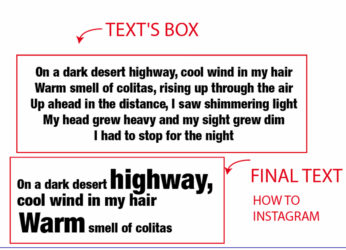
June 24, 2021 at 3:04 amHello, very good, this code I congratulate you, maybe you can help me (image attached) I want to have that result but with lines of texts, how can I do it, I only have the code that is here
m = thisLayer.marker;
i = m.nearestKey (tiempo) .index;
if (m.nearestKey (hora) .hora> hora) {i–;}
si (i <1) {i = 1};
I–;
-
Filip Vandueren
June 24, 2021 at 9:55 amYour setup is a bit different than Christopher, because the sourceText is changed by the markers.
maybe you can try something like this:
(Copy and paste this onto the selected text-layer, it is not an expression)
Adobe After Effects 8.0 Keyframe Data
	Units Per Second	25
	Source Width	1
	Source Height	1
	Source Pixel Aspect Ratio	1
	Comp Pixel Aspect Ratio	1
Text	Animators	Animator #2	Selectors	Range Selector #1	Offset #3
	Frame	percent
		-100
Expression Data
m = thisLayer.marker;
i = m.nearestKey(time).index;
if (m.nearestKey(time).time > time){ i--;}
linear(time,m.key(i).time, m.key(i).time+0.5,-100,100);
End of Expression Data
Text	Animators	Animator #2	Selectors	Range Selector #1	Advanced	Ease Low
	Frame	percent
		60
Text	Animators	Animator #2	Selectors	Range Selector #1	Advanced	Randomize Order
	Frame
		1
Text	Animators	Animator #2	Selectors	Range Selector #1	Advanced	Shape
	Frame
		2
Text	Animators	Animator #2	Properties	Opacity
	Frame	percent
		4
Text	Animators	Animator #2	Properties	Position
	Frame	X pixels	Y pixels	Z pixels
		0	-132	0
Text	Animators	Animator #3	Selectors	Range Selector #1	Offset #3
	Frame	percent
		-100
Expression Data
m = thisLayer.marker;
i = m.nearestKey(time).index;
if (m.nearestKey(time).time > time){ i--;}
if (i==m.numKeys) {
	100
} else {
	linear(time,m.key(i+1).time-0.5, m.key(i+1).time,100,-100);
}
End of Expression Data
Text	Animators	Animator #3	Selectors	Range Selector #1	Advanced	Ease Low
	Frame	percent
		60
Text	Animators	Animator #3	Selectors	Range Selector #1	Advanced	Randomize Order
	Frame
		1
Text	Animators	Animator #3	Selectors	Range Selector #1	Advanced	Shape
	Frame
		2
Text	Animators	Animator #3	Properties	Opacity
	Frame	percent
		4
Text	Animators	Animator #3	Properties	Position
	Frame	X pixels	Y pixels	Z pixels
		0	132	0
End of Keyframe Data -
priscila johanna
June 24, 2021 at 2:51 pmhi Filip
Thank you very much for taking your time and helping me I get an error in the expression, could you upload a file if it is not too much trouble please?
Reply to this Discussion! Login or Sign Up