Creative Communities of the World Forums

The peer to peer support community for media production professionals.

Activity Forums Adobe After Effects Electromagnetic Field Visualization

  • Electromagnetic Field Visualization

    Posted by Sinjin Manta on January 24, 2021 at 6:09 am

    I’ve been away from After Effects for many many years, but just starting to get back into it. I’m attempting to create an animation of electromagnetic fields. A great example of what I’m looking to create can be found in this video: https://youtu.be/3TufSRaHB6g?t=41

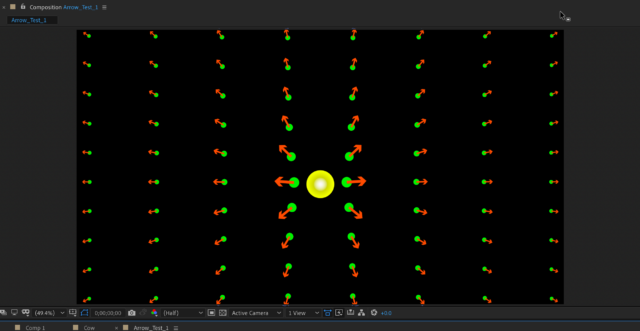
    Essentially, it is an evenly spaced set of objects (x’s, dots, anything) that cover the whole screen. Each of those objects then has an arrow attached to it (this is to denote vector direction in the electromagnetic field). The arrows will each need to shift in a radiating pattern relative to an applied change. So, if there is a ball in the center and it moves to the right, there is essentially a ripple effect emanating outwards, with the greatest effect being local and the least being furthest away.

    Attached is an image from the video.

    Ideally the field would be 3D, but I’d be thrilled just to get this 2d representation working.

    Thank you for any help or direction you can give.

    Some contents or functionalities here are not available due to your cookie preferences!

    This happens because the functionality/content marked as “Google Youtube” uses cookies that you choosed to keep disabled. In order to view this content or use this functionality, please enable cookies: click here to open your cookie preferences.
    Filip Vandueren replied 5 years, 1 month ago 3 Members · 4 Replies
  • 4 Replies
  • Filip Vandueren

    January 24, 2021 at 12:53 pm

    You can quickly proto-type this with text layers that have a right pointing arrow: “→”

    and a particle text-layer “O”

    Each arrow-layer would need an expression for rotation, for 2D that would be:

    particleLayer = thisComp.layer("O");
    p= position - particleLayer.position;
    radiansToDegrees(Math.atan2(p[1],p[0]));

    And also an expression for scale, based on the distance towards the central particle. I suppose it would be the inverse square so:

    particleLayer = thisComp.layer("O");
    strength = 10;
    d= length(position - particleLayer.position);
    value * strength*(1/Math.sqrt(d));

    (this would give an divide by zero error if an arrow is at the exact same location as the particle, but I guess that’s physically accurate 🙂 )

  • Sinjin Manta

    January 24, 2021 at 5:29 pm

    Filip, Thank you very much. I was able to use your expressions and apply them to some shape layers to get it working. I’m thrilled. THANK YOU.

  • Nawaz Alamgir

    April 2, 2021 at 7:23 pm

    Hi @<b style=”font-family: inherit; font-size: inherit;”>Filip

    What code would make the scale of the arrows smaller when closer to the target and no change when far? so basically the opposite..

    Thanks

  • Filip Vandueren

    April 3, 2021 at 8:41 am

    value*strength*d;

    And tweak strength.

    Or, if you want to fine tune and limit it, use a linear() function something like:

    linear(d, 0,960, 10,100);

We use anonymous cookies to give you the best experience we can.
Our Privacy policy | GDPR Policy