Creative Communities of the World Forums

The peer to peer support community for media production professionals.

Activity Forums DaVinci Resolve DaVinci voice-over tool in Fairlight just not happening?

  • DaVinci voice-over tool in Fairlight just not happening?

    Posted by Nigel Cooper on December 13, 2020 at 12:31 am

    I have full version of Resolve 16.2.7 and the voice over tool in Fairlight is just not happening.

    I’ve followed the manual and watched three different YouTube tutorials. I ‘patch’ and choose all the right settings but when I ‘arm’ the voice over track by pressing the record button the level indicators don’t move when I speak, if I make an actual recording, nothing is being picked up.

    I upgraded thinking this feature did not exist in the free one, but £300 later it still does not work.

    I’m on an iMac running latest Mojove and I’ve tried with the iMac’s built in mic and with a TRRS mic plugged directly into iMac, nothing.

    Any ideas?

    Nigel Cooper replied 5 years, 5 months ago 3 Members · 4 Replies
  • 4 Replies
  • David Baud

    December 13, 2020 at 1:44 am

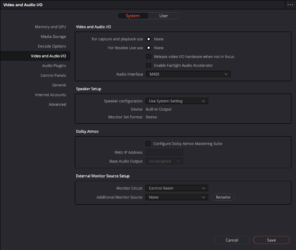
    Have you checked your preference settings for your sound input? Under Resolve Preference?

  • Nigel Cooper

    December 13, 2020 at 9:40 am

    Is this what you mean? see attached screen grab. This is how it was set by default, I’ve changed nothing.

  • Glenn Sakatch

    December 13, 2020 at 4:57 pm

    Never really used fairlight, but i’m guessing, as with most things Resolve, you still need to go through BM hardware for any kind of input. I doubt plugging a mic directly into you computer will achieve anything. In the old Resolve world, even with hardware, you could not capture audio only, and had to have a video signal going in as well, so that my also be part of it. Again, I don’t use fairlight, but this is where I would start looking.

  • Nigel Cooper

    December 13, 2020 at 5:09 pm

    Managed to sort it. It was a Mac thing. Had to go into Mac System prefs/Security and Privacy/Microphone and check the DaVinci box as it was unchecked.

We use anonymous cookies to give you the best experience we can.
Our Privacy policy | GDPR Policy