Creative Communities of the World Forums

The peer to peer support community for media production professionals.

Activity Forums Adobe After Effects AE not rendering Active Camera

  • AE not rendering Active Camera

    Posted by Daniel Siddall on November 17, 2020 at 11:54 pm

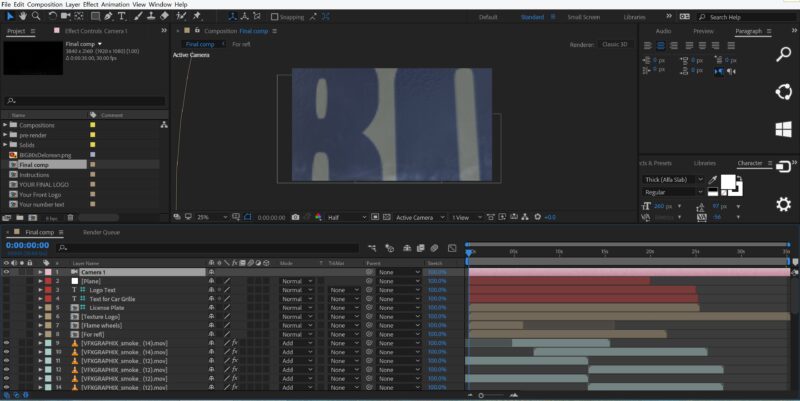
    I have looked at other topics that said they had this problem but they all had some basic error. I cannot find any such basic error in my composition.

    – I have one camera

    – No layers are shy

    – The camera is activated (the eyeball is on)

    – The camera is the top layer

    When I do a RAM preview, it is correct. When I add to the Render Queue and render, it renders from some other angle. (see pics). As you can see in the second pic (the render queue) there is something there…some smoke….but it is not the view of the Active Camera as it should be!)

    Any help is appreciated!

    Michael Szalapski replied 5 years, 5 months ago 2 Members · 8 Replies
  • 8 Replies
  • Michael Szalapski

    November 18, 2020 at 1:02 pm

    I see some of your layers are set to guide layers. Are the layers you want to be seeing accidentally set to be guide layers too?

  • Daniel Siddall

    November 18, 2020 at 3:35 pm

    Thanks for taking the time to reply! I have to admit that while I have done a lot of projects in AE, I have never dealt with guide layers. I will look into that immediately.

    Thanks again!

    -Daniel

  • Daniel Siddall

    November 18, 2020 at 3:38 pm

    No, none of the layers that are meant to be seen are set as guide layers.

    It’s almost as if there is a second camera, but there isn’t!

    -Daniel

  • Michael Szalapski

    November 18, 2020 at 6:54 pm

    Can you share the project file?

  • Daniel Siddall

    November 18, 2020 at 9:08 pm

    I can….but I am new to this forum…. is the .ae file useful alone or do I need to attach all of the project files as well?

  • Michael Szalapski

    November 18, 2020 at 11:56 pm

    So, the Element 3d Car layer isn’t supposed to be visible?

  • Daniel Siddall

    November 19, 2020 at 2:17 am

    It is supposed to be visible, of course. Thanks for the fresh pair of eyes, seeing something I looked right at and didn’t see.

    I will mark this as SOLVED. Thanks so much!

  • Michael Szalapski

    November 19, 2020 at 2:40 pm

    You’re welcome! ?

We use anonymous cookies to give you the best experience we can.
Our Privacy policy | GDPR Policy