

Activity › Forums › Adobe After Effects Expressions › Math.sin easing?
-
Math.sin easing?
Posted by Niek Pronk on November 5, 2020 at 3:27 pmIs it possible to add easing to a generated sine wave using the math.sin expression?
Filip Vandueren replied 5 years, 10 months ago 3 Members · 9 Replies -
9 Replies
-

Dan Ebberts
November 5, 2020 at 7:15 pmHard to guess what you’re after exactly, but maybe something like this:
freq = 2;
amp = 100;
period = 1/freq;
t = time%period;
tt = ease(t,0,period,0,period);
amp*Math.sin(freq*tt*Math.PI*2)
-

Niek Pronk
November 10, 2020 at 1:01 pmHi Dan,
thank you so much for your reply. It’s not really doing what I wanted though.
Im trying to keep a pulse in my animation and let the Math.sin expression dictate that pulse. My expression is as follows:
x=value[0];
a=thisComp.layer(“SLIDER controls”).effect(“Amplitude 1”)(“Slider”);
f=1.8461538462;
t=time-inPoint;
y=Math.sin(t*2*Math.PI*f/thisComp.layer(“SLIDER controls”).effect(“Speed”)(“Slider”))*a;
[x,y]
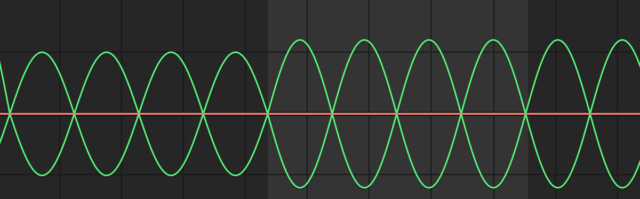
It is generating a nice pulse (see my attached screenshot) but I would like the top and bottom half of the pulse to have more ease-in and ease-out. Is this possible?
Thanks again so much
Niek

-

Filip Vandueren
November 10, 2020 at 1:44 pmsomething like this:
s = Math.sin(t);
Math.pow(s, 0.5) * Math.sign(s);
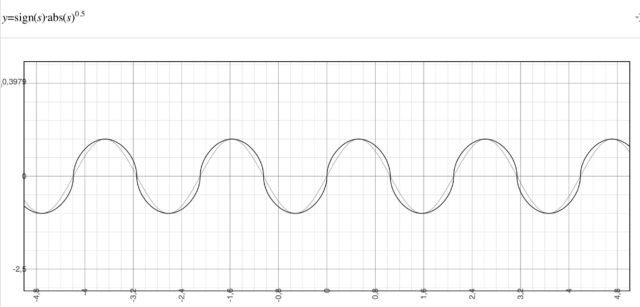
as that 0.5 will tend to 0, the sin will flatten the tops and bottoms of the sinewave more and more, approaching a square wave. Making the value of the power larger than 1 will make it approach a ‘needle pulse’ as it tends to infinity.
If you are running the Legacy javascript engine. Math.sign() isnet supported and you would need this:
s = Math.sin(t);
Math.pow(s, 0.5) * (s<0 ? -1:1);
replace the “t” with your formula of course.
-
Niek Pronk
November 10, 2020 at 1:55 pmHi Filip,
thanks a lot for your reply. Not sure if I am applying your suggestion correctly. Does it mean I paste your suggestion after I’ve defined y? Like this:
x=value[0];
a=thisComp.layer(“SLIDER controls”).effect(“Amplitude 1”)(“Slider”);
f=1.8461538462;
t=time-inPoint;
y=Math.sin(t*2*Math.PI*f/thisComp.layer(“SLIDER controls”).effect(“Speed”)(“Slider”))*a;
Math.pow(y, 0.5) * Math.sign(y);
[x,y]
Because that unfortunately doesn’t change the pulse of the math.sin. But maybe I am doing something wrong here..?
-
Filip Vandueren
November 10, 2020 at 4:02 pmYou didn’t assign the new calculation to anything yet, so the y indeed stays unchanged.
The Math.pow should be done on a -1 to +1 sin value, so wait with mulitplying *a untill afterwards.
Like this:
y=Math.sin(t*2*Math.PI*f/thisComp.layer("SLIDER controls").effect("Speed")("Slider"));
y=Math.pow(y, 0.5) * Math.sign(y) * a;
[x,y]
-
Niek Pronk
November 12, 2020 at 8:10 amThanks for your help Filip. Unfortunately it’s giving me an error and the movement is somehow only going up..
-
Filip Vandueren
November 12, 2020 at 9:13 amCan you tell me the error ?
Probably you are on an the legacy Javascript engine that doesn’t support Math.sign
replace it with (s<0 ? -1:1)
-
Niek Pronk
November 12, 2020 at 11:06 amIt is still only completing the top half of the pulse. AE tells me it cannot produce a numeric value for [x,y]
this is what i have now:
y=Math.sin(t*2*Math.PI*f/thisComp.layer(“SLIDER controls”).effect(“Speed”)(“Slider”));
y=Math.pow(y, 0.5) * (y<0 ? -1:1) * a;
-
Filip Vandueren
November 14, 2020 at 2:06 pmSorry, i forgot to include Math.abs(y) inside the power !
x=value[0];
a=thisComp.layer("SLIDER controls").effect("Amplitude 1")("Slider");
f=1.8461538462;
t=time-inPoint;
y=Math.sin(t*2*Math.PI*f/thisComp.layer("SLIDER controls").effect("Speed")("Slider"));
y=Math.pow(Math.abs(y), 0.5) * Math.sign(y) * a;
[x,240+y];
Reply to this Discussion! Login or Sign Up