

Activity › Forums › Maxon Cinema 4D › Multi Shader random textures movement
-
Multi Shader random textures movement
Posted by Vincenzo Marchese Ragona on November 4, 2020 at 3:26 pmHi, I set up a scene of some tiles multiplied with a cloner. Each of them has a different texture that I applied using a multi shader + random set up on “Effector Color”. I managed to make it work, but when I apply another effector to the cloner to add movement for example those same textures keep changing randomly.
Not sure if that was clear, seems like if movement is applied the texture keeps spinning randomly. Is there a way to have those textures still while moving tiles around?
Jim Scott replied 5 years, 9 months ago 2 Members · 12 Replies -
12 Replies
-

Jim Scott
November 4, 2020 at 10:41 pmIt sounds like the Color Mode of the second effector (which I’m guessing is also a Random effector) is also set to “Effector Color.” Make sure it’s set to “Off.” If that’s not the issue, please post your project file.
-

Vincenzo Marchese Ragona
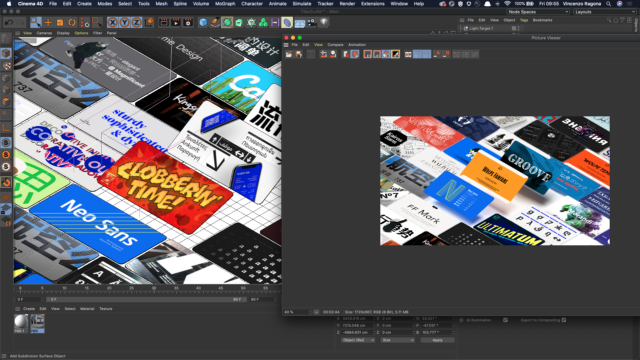
November 5, 2020 at 7:16 pmI’m noticing now that the preview texture is different once rendered, It just renders a different texture.
-
Jim Scott
November 6, 2020 at 12:45 amI don’t know what would cause the rendered texture to be different than what is displayed in the viewport. When I test my own example the textures rendered in the Picture Viewer are identical to those in the viewport. Any chance you were altering the random seed in-between renders?
-
Vincenzo Marchese Ragona
November 6, 2020 at 9:56 amI’m sure, I’m not altering the random seed.
Please find attached the screenshot that proves it.
Not sure what’s going on!

-
Vincenzo Marchese Ragona
November 6, 2020 at 10:20 amalso noticing that the texture change also when zooming in or out!
-
Jim Scott
November 6, 2020 at 1:58 pmIn regards to the altering of the random seed, I never doubted that what you said was happening actually was. I was only looking for possibilities, and the accidental altering of the random seed was one. The fact that the textures change when zooming is really odd — which may suggest that a reinstall is necessary. Again, I am at a loss as to what is going on. Perhaps someone else will chime in with a solution. Best of luck.
-
Jim Scott
November 6, 2020 at 2:19 pmOne more thought. Do you get the same odd issues if you use a different folder of textures in the Multi Shader, or if you simply use a Color Shader instead?
-
Jim Scott
November 6, 2020 at 3:35 pmIf you are getting the same issues with different texture folders (and/or using a Color Shader instead) could you post your project file so that others could try it with their own textures?
Reply to this Discussion! Login or Sign Up