

-
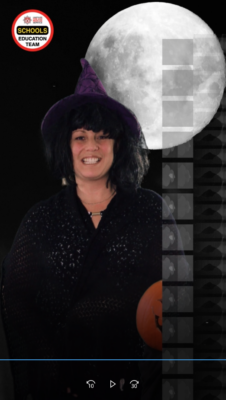
Weird repeated image artifact in After Effects Green Screen export
Hi guys,
I wonder if you can help. I’m trying to export an AE video (photo attached) but I’m getting a weird artifact in one frame everytime I try. The video is exported from Premiere Pro 2020 (I’ve tried both H.264 and Apple Pro-Res exports). I’ve then green-screened with KeyLight 1.2, fixed colour with Lumetri Colour and added a little smoke effect layer.
I’ve had trouble with this clip in KeyLight 1.2 as it was freezing everytime I tried to use Key Cleaner. However I seemed to fix this issue by fiddling with the pre-blur as suggested on these forums.
The artifact is a line of copies of the original video of the woman, in B/W. It’s really weird.
Any ideas what it is/what I’ve done wrong and how to get rid of it?
I’m using AMD Ryzen 7 1700 8 Core Processor, GeForce GTX 780, 16 GB RAM.
Thanks!

Sorry, there were no replies found.