Creative Communities of the World Forums

The peer to peer support community for media production professionals.

Activity Forums Adobe Photoshop How to make brush “crisp”? 100% hardness still a bit blurry/soft

  • How to make brush “crisp”? 100% hardness still a bit blurry/soft

    Posted by Robert Maric on October 3, 2020 at 1:04 am

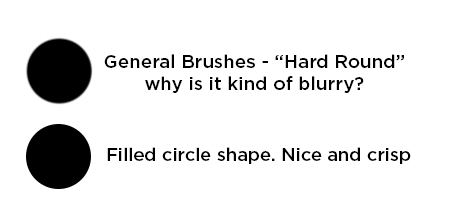
    Hi there, this has me a bit stumped. I am trying to use the brush tool to create crisp lines but it always looks a little blurry. See screenshot attached to compare brush dot compared to circle shape fill dot. I have no effects, havent scaled it, just using the default General Brushes > Hard Round. I have tried messing with all settings but just cannot shake this slight soft edge. Is it possible to make the brush more crisp or are brushes just inherently always a little blurry? Thank you.

    Brendon Murphy replied 5 years, 8 months ago 2 Members · 1 Reply
  • 1 Reply
  • Brendon Murphy

    October 5, 2020 at 3:51 am

    I believe this is due to anti-aliasing. The pencil tool has no anti-aliasing, while the brush tool has it built in. My theory is that the shape tool uses a different kind of anti-aliasing – like how you can chose the different flavors of anti-aliasing when using the type tool.

We use anonymous cookies to give you the best experience we can.
Our Privacy policy | GDPR Policy