Creative Communities of the World Forums

The peer to peer support community for media production professionals.

Activity Forums Adobe After Effects Expressions Changing Font Weights with Sliders

  • Changing Font Weights with Sliders

    Posted by Nathaniel Costa on September 29, 2020 at 8:21 pm

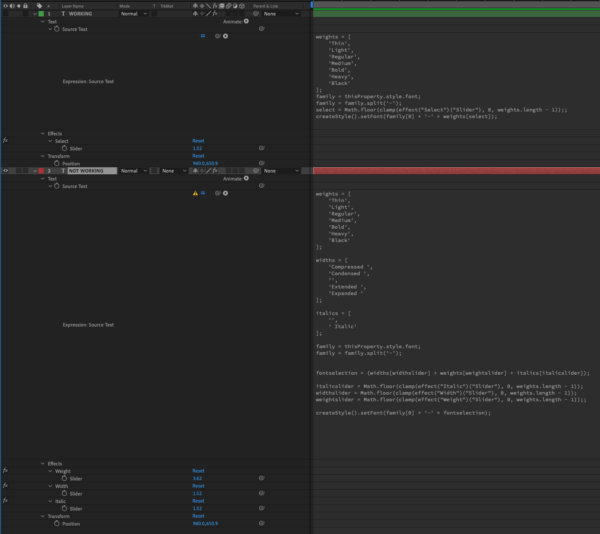
    I am trying to create a text layer with the font weights linked to sliders. I was able to get a single slider to shuffle through an array of weights, thanks to the help of the guys over at workbench. I am trying to set up three sliders to access all of the different font options (width, weight, italic). The font weights are named in three parts, width, weight, italic. ex. Condensed Bold Italic etc. I created an array for each part that would be controlled by sliders to assemble the name of the font weight. Below are the two expressions (not working & working) as well as screen shots of my AE and full font list I am trying to access. Please help, thanks!!

    NOT WORKING:

    weights = [

    ‘Thin’,

    ‘Light’,

    ‘Regular’,

    ‘Medium’,

    ‘Bold’,

    ‘Heavy’,

    ‘Black’

    ];

    widths = [

    ‘Compressed ‘,

    ‘Condensed ‘,

    ”,

    ‘Extended ‘,

    ‘Expanded ‘

    ];

    italics = [

    ”,

    ‘ Italic’

    ];

    family = thisProperty.style.font;

    family = family.split(‘-‘);

    fontselection = (widths[widthslider] + weights[weightslider] + italics[italicslider]);

    italicslider = Math.floor(clamp(effect(“Italic”)(“Slider”), 0, weights.length – 1));

    widthslider = Math.floor(clamp(effect(“Width”)(“Slider”), 0, weights.length – 1));

    weightslider = Math.floor(clamp(effect(“Weight”)(“Slider”), 0, weights.length – 1));;

    createStyle().setFont(family[0] + ‘-‘ + fontselection);

    WORKING (single array):

    weights = [

    ‘Thin’,

    ‘Light’,

    ‘Regular’,

    ‘Medium’,

    ‘Bold’,

    ‘Heavy’,

    ‘Black’

    ];

    family = thisProperty.style.font;

    family = family.split(‘-‘);

    select = Math.floor(clamp(effect(“Select”)(“Slider”), 0, weights.length – 1));;

    createStyle().setFont(family[0] + ‘-‘ + weights[select]);

    Dan Ebberts replied 3 years, 11 months ago 4 Members · 4 Replies
  • 4 Replies
  • Nathaniel Costa

    September 29, 2020 at 10:26 pm

    SOLVED: it was a spacing issue with the font names

  • Tomas Bumbulevičius

    September 30, 2020 at 10:04 am

    Just to give a good reference, I saw this tutorial by Workbench in the past, which could be useful resource for others: https://youtu.be/TlGR72oN1Ks

    Some contents or functionalities here are not available due to your cookie preferences!

    This happens because the functionality/content marked as “Google Youtube” uses cookies that you choosed to keep disabled. In order to view this content or use this functionality, please enable cookies: click here to open your cookie preferences.

  • Amy Auman

    July 19, 2022 at 12:57 pm

    I tried this exact same expression, and I keep getting errors stating SyntaxError: Invalid or unexpected token, an expression was disabled as a result of an error. Any ideas on what’s going on?

    weights = [
    ‘Light’,
    ‘Regular’,
    ‘Bold’,
    ‘Ultra’,
    ‘Black’
    ];

    family = thisProperty.style.font;

    family = family.split(‘-‘);

    select = Math.floor(clamp(effect(“Select”)(“Slider”), 0, weights.length – 1));;

    createStyle().setFont(family[0] + ‘-‘ + weights[select]);
  • Dan Ebberts

    July 19, 2022 at 1:50 pm

    It worked fine for me once I cleaned up the way code gets trashed when you post it here without formatting it. This is what I used:

    weights = [
    'Light',
    'Regular',
    'Bold',
    'Ultra',
    'Black'
    ];
    family = thisProperty.style.font;
    family = family.split('-');
    select = Math.floor(clamp(effect("Select")("Slider"), 0, weights.length - 1));;
    createStyle().setFont(family[0] + '-' + weights[select]);

We use anonymous cookies to give you the best experience we can.
Our Privacy policy | GDPR Policy
