Creative Communities of the World Forums

The peer to peer support community for media production professionals.

Activity Forums Adobe Photoshop Anyone know how to can print these exact circle size on a letter size (8.5×11)?

  • Anyone know how to can print these exact circle size on a letter size (8.5×11)?

    Posted by Jaymes Gordon on September 16, 2020 at 8:42 pm

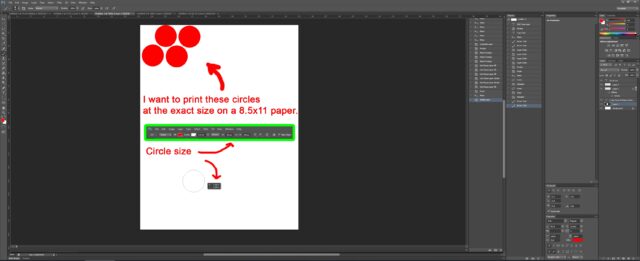
    Does anyone know how to can print these exact circle size on a letter size (8.5 x 11) on Photoshop CS6? I’m pretty sure there’s a settings somewhere in the printing settings, but I couldn’t find it.
    I was able to do it on Microsoft Works by pasting only one single circle there and adjust the object size. But in my case, I want 4 circles at a pattern. It seems complicated. Please help. …see photo attachment for more detail. Thanks.
     

    Brendon Murphy replied 5 years, 9 months ago 2 Members · 1 Reply
  • 1 Reply
  • Brendon Murphy

    September 17, 2020 at 1:36 am

    Not sure what you’ve tried so far, but I have good luck saving to a photoshop pdf and printing through acrobat. Make sure you use “actual size” in the print dialogue. One issue I see in your design is that there’s no margin. Many printers cannot print all the way to the edge of the page.

    So in short:

    -Create your graphics in an 8.5″X11″ document at the exact size you would like them to print (use your rulers under the “view” menu, and guides to check everything).

    -Keep graphics at least .25″ from the edge of the document

    -Save as photoshop pdf (high quality or press quality preset should do it)

    -Print through acrobat using “actual size”

We use anonymous cookies to give you the best experience we can.
Our Privacy policy | GDPR Policy