

Activity › Forums › Adobe After Effects Expressions › Is there a script that combines Throw with a direction?
-
Is there a script that combines Throw with a direction?
Posted by Tl Westgate on September 8, 2020 at 6:34 pmMy searches yield nothing like what I want exactly.
It would be nice if there was a script to just type in a Throw value (pixels/sec) AND maybe a 360 degree dial to give a direction to the item you want to animate. It seems this would be super helpful and animating motion where you want different objects to all have the same speed but maybe not all be going in the same direction.
Tl Westgate replied 6 years ago 4 Members · 10 Replies -
10 Replies
-

Ernestas Cepulionis
September 8, 2020 at 6:51 pmYou don’t need a script on this issue because expressions describes behavior of layers/motion. Just take circle or ellipse formula, make some variables like speed and initial throw angle and make some calculations to get arc. You can use expression control also for quick managment of your animation. With script you can do the same calculations, but instead of motion function that could be described with expression, you can output script calculations to keyframes. In this case you can’t control your animation, you need run script each time to get new animation with different initial parameters. In ghis case you can write a gui script, but i don’t think that you need it ?
-

Chris Jeffries
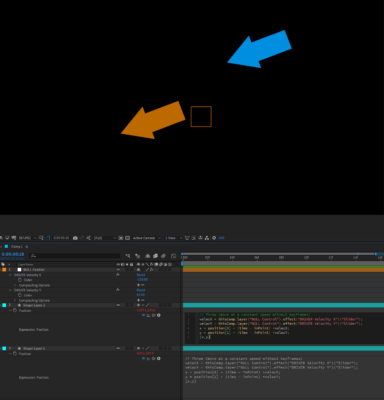
September 8, 2020 at 7:01 pmSee the attached image for a possible solution.
I don’t know the math required to make a similar setup with an angle control, but I’m sure there’s another helpful soul out there who does.
(I’m intentionally not including text for copy/paste because I’m of the
opinion that it’s helpful, when learning these things, to actually type
them out. Hope you still find this useful!)
-

Dan Ebberts
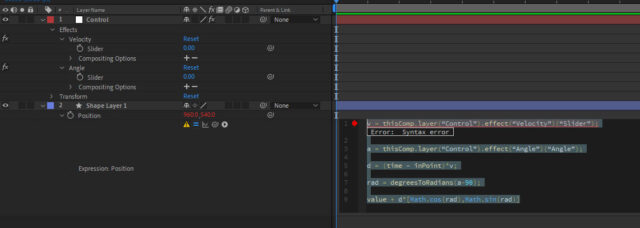
September 8, 2020 at 7:46 pmLike this maybe:
v = thisComp.layer(“Control”).effect(“Velocity”)(“Slider”);
a = thisComp.layer(“Control”).effect(“Angle”)(“Angle”);
d = (time – inPoint)*v;
rad = degreesToRadians(a-90);
value + d*[Math.cos(rad),Math.sin(rad)]
Dan
-

Tl Westgate
September 8, 2020 at 7:53 pmI really appreciate your post and the others, but I don’t know what to do with this.
Do I alt-click the position for an item and paste this there?
-
Dan Ebberts
September 8, 2020 at 8:31 pmYes. You also need to set up the Control layer with the Velocity slider and Angle control.
Dan
-
Dan Ebberts
September 9, 2020 at 3:12 pmSorry, I’m still getting the hang of how to post code into this new format. Let me try again:
v = thisComp.layer("Control").effect("Velocity")("Slider");
a = thisComp.layer("Control").effect("Angle")("Angle");
d = (time - inPoint)*v;
rad = degreesToRadians(a-90);
value + d*[Math.cos(rad),Math.sin(rad)]
Dan
-
Tl Westgate
September 9, 2020 at 3:21 pmI had to change:
a = thisComp.layer(“Control”).effect(“Angle”)(“Angle”);
to this:
a = thisComp.layer(“Control”).effect(“Angle”)(“Slider”);
and it worked! Thanks much!
-
Dan Ebberts
September 9, 2020 at 3:59 pmThat control was meant to be an angle control (not a slider) where the direction indicated by the control would match the direction of the throw…
Dan
-
Tl Westgate
September 9, 2020 at 4:05 pmOh, gotcha! I’ve never used an angle control. That makes much more sense. I like it. Thanks again!
Reply to this Discussion! Login or Sign Up