

-
Moving a whole row of files wihtout CTRL and click?
Posted by Adam Harrington on June 24, 2016 at 8:46 pmHows that done again? Sorry for the newb questions, it was a gift and I’m just learning as I am a hopeful fan editor. 😀
George Dean replied 10 years, 1 month ago 2 Members · 8 Replies -
8 Replies
-

George Dean
June 24, 2016 at 8:56 pmAuto Ripple, keybaord shortcut Ctrl+L toggles on and off.
Best Regards….George
-

Adam Harrington
June 24, 2016 at 8:59 pmOMG TY,
One thing they should do is show it selected or something though, I couldn’t tell until I got brave and moved it 😀 -
Adam Harrington
June 24, 2016 at 9:21 pmWorks great but for some reason it doesnt like that I have some empty space for some areas where I wanted them there. Can’t I just delete the empty space at the beginning of my timeline? That’s where I basically want it.
-
George Dean
June 24, 2016 at 9:33 pmHi Adam,
What version are you using and is it Vegas Pro or Movie Studio? They are a biy different, some show it and others not so easy!
Best Regards….George
-
George Dean
June 24, 2016 at 10:07 pmHi Adam,
On the tool bar below the timeline you should see an Auto Ripple option icon that looks like this if Auto Ripple is turned On….

It should look like this when Auto Ripple is turn Off…….

The little down arrow menu will present the Auto Ripple options that look like this………
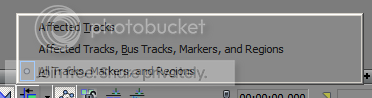
Hope this helps a bit…..
Best Regards…..George
-
George Dean
June 24, 2016 at 11:29 pmHi Adam, you are certainly welcome, glad I could help out in a small way…
Best Regards…..George
Reply to this Discussion! Login or Sign Up