


Monica Nolan
Forum Replies Created
-

Thanks Shane. Anyway to double check the quality without running out and making those purchases?
I’m also going to be pulling the clips into AE, where I’m tempted to work in a 1240×720 project, especially since I suspect the client will end up wanting dvd and posting to the web.
I’m wondering if I pull a clip into AE as described above that will give me a better sense…
-
Monica Nolan
September 16, 2010 at 7:23 am in reply to: Can’t output HDTV 1080 comp–deadline approachingHere’s what I ended up doing:
going back to a 1280×720 comp and working in that for the back and forth with client. Pre-rendering that background and other subcomps was indeed key to being able to ram preview.
Since I think we’re (finally) close to outputting, I scaled up my comp, scaled up a few of the subcomps where it seemed to make a difference (collapse transformations not playing well with motion blur etc) and output a 20 second test, which looks pretty good (looking at still frames in QT and following Walter’s advice and compressing it to watch it through).
I also found this site about speeding up AE performance helpful:
https://help.adobe.com/en_US/AfterEffects/9.0/WSF13D6BED-C53B-408a-B2D6-C8B4205D4FB7a.htmlAnd this discussion made me resolve to get more ram!
https://forums.creativecow.net/thread/202/884887#884895Thanks cowies.
-
Monica Nolan
September 10, 2010 at 10:18 pm in reply to: Can’t output HDTV 1080 comp–deadline approachingWalter–I tried pre-rendering a nested comp and then outputting a small section of the pre-rendered, nested comp over the blue background and for the first time it worked at 1920×1080, animation codec. However the test section didn’t really play beyond the first fade up–more like it was jumping forward, freeze framing, jumping forward.
Thoughts???
Thanks,
Monica
-
Monica Nolan
September 10, 2010 at 8:02 pm in reply to: Can’t output HDTV 1080 comp–deadline approachingHow are you playing the comp? Standard preview (spacebar) or RAM preview (0 on numeric keypad)?
I’m using RAM preview. I need to hear the audio to change the animation timing.
What does it say in the project panel when you select the footage? It should identify the compressor for you.
It says: HDTV (rec 709)
Is the dot also supposed to be perfectly round, or is it supposed to be an oval as we see here? It might a pixel aspect ratio issue. What is the source of the dot? A file, or a shape layer? Does it look this in the comp as well as the output? Can we get a screenshot of your AE user interface showing the problem?
The dot is supposed to be round. It doesn’t look like that in the comp–at least not this morning (that output was late last night and at that point I shut down and went to bed). The source file is a layer in a many layered .psd file I imported as a composition. Perhaps I should mention here that I’ve output several times to show the client and have the usual back and forth. It’s only since yesterday that the program began acting up. When I was still working in 1280×720 I output fullsize with the animation codec and used compressor to shrink the file size. When I began having problems I could still output the 1920×1080 file size using the animation compressor with resolution set to half.
How much RAM do you have?
4 gigs.
Thanks again for your time. At this point it’s so buggy I’m thinking of reinstalling or downloading a trial version of CS5. Any suggestions appreciated.
Monica
-
Monica Nolan
September 10, 2010 at 6:37 pm in reply to: Can’t output HDTV 1080 comp–deadline approachingThanks Dave & Walter for your quick responses.
The situation is worse this morning–can’t play through my comp to make changes. Audio stops and starts, and seems out of sync. I just threw away my preferences and retried, no change.
Dave: multiprocessing was off. I just turned off the Open GL. There are two audio files: VO (aiff) and music (wav). I don’t know how the .mov file I’m using was produced, but it’s 1920×1080 square 29.97–364 mb for 33 seconds. Does that file size say h.264?? I’m inclined to think that’s not the source of the problem, as the render has output that, and then stopped and given me the error message when it reached the background jpegs.
Walter: I precomposed the background but did not prerender it. I’ll try that next.
Here’s a screen shot of the artifacting: That is supposed to be an arrow with a shadow, and the blue dot is supposed to be inside the box, not floating in space. this was produced after I turned off the background.
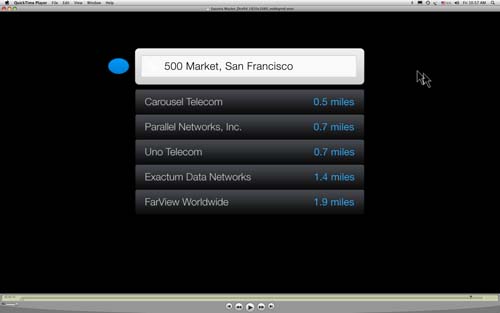
Question: should I stop thinking the cause is my computer not having enough horsepower? Or is that still on the table?
Thanks so much,
Monica
-
I got this error message and I’ve isolated the source as a jpeg I was given to use as a background to the animation.
Without the background, or with the old background (a smaller file) I can output 1920×1080; with the background I get the error message when it fades up.
It’s 2560×1600, two layers, rgb, 8-bit. Anything I should ask its creator about? I’m very puzzled. I don’t have many third party components or codecs that I know about.
I’m on CS4, mac os x, quadcore.
Thanks!
-
Wow–thank you, thank you. This worked like a charm.
I’m working with nested comps, and I see the subcomps remain unaffected (still 1280×720). There’s no reason to go in and scale up each comp individually, is there? And do I need to make sure rasterized is checked for the subcomps or the individual elements or both?
I think I may have a resolution issue here or there but this is a huge timesaver. Which is good because I talked to the client finally and HE doesn’t have the information about how it will ultimately be played, and so wants it output a bunch of different ways to be on the safe side.