

Activity › Forums › Apple Final Cut Pro › upconverting from 480i29.97 for 1080p24 delivery – should I use 1080sf29.97 ?
-
upconverting from 480i29.97 for 1080p24 delivery – should I use 1080sf29.97 ?
Posted by Nicholas Natteau on August 3, 2021 at 2:39 amI’m going to be editing and mastering a documentary in a 24fps timeline in Final Cut Pro (10.5.4) because the vast majority of my footage is 24fps. But I have a bunch of old newsreels I acquired long ago on Mini-DV tapes in standard video (480i29.97). Using my AJA Kona LHI card for hardware upconversion, should I select 1080sf29.97 or 1080i29.97. I’m confused about which upconvert format to choose because my source footage is 480i29.97 but my delivery is 1080p24 for festivals and online. Thank you in advance for your help.
Nicholas Natteau replied 5 years, 1 month ago 5 Members · 12 Replies -
12 Replies
-

Frank Valtellina
August 3, 2021 at 7:48 amAcquire in the original DV format 480i29.97, then select all DV clips in the browser, go to “Inspector” select “Settings” menu and check deinterlace function. Edit your clips in timeline, select all DV clips and select the better “Frame sampling” in “Rate Conform” menu in the “Inspector” 😉
-

Nicholas Natteau
August 3, 2021 at 10:28 amHi Frank, thanks very much for your help and feedback. But as I have the Kona LHI card, isn’t it better to upconvert to 1080 with that hardware than not doing so? As I will be editing and delivering a 1080 project.
-
Frank Valtellina
August 3, 2021 at 6:45 pmFCPX make a very good job during deinterlace process. You can upconvert with Kona and deinterlace with FCPX. I suggest to make a test both ways.
-

W thomas Leroux
August 3, 2021 at 7:29 pmI agree, Frank – having the native footage can give you some additional flexibility down the road too.
-
Nicholas Natteau
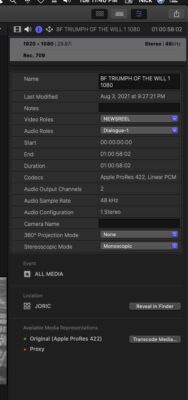
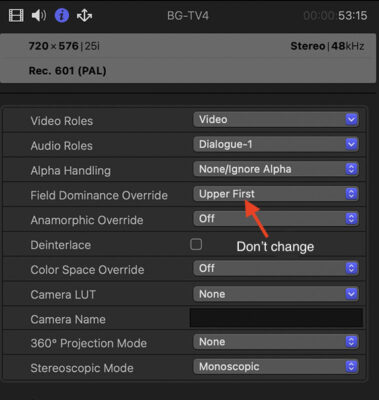
August 4, 2021 at 3:44 amHi Frank, sorry to bother you with this, but I’m not seeing a de-interlace option in Final Cut Pro. Can you help me locate it? Thanks very much in advance. This is what I see in my inspector window when I select an upconverted (from 480i29.97) 1080i29.97 clip:

-
Frank Valtellina
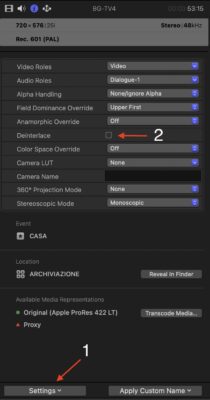
August 4, 2021 at 10:07 pm1) Select all the clips
2) Select Settings in roll out menu (number 1) (look the picture)
3) Check Deinterlace (number 2)
That’s all
-
Nicholas Natteau
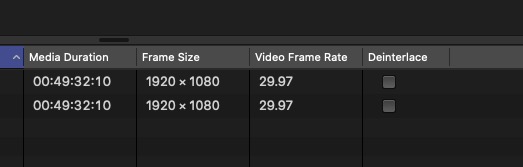
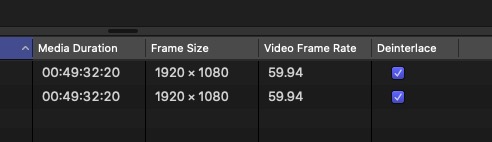
August 5, 2021 at 1:49 pmGot it thanks Frank. The only problem is when I put a checkmark in the “deinterlace” column, it changes the fps timecode of the clips from 29.97 to 59.94:
-
Frank Valtellina
August 5, 2021 at 7:34 pmIt doesn’t matter, the reference is the Timeline setting.
-
Frank Valtellina
August 5, 2021 at 7:40 pmWhen you deinterlace a clip don’t change the “Field Dominance”
-

Michael Grenadier
August 6, 2021 at 1:02 pmFirst, there is a difference between 24fps and 24p (which is actually 23.976). I’m assuming you mean 24p for your new footage.
How were your old newsreel footage clips digitized? If they were transferred “properly” It may be possible to remove the pulldown to restore the clips to progressive 24p. Happy to describe the details of exactly what’s going on here, but probably not necessary. I abandoned apple editing software many years ago when Apple abandoned fcp7, but this used to be possible in Cinematools which was part of FCP Studio. It may still be possible in Compressor, but you’ll need to do some research on that. It is a feature in AfterEffects if you have access to it.
Removing Pulldown will give you better quality than just deinterlacing and retiming. Also, scaling the SD material in compressor with the best quality options enabled will probably do a better job of scaling than FCPX albeit with a much greater rendering time.
Reply to this Discussion! Login or Sign Up