

Activity › Forums › Adobe Premiere Pro › Transition help need
-
Transition help need
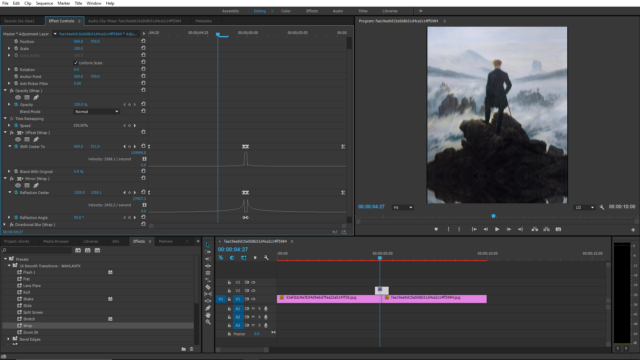
Posted by Fahim siyam on September 8, 2025 at 10:21 pmCan anyone teach me this mirror slide/ wipe transition? No video on youtube, only about slide transition, but i want this mirror border below. I found this preset online, but it only have down slide. plz help
 Devrim Akteke replied 1 year ago 3 Members · 16 Replies
 -
16 Replies
-

Devrim Akteke
September 9, 2025 at 8:00 amDo you have a video showing what you need? It’s hard to understand what you mean by a still frame.
-

Fahim siyam
September 9, 2025 at 9:44 amsure, here it is, ” https://youtube.com/shorts/mF2rj15A9T8?si=sQ9k1m24Vy8zJs0r ” . look closely, when the image slides to another there is a reflection . i found only one video on internet saying you need sapphire plugin to do mirror / reflection effect. but then i found a free preset doing the same, without plugin.direction But it is one directional , just down, can you help me to slide the to every direction , up. left , right.
Some contents or functionalities here are not available due to your cookie preferences!This happens because the functionality/content marked as “Google Youtube” uses cookies that you choosed to keep disabled. In order to view this content or use this functionality, please enable cookies: click here to open your cookie preferences.
-
Fahim siyam
September 9, 2025 at 9:49 amhere is the preset; https://drive.google.com/file/d/1GsPxhZqZWyuVI3Ca8zg42448uwz3k1IT/view?usp=drive_link . the transitions is under wrap section, and just disable the brightness/ contrast fx
-
Devrim Akteke
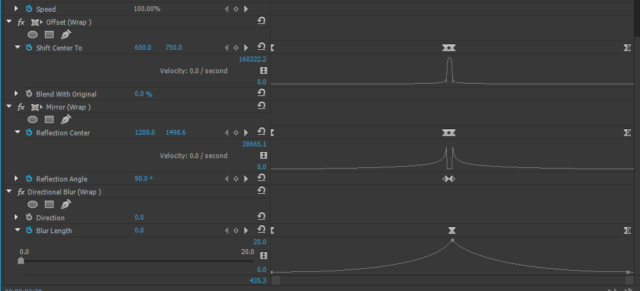
September 9, 2025 at 10:41 amWell, it’s basically changing X and Y values. This one changes Y values, so it moves vertically; if you change X values on keyframes, it will move horizontally. But also, there is the mirror wrap effect; you have to play with those, too. If I have some time, I will try to modify it and let you know.
-

Mads Nybo jørgensen
September 9, 2025 at 11:44 pmHey Fahim,
Adding to Devrim’s advice, I would also “play” with the reflection angle.
Atb
Mads
-
Fahim siyam
September 10, 2025 at 6:29 amyeah, got it , but when ever i try to change offset value. thing get messy. can you please tall me what would be the offset value for up, right, and left
-
Devrim Akteke
September 10, 2025 at 11:33 amThe numbers I used in the sample I sent are:
960×540 — 0x540 — 1920×540 — 960×540
This is for horizontal, I am changing only X values and keeping the Y values intact.
-
Fahim siyam
September 11, 2025 at 6:37 pmDear akteke sir
would you please remove the YouTube link from our previous discussion? as this kind of video is against my values and I do not want to promote them, but i don’t find any way to edit the post
-
Mads Nybo jørgensen
September 11, 2025 at 6:46 pmDear Fahim,
You’ll need to explain why that video goes against your values, as I can see nothing wrong with it?
In fact, you had no problem with it whilst you were seeking help, so it is double standard then to ask for it to be removed, right?
Just making an observation.
Not a judgement on your moral code or religion.Atb
Mads
Reply to this Discussion! Login or Sign Up