

Activity › Forums › Adobe After Effects Expressions › Ternary diagram / ternary plot calculations
-
Ternary diagram / ternary plot calculations
Xavier Gomez replied 10 years, 8 months ago 3 Members · 22 Replies
-

Patrick Grossien
January 22, 2016 at 10:25 amYes, the sliders are just there to store the results so that I can easily use these as text sources to display the percentage in the animation.
I used the 3 slider controls in the dot layer so that the expression can always easily reference to it’s own layer position and that it’s all in one place.
-

Kalleheikki Kannisto
January 22, 2016 at 1:28 pmThe distance calculation between a point and a line can be found here:
Mathwold, Point-Line DistanceSince we know all the points (the corners that create the line and the point that we want to know the distance of), the solution lies here:
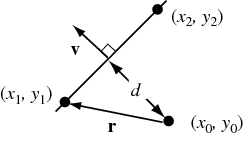
and in this formula:

-

Xavier Gomez
January 22, 2016 at 5:25 pmThe expression below is for a text layer (display all 3 coordinates in 1 single text) :
A = thisComp.layer("A").transform.position.value;

B = thisComp.layer("B").transform.position.value;

C = thisComp.layer("C").transform.position.value;

M = thisComp.layer("Point").transform.position.value;

AB = sub(B,A); if (AB.length<3) AB.push(0);

BC = sub(C,B); if (BC.length<3) BC.push(0);

CA = sub(A,C); if (CA.length<3) CA.push(0);

AM = sub(M,A); if (AM.length<3) AM.push(0);

u = cross(AB, CA);

U = dot(u,u);
c = dot(u, cross(AM, AB))/U*100;
b = dot(u, cross(AM, CA))/U*100;
a = 100-(b+c);letters= ["a", "b", "c"];
values = [a,b,c];
for (k=0; k<3; k++) letters[k] += " : " + (values[k]<10 ? " " : "") + values[k].toFixed(1) + "%";
letters.join("\n");It’s not optimal as it does unnecessary calculations, but trying to optimize would make it less compact.
Xavier

-
Kalleheikki Kannisto
January 22, 2016 at 6:29 pmXavier got there before me 🙂
Anyways, attached is my humble approach which is not quite as compact.
I’ve used the coordinates that show on the diagram, so they need to be modified for a triangle that has different corner coordinates.
Also, there’s no code checking that the dot is not outside the triangle, but I figured you will animate it so that that doesn’t occur.
-
Patrick Grossien
January 22, 2016 at 7:46 pmWow! Both you guys are amazing. You just made my day.
Now I need to backtrace what you did, trying to understand the math and expressions behind it, but it’s awesome already. I tried both solutions and they both work nicely!
I have the problem that I didn’t get Xaviers solution to work. I tried this one first, because I could easily integrate into my existing comp. Now the percentages are all of. In a clean composition it works like a charm. But I’ll go ahead and try to figure out what’s going on there.
Just to be sure, @Xavier: I could also just add [x,y] values for each one of the ABC variables instead of linking layers to the expression, correct?
-
Patrick Grossien
January 22, 2016 at 7:47 pmThank you, thank you, thank you, for your generous help!
Next beer’s on me! 🙂
-
Patrick Grossien
January 22, 2016 at 7:56 pmPS.
OK direct input of the coordinates works of course.
I just wanted to let you know whats happening where I integrated it into my comp:In the center of the triangle I get
a: 100, b: 100, and c:-100and for example at the lower left corner (A) I get
a: 164, b: 65, and c: -129I’ll continue to search for what happens. But maybe this already triggers for you what could be going wrong here.
-
Patrick Grossien
January 22, 2016 at 8:00 pmOK I found it: I was relying on getting the summits XY positions from INFO window XY values, which were not the same as the true positions of the summits inside the comp
I got this working now, but how can the Info window be wrong? Any clue?
-
Xavier Gomez
January 22, 2016 at 8:31 pmI can’t tell.
The expression i gave assumes that all point coordinates A, B, C and M are in the same system. Depending on your set up you might have to use one of the space transform functions (toComp/fromComp etc).Also, that expression is unnecessarily heavy. If you have lots of points you can change it to this one, which does the same thing without extra stuff:
A = thisComp.layer("A").transform.position.value;

B = thisComp.layer("B").transform.position.value;

C = thisComp.layer("C").transform.position.value;

M = thisComp.layer("Point").transform.position.value;

AB = sub(B,A);

BC = sub(C,B);

CA = sub(A,C);

AM = sub(M,A);

u = AB[0]*CA[1]-AB[1]*CA[0];
c = 100 * (AM[0]*AB[1]-AM[1]*AB[0]) / u;
b = 100 * (AM[0]*CA[1]-AM[1]*CA[0]) / u;
a = 100-(b+c);letters= ["a", "b", "c"];
values = [a,b,c];
for (k=0; k<3; k++) letters[k] += " : " + (values[k]<10 ? " " : "") + values[k].toFixed(1) + "%";
letters.join("\n");Xavier

Reply to this Discussion! Login or Sign Up