

Activity › Forums › Maxon Cinema 4D › Sorting Objects with Mograph Random Effector
-
Sorting Objects with Mograph Random Effector
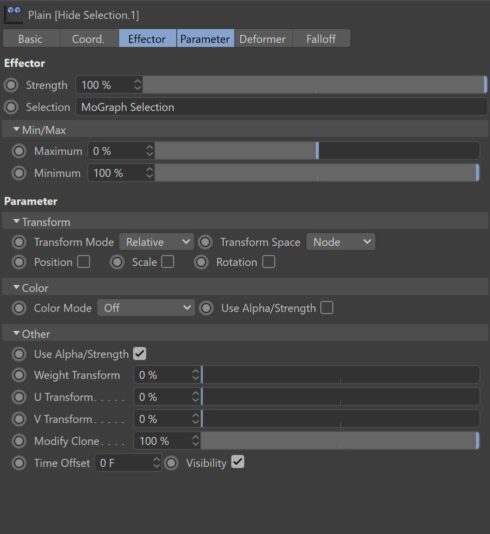
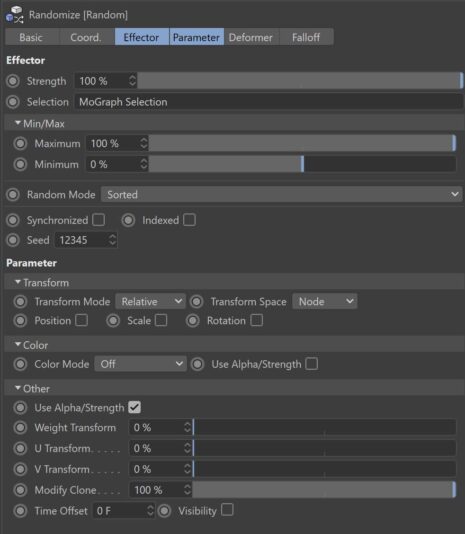
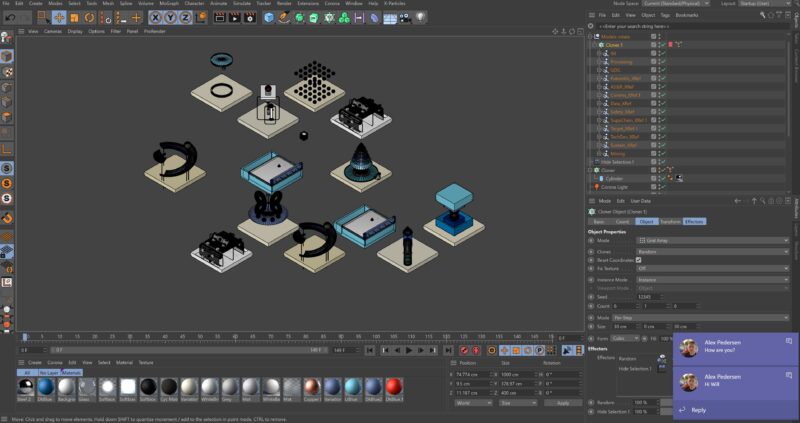
Posted by Will Barber on November 11, 2020 at 1:47 pmI have different randomly placed objects inside a mograph cloner set on Grid Array, and i can’t figure out why i’m getting repeated objects. The random effector is set on ‘Sorted’. I have 13 objects which i want to show, 3 aren’t there and it has duplicated some in their place as shown.
Am i doing anything wrong here? Images attached
Cheers in advance for any suggestions!
Will.
 Andy Kiernan replied 5 years, 10 months ago 3 Members · 12 Replies
 -
12 Replies
-

Jim Scott
November 11, 2020 at 3:02 pmI would think you would want your Clones set to “Iterate,” rather than “Random.”
-

Will Barber
November 11, 2020 at 4:13 pmHi Jim, i’ve changed it to Iterate now but still getting the same issue and positions haven’t changed.
-
Jim Scott
November 11, 2020 at 5:18 pmWith “Iterate” selected it shouldn’t repeat any clones until going through all of them. Perhaps I’m missing something else in your setup. Could you upload the project file, perhaps with simplified objects?
-
Jim Scott
November 11, 2020 at 7:59 pmWill, thanks for sharing the project. Could you please walk me through the steps you took and what your intentions were with each, and what you intend to do with the completed setup? I think I am confused by your use of the mograph selection, which would allow you to select one of each of the 13 objects. At what point did you make that selection?
I’ve got to leave for a doctor’s appointment shortly, but will check back later. Perhaps someone brighter than me will chime in in the meantime. 😉
-

Andy Kiernan
November 12, 2020 at 10:42 amI had a quick look, will look again later, the small selection is seemingly random as the cloner is making 36 clones and then your selection is from that, so some duplication is happening, didn’t have a chance yet to see how to fix it. But, if this is the max number you’re going to use, perhaps simpler to manually place in a grid and then add all models to a fracture object to get them into the mograph module and do your thing from there?
-
Will Barber
November 13, 2020 at 1:53 pmCheers Jim, I basically wanted a random layout that easily be switched around depending what mograph selection was chosen. It was just for different layouts of the same thing. So started with a grid array and with the ones i didn’t what to show i just switched them off. Then added the randomizer. But I’ll try this Fracture idea out that Andy mentions and let you guys know how it went.
Thanks again,
Will.
-
Will Barber
November 13, 2020 at 2:05 pmSuccess!! It worked using the Fracture instead of Cloner – i don’t know a lot about Fracture but this is interesting. Thank you.
Will.
Reply to this Discussion! Login or Sign Up