

Activity › Forums › DaVinci Resolve › Normal / Full Range
-

Charlie Ellis
May 17, 2012 at 2:22 amStrange out of line question,
Can anyone comment on how lustre / scratch / baselight or any other system handle the two?
Somehow they must,
Davinci Resolve Control Surface
MacPro
Cubix desktop 4
2 Red Rockets
GTX470+GTX470+GTX285
24GB RAM
HP Dreamcolor -

Juan Salvo
May 17, 2012 at 3:54 amBaselight allows you to choose scale or unscaled he-sdi output and scaled or unscaled file export. Believe scratch and Lustre currently work the same.
Online Editor | Colorist | Post Super | VFX Artist | BD Author
-

Peter Chamberlain
May 17, 2012 at 7:04 amHi Stig, the simple question is; can you monitoring solution accept full range and display it?
If it can, use that, my guess is it can not. So, use scaled video for the Resolve and Smoke/Flame monitor, that’s what it can accept.
The file you render in Resolve should be full range if you plan on sending it to a downstream device to finish… that downstream device will work in full range. Keep in full data range till you get to the last step.
Peter
-

Sascha Haber
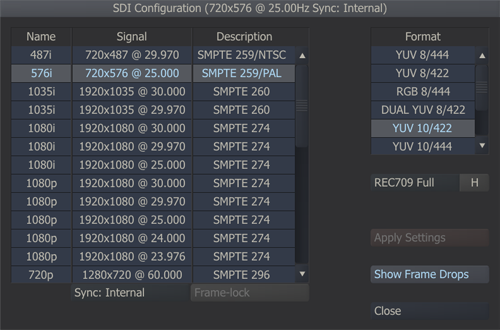
May 17, 2012 at 7:45 amSo does Scratch :
A slice of color…
DaVinci 8.2.1 OSX 10.7.2
MacPro 5.1 2×2,4 24GB
RAID0 8TB
GTX 470 / Quadro 4000
Extreme 3D+ICA Instructor
https://www.icolorist.com/Sascha.html -
Peter Chamberlain
May 17, 2012 at 7:46 amOne more thing… .Resolve has an Auto mode for source and render settings of video/data levels… unless you know or have been asked otherwise, its probably safe to use ‘Auto’ especially when dealing with many of the compressed codecs.
My guideline on ‘always’ full range is from experience using dpx where everything is as you expect.
Peter -

Dimitrios Papagiannis
May 17, 2012 at 11:12 amMy guess would be that what happened Stig is that you rendered in “legal mode” and then when you went to the flame it thought is was full range and so then when it was rendered out of flame it was “legalized” again, or now double legalized therefore leading to your lighter blacks. Does that make sense?
-
John Sellars
May 19, 2012 at 7:06 pmIs there any difference on using HDMI or HD-SDI from DeckLink 3D in manner of full range?
Yes. What most people don’t realize is that the HDMI output of the 3DE is legal range only. I have confirmed this by running a full range PLUGE through Resolve/outboard scope. The below black is gone on the HDMI, but visible on the the SDI output through an HDLink Pro to HDMI. Also HDMI output is 8 bit only. I got conflicting answers from BMD on whether the HDMI output is actually 10 bit on the 3DE+.
-
Jack Jones
May 21, 2012 at 2:38 pmNucoda gives you the option of working in a SMPTE or Full Range (CG) project – As well as Log and Video Log.
This sets all the pivot points where they need to be, and there is a great option for scaling CG for monitoring and force clipping on SMPTE (If you really wanted to!).
I tend to use LUTs to do my SMPTE>CG and reverse.
The confusion tends to come in when QuickTime automatically expands SMPTE to CG. Bit of a pain when it comes to proper color management, but once you know what does what you tend to be fine 🙂
Jack Jones
Freelance Nucoda/Baselight/DaVinci Colourist
—
https://www.jackjonescolourist.com -
Stig Olsen
June 5, 2012 at 2:07 pmHi again, and thanks for all the inputs!
After a week of testing, I have delivered a couple of TV-commercials with the following worklow:
AVID:
Edit Dnx36 as usual + EDL
RESOLVE:
Relink to original Alexa / r3d-footage
Normal scaled monitoring
Render normal range (remap from full range to normal range)
Note: Davinci always work full range intern.AVID (for client viewing purposes)
Regular MXF dump
Intern scopes show legal values (16-235)Note: Avid Mojo DX cant monitor full range and my monitor is also set for legal values.
Export RGB that remappes the file to 0-255.ADSTREAM / ADTOOX encoder for file delivery:
The encoder will remap full-scale RGB to scaled YCbCr
(16-235) and it will be good to go for TV.I also downloaded the delivered file that was remapped to 16-235.
I questioned the “RGB-look” on this file when viewed on my computer screen in any software. I wondered why it didnt look like a normal ranged file – like the one you are “used to see” when exporting 709 from Avid.
The reason is that the player remaps the 16-235 values (stored in the file and never seen) to 0-255 (what you see in the player) by default when played out on a computer.
In other words, 16-235 is stored in the file and 0-255 is seen on the computer monitor when you play the file. A computer monitor usually assumes 0-255 (if not calibrated in another way). Remapping is done in real-time when you play the file.On TV, the opposite thing happens: A TV-set assumes 16-235, which is stored in the m2v file and is broadcasted as well.
I guess this remapping issue would not be a problem if the final adjustments were made in Flame. Then I could probably render a full range DPX from Resolve to Flame and remap the signal to legal values on the monitor output.
The problem for me was that I wanted the file to be screened from Avid before delivered to Flame or for broadcast.This works for me now, but If some of you have suggestions that will improve the workflow, I will be very happy to listen.
Stig
Reply to this Discussion! Login or Sign Up