

-

Colin Morris
August 24, 2013 at 3:59 amHi Angelo- There are 2 other issues you should consider. Make sure you have a quality power conditioner and UPS (not just a surge protector) to plug the raid array into. Arrays are sensitive to power fluctuations etc. Another thing you should consider is paying a bit more for Enterprise class hard drives as opposed to desktop drives. They are faster and fail far less. You should not have a problem with 2TB drives-especially if they are enterprise class. If you want to edit on more than one machine (render on one, edit on another etc) with access to all the footage, you may consider Network Attached Storage (NAS) which will have an ethernet connection. A NAS is usually configured as a RAID array of some type, with several drive bays. Any computer on that network segment can access NAS. Stephen is totally right about hot swapping- It can lead to complications with RAID. Hope that helps.
Colin Mendez Morris
ArsMusica
http://www.arsmusica.ca -

Angelo Mike
August 24, 2013 at 5:15 amThanks. I may very well end up with all of that. My client just dumped on me another 500 GB of footage, which I have space for because I just got another 1 terabyte hard drive for him, but I’m going to have to get a RAID setup soon because I can’t really edit all this and keep it properly backed up with the setup I have now.
Just by coincidence, I’m taking donations for a new RAID setup, UPS, NAS, new desktop, a few monitors, an office to rent (my room is nearly filled to the ceiling along every wall with equipment), and Enterprise class hard drives.
-

John Rofrano
August 24, 2013 at 1:24 pmIt’s important to note that there is no swapping of drives with a RAID! The drives are dedicated and when people speak of swapping the drive, it’s because the drive has failed and needs to be replaced. You don’t just swap a drive out of a RAID and replace it with a drive that has different data. A RAID is one logical hard drive made of of many physical hard drives. The logical hard drive does not exist unless all of the physical hard drives are present.
If you are looking for a solution where you need to swap drives you do not want a RAID, you just want an enclosure that supports JBOD (Just a Bunch Of Disks).
What I would do is use a RAID 5 for all current projects and then archive them to external hard drives when your done. So purchase a RAID 5 that has enough capacity to hold all of your current projects. As you complete a project, archive it to stand-alone hard drives and delete it from the RAID to make space for the next project.
~jr
http://www.johnrofrano.com
http://www.vasst.com -
John Rofrano
August 24, 2013 at 1:31 pm[Dave Haynie] “What they really mean is that the RAID chip, card, or box with its own processor to run the RAID software. Otherwise, that software runs on you PC’s processor.”
Yes, and that’s the point I as trying to make. If your CPU has to run the RAID software it’s going to be painfully slow with RAID 5. I’ve already done this with a box that claimed to support RAID 5 and then I had to install software to manage it. The CineRAID has a controller card in the box that manages the RAID. I set a switch to tell it to use RAID 5, popped in the drives, and it started building the RAID when I turned it on. I can plug it into my Windows PC or MacBook Pro and it just shows up as a big hard drive. No drain on the CPU of the computer that’s using it.
~jr
http://www.johnrofrano.com
http://www.vasst.com -

Stephen Mann
August 24, 2013 at 4:13 pm“It looks like I can pull hard drives in and out and is hard drive based. I’m not looking for hot swappable necessarily, but I do want to be able to pull out different hard drives.”
From your project description, RAID sounds like the better solution. The 8-bay drive enclosure you linked looks pretty good. You still need the external docking station to copy the data from the client’s drives to the RAID, but then you set aside the original data as a backup. So the combination of RAID and the external dock gives you both large storage capacity and swappable drives.
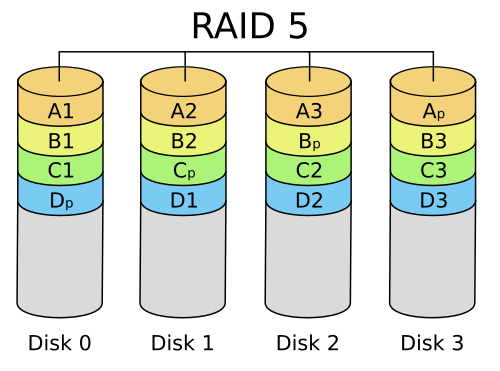
You need to understand that on a RAID array, your data is spread across all of the disks in the array, and in the case of RAID 5, a single drive is the parity bit for everything in the RAID array. You can’t just “pull out a drive”. First, there is no PC readable data on that drive. If you drop that drive into a docking station on a PC, Windows will insist on reformatting it. You can if the enclosure supports JBOD, but in an 8-bay enclosure, JBOD will look to the PC as eight separate disk drives. For example, E;, F:, G:, H:, I:, J: K:, and L:. Potentially 25Tb of storage. Yes, you can mix them any way you want and each disk is readable by itself on the PC. But managing eight drive letters is a nightmare. (Been there). Eight 3Tb drives in a RAID 5 configuration (depending on the hardware configuration) will give you about 20Tb of storage, but it looks to the PC like a single 20Tb drive. It would be much easier to manage the project data on a single drive. The beauty of RAID is that you don’t have to start with eight drives. Start with three and your storage bucket can hold about 6Tb in RAID5. When need more space, plug in a fourth drive then go watch a double-feature while the RAID assimilates the new drive. The drive controller spreads the existing data that is on two drives plus parity over three drives plus parity. It will take a few hours, which is why you can’t treat the RAID array as a JBOD. But you can use the drive while data is being Borged. If the 8-bay will allow you to specify a standby drive then if a failed disk is detected, then it swaps in the standby drive and begins rebuilding the data.
It’s been years since I used RAID, so I would appreciate you keeping us up to speed on what you do.
Steve Mann
MannMade Digital Video
http://www.mmdv.com -
Angelo Mike
August 25, 2013 at 7:06 am[John Rofrano] “It’s important to note that there is no swapping of drives with a RAID! The drives are dedicated and when people speak of swapping the drive, it’s because the drive has failed and needs to be replaced. You don’t just swap a drive out of a RAID and replace it with a drive that has different data. A RAID is one logical hard drive made of of many physical hard drives. The logical hard drive does not exist unless all of the physical hard drives are present.
If you are looking for a solution where you need to swap drives you do not want a RAID, you just want an enclosure that supports JBOD (Just a Bunch Of Disks).
What I would do is use a RAID 5 for all current projects and then archive them to external hard drives when your done. So purchase a RAID 5 that has enough capacity to hold all of your current projects. As you complete a project, archive it to stand-alone hard drives and delete it from the RAID to make space for the next project.”
I just want to make sure I have this straight, because this is a lot of hard drives to back up. You’re saying copy the whole project, right? So if I need to work on the project in the future, I’d use all those archive drives in a RAID setup?
-
Angelo Mike
August 25, 2013 at 7:12 amSounds like I’ll be busy testing it out just to see how I’ll configure it. I probably should get 3 TB hard drives. I just got dumped 500 GB of footage for three days of shooting from another crew my client worked with. That’s barely the beginning of what I’m cutting.
[Stephen Mann] “It’s been years since I used RAID, so I would appreciate you keeping us up to speed on what you do.”
Will do.


-
John Rofrano
August 25, 2013 at 2:16 pm[Stephen Mann] “You need to understand that on a RAID array, your data is spread across all of the disks in the array, and in the case of RAID 5, a single drive is the parity bit for everything in the RAID array.”
Just to clarify, the parity is not contained on one single drive, it is spread across all of the drives along with the data. It consumes the same space as a single drive but it’s physically distributed across all of the drives. People are often confused when they hear someone say, “you loose one drive to parity” but they really mean, “you loose the capacity equivalent to a single drive to parity”. This is what contributes to RAID 5 being slow. It needs to calculate parity across several drives and when adding a drive it needs to redistribute the parity across all of the drives.

It’s just a “nit” but I didn’t want anyone to think all of the parity was on a single drive.~jr
http://www.johnrofrano.com
http://www.vasst.com -
Stephen Mann
August 25, 2013 at 4:45 pmYou are correct, John, and I appreciate the improved explanation.
Steve Mann
MannMade Digital Video
http://www.mmdv.com


Reply to this Discussion! Login or Sign Up