

Activity › Forums › Adobe After Effects › King Kong Displacement map
-

Brad Bartkus
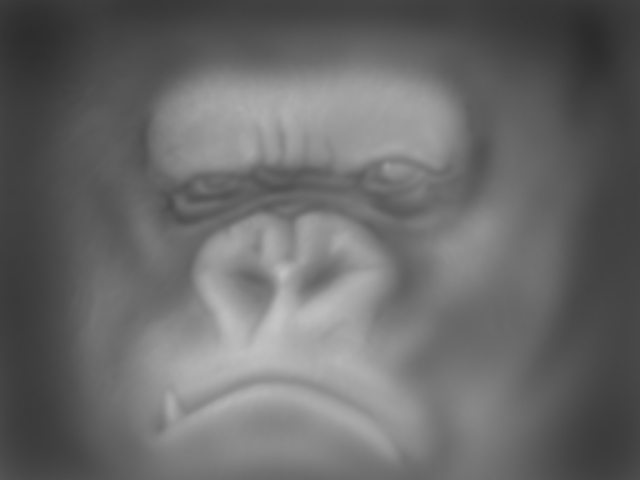
January 24, 2008 at 3:02 pmHere’s my displacement map that everyone’s referring to. As you can see, mine’s got a little more detail to it, but it’s similar to the one’s above.
https://flickr.com/photos/60296545@N00/2216808930/
-

Aharon Rabinowitz
January 24, 2008 at 4:27 pmNow that makes a lot more sense.
Don’t get me wrong Jerzy, I’m sure yours works, but this is more of what I was expecting to see. I knew there was more detail – I wanted to see how much.
Very well done.
Did you paint it entirely by hand or convert colors in the image or what? What was your technique?
Aharon Rabinowitz
Email: arabinowitz (AT) yahoo (DOT) com
All Bets Are Off Productions, Inc.
Creative Cow After Effect Podcast
Internet Killed the Video Star: A Guide to Creating Video for the Web -

Jerzy Drozda jr
January 24, 2008 at 4:57 pmI wouldn’t get you wrong Aharon even if you wanted me too 🙂 You know I love you man 🙂 And that displacement is exactly my point. You have to have more painting skills, or at least a good feeling, and more time 🙂 But as you pointed out. It works, and it works fine.
maltaannon.com – Free After Effects Video Tutorials and more
-

Steve Roberts
January 24, 2008 at 5:03 pmYou know, a little compound blur for depth of field would be cool, too.
-
Brad Bartkus
January 24, 2008 at 5:46 pmI usually start out with a layer that I’ve filled with 50% black. Then I duplicate one of the channels and use that as a mask to brighten or darken areas. Then I do a gaussian blur to soften it a bit and then go in and dodge and burn the areas even more (all of this is done while the layer is set at a slight opacity so you can see the image underneath). What’s nice is you can see your changes in AE and if you don’t like the way the displacement map is working you can go back in Photoshop and tweak it and the reload footage and try again. I’ve used this technique to skew ground planes (with a simple gradient), faces, mountain ranges, clouds, fireballs, etc.
Reply to this Discussion! Login or Sign Up