

Activity › Forums › Apple Final Cut Pro Legacy › importing miniDV in better quality??
-
importing miniDV in better quality??
Adam Smith replied 18 years, 11 months ago 6 Members · 17 Replies
-

Victvillain
October 18, 2007 at 6:26 pmok! Great advice! How would I go exporting my final project as uncompressed? Will there be a option in my export to QuickTime?
-

Adam Smith
October 18, 2007 at 9:05 pmYup, when rendering out the full movie you’d pick ProRes or 8-bit Uncompressed as your QuickTime format.
-
Adam Smith
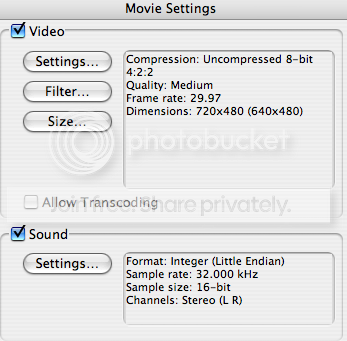
October 19, 2007 at 1:26 amFor video I’d set the quality to 100%.
For sound I’d assume your camera records as 48k so I’d output your file at the same sampling rate unless you need 32k for some reason.
Otherwise yeah it looks good.
—
Video Photographer / Avid Editor / Final Cut Neophyte -
Victvillain
October 19, 2007 at 4:08 amI actually film with a Sony DCR-VX1000, so it records at 32kHz. But i was trying to figure out how to change the quality from medium to “100%”. Cant seem to figure where to change those settings…
-

Rafael Amador
October 19, 2007 at 5:13 amWhat you have post is a snap-shot of the “Export using QT Conversion”. Don’t do that. You must “Export QT”. NOT QT conversion.
The think is like that. You capyure and edit DV, and when the sequence is finish change the Sequence Setting to 8b Uncompress. Like that the rendering will be done in 8b Unc.
If you use QT conversion you are rendering in DV and them the DV is file is transcoded to 8b Unc. You won’t get not improvement.
Rafael -
Adam Smith
October 19, 2007 at 8:03 pmah, good catch!
—
Video Photographer / Avid Editor / Final Cut Neophyte
Reply to this Discussion! Login or Sign Up