

Activity › Forums › Adobe After Effects Expressions › How to use Shape Group #s instead of layer index in an Expression
-
How to use Shape Group #s instead of layer index in an Expression
Sandro Tagliavini replied 3 years, 7 months ago 8 Members · 22 Replies
-

Paul Roper
September 9, 2020 at 11:00 amSo, I’m back again, several years after my last post. I’m now looking to do something similar, but with text animators. All I want to do is get the name of the specific text animator. Like this:
I add an Animator. AE, by default, calls it “Animator 1”. I want this animator to affect line x of my text, so I rename it from “Animator 1” to, say “3” because I want it to affect line 3. I then put an expression in the Range Selector (which I’ve already set to Index and Lines). I assume it would look something like:text.animator(parseInt(thisProperty.propertyGroup(1).name)
or
parseInt(text.animator(thisProperty.propertyGroup(1).name))
…but that doesn’t work. Any suggestions, anyone? (And by “anyone”, I obviously mean The Undisputed Genius of Expressions Dan Ebberts!
 ).
). -

Dan Ebberts
September 9, 2020 at 11:32 amI think you could do this for End:
parseInt(thisProperty.propertyGroup(3).name,10)
and this for Start:
parseInt(thisProperty.propertyGroup(3).name,10) – 1
Dan
-
Paul Roper
September 9, 2020 at 11:37 amTHANK YOU!
I was kinda on the right lines!
Strangely, the “parseInt(thisProperty.propertyGroup(3).name,10) – 1” didn’t work, but if I split it into a couple of lines:var x = parseInt(thisProperty.propertyGroup(3).name,10);
x-1
…it DID work.
-
Dan Ebberts
September 9, 2020 at 3:03 pmSorry about that. I typed the – 1 in (rather than pasting the whole line) and the editor here changed it to a different type of minus sign. Just to be sure, I’m going to try pasting in the whole line and see if that works:
parseInt(thisProperty.propertyGroup(3).name,10) – 1
and also try it using the preformatted text control:
parseInt(thisProperty.propertyGroup(3).name,10) - 1
Dan
-
Paul Roper
September 9, 2020 at 3:09 pm“Sorry about that.” Yes, Dan. you should be sorry. That’s not what we pay you for!
I read somewhere recently that the world’s motion graphics community would completely collapse if Dan Ebberts ever stopped helping us all! And I absolutely agree!
We all love you and owe you MANY hours/days saved throughout our careers!
-

Andrew Jehan
January 26, 2022 at 7:59 pmThis almost gets me there, but I’m trying to simply get the number for the current shape group and I’m a bit confused.
When I pickwhip the relevant properties, it shows up as:
content(“Group 1”).transform.position
content(“Group 2”).transform.position
etc.I just want to use a single expression that can be applied to all the groups, which therefore needs to reference the current group number.
I’ve tried copying in the expression from the solution above like so:
content(“Group” + (parseInt(thisProperty.propertyGroup(3).name.split(” “)[1],10))).transform.position
But I get a “syntax error”. Can you tell me what I’m doing wrong? Thanks!
-
Andrew Jehan
January 26, 2022 at 8:03 pmI’m trying to simply get the shape group’s position information, but I’m still having trouble.
When I pickwhip the properties in question, they’re as follows:
content(“Group 1”).transform.position
content(“Group 2”).transform.positionand so on. I’ve tried copying in the code from the solution above like so:
content(“Group” + (parseInt(thisProperty.propertyGroup(3).name.split(” “)[1],10))).transform.position
but I get a “syntax error”. Can you tell me what I’m doing wrong? Thanks.
-
Andrew Jehan
January 26, 2022 at 8:11 pmNevermind. I just saw Ranveer’s suggestion above (who knew there was a page 2?) and it works fine! Thanks
-

Sandro Tagliavini
February 16, 2023 at 4:53 pmMight as well post something in here:
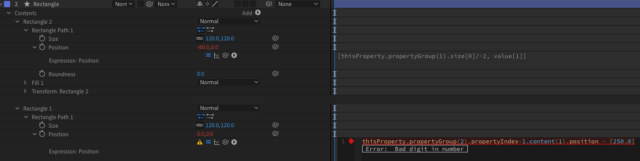
Somethings wrong with this expression
(see image)
thisProperty.propertyGroup(2).propertyIndex-1.content(1).position – [250,0]it’s sth with the propertyIndex, same missing brackets, I honestly dont know…
help is appreciated
Reply to this Discussion! Login or Sign Up