Creative Communities of the World Forums

The peer to peer support community for media production professionals.

Activity Forums Adobe After Effects Animation highlighting the sound coming from the speaker

  • Animation highlighting the sound coming from the speaker

    Posted by Cagdas Kara on July 9, 2025 at 9:26 pm

    Hello everyone.

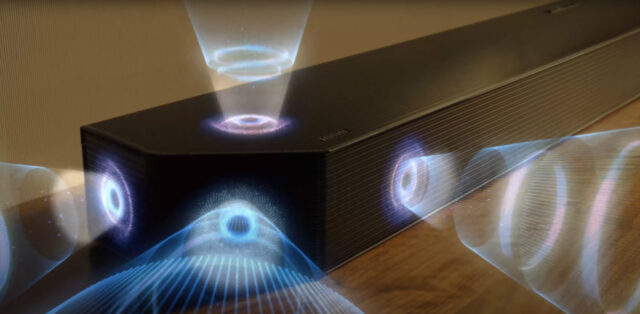
    I want to create an animation to highlight the sound from the speaker, as shown in the video screenshot I shared as an example.

    The Samsung Soundbar promotional video explains this very well.

    Is it possible to do something like this in After Effects?

    It looks much more effective when viewed from a perspective.

    I would be very grateful if you could help me.

    Thank you to everyone who comments.

    https://www.youtube.com/watch?v=idX6JFks9g8

    https://www.youtube.com/watch?v=MOg_lzp9v5E

    Some contents or functionalities here are not available due to your cookie preferences!

    This happens because the functionality/content marked as “Google Youtube” uses cookies that you choosed to keep disabled. In order to view this content or use this functionality, please enable cookies: click here to open your cookie preferences.

    Mads Nybo jørgensen
    replied 10 months, 1 week ago
    4 Members · 13 Replies
  • 13 Replies
  • Mads Nybo jørgensen

    July 10, 2025 at 12:01 am

    Hey Cagdas,

    Yes, you can do all of the compositing inside After Effects.
    Some of the wave animations should be possible too, although you might need a plugin, or buy it as an 3D object that you import in.
    The taking apart stuff and putting back together is likely to be a mix of CAD, 3D software and After Effects.

    If After Effects can’t give you all the planes, You may also need something like Mocha Pro or similar for tracking and masking.

    Hope this Helps?

    Atb
    Mads

  • Eric Santiago

    July 10, 2025 at 12:57 am

    it would be easy enough if the shot was static or have a slow pan/action.

    the only issue is the amount of detail you can create within AE for the waves.

  • Cagdas Kara

    July 10, 2025 at 5:56 pm

    Hello.

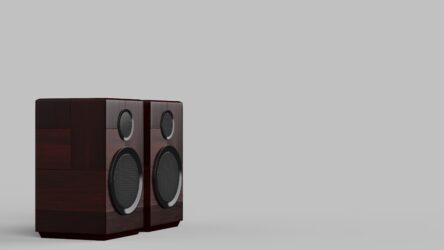
    My object on stage will be static. But it has a 30-degree angle.

    I forgot to write this detail. I apologize.

    Is there a tutorial on how to do this?

  • Cagdas Kara

    July 10, 2025 at 6:00 pm

    Hello.

    If an add-on is available, I can purchase it.

  • John Martin

    July 10, 2025 at 7:07 pm

    Yo Cagdas, it’s time to solve this. Send your 30d degree object to integrate and i’ll record a custom tutorial just for you!

  • Cagdas Kara

    July 10, 2025 at 8:06 pm

    Dear John,

    that’s great news. I’m very happy.

    Thank you very much for your help.

  • John Martin

    July 11, 2025 at 9:10 am

    I’m slightly confused, so this still image is all you have?

  • Cagdas Kara

    July 11, 2025 at 1:02 pm

    No, this is just one of the scenes from the video.

    In this scene, I am providing information about these speakers and sound.

    That is why I need the animation I mentioned.

  • John Martin

    July 11, 2025 at 1:05 pm

    That sounds good Cagdas. For me to explain this, i need the video, when you have a minute, please upload the video file here and i’ll take care of the rest.

  • Cagdas Kara

    July 11, 2025 at 1:37 pm

    The project is still ongoing, and I can share the video of the sound page.

    I left the middle area blank for the sound wave animation.

    I would be very grateful if you could help me.

Page 1 of 2

We use anonymous cookies to give you the best experience we can.
Our Privacy policy | GDPR Policy