Creative Communities of the World Forums

The peer to peer support community for media production professionals.

Activity Forums Apple Final Cut Pro 10.4.8 compressor problem

  • 10.4.8 compressor problem

    Posted by Eric Grayson on November 16, 2020 at 1:04 am

    I am running an older system that’s been upgraded heavily and I’m staying with Mojave because I use a lot of 32-bit software.

    On one of the last system updates from Apple, my 8-bit uncompressed file stopped working. I can no longer import nor export files with this compressor, even ones I created with FCP 10.4.8.

    I’ve reinstalled, rebooted, reinstalled all the compressors, and it’s still gone. I have a suspicion what may be going on but I don’t want to corrupt the hive mind to see what you think first, and if what I think is going on is truly the problem then I don’t know how to fix it anyway.

    Mojave

    2010 Mac Pro upgraded to 12-core 3.46 GHz

    128GB Ram

    METAL card

    Thanks,

    Eric Grayson

    aka Dr. Film

    Film Restoration/Indianapolis IN

    Eric Grayson replied 5 years, 6 months ago 2 Members · 11 Replies
  • 11 Replies
  • Jeremy Garchow

    November 16, 2020 at 3:25 pm

    What system update was it?

    Codec update too?

  • Eric Grayson

    November 16, 2020 at 4:13 pm

    There was no Codec update. It was the Security update from about 3 weeks ago that Apple sent out. That’s when it broke.

  • Jeremy Garchow

    November 16, 2020 at 4:47 pm

    Got ya. Do other codecs work? If you open an 8bit file in QT does it attempt to convert it?

    Does FCPX attempt to convert it? You should get warnings about it.

    Do you need that codec specifically?

  • Eric Grayson

    November 16, 2020 at 5:40 pm

    Yes, it tries to convert it to 12-bit. I need that codec specifically. I am doing some film restoration work and these are going through zillions of programs to do different clean-ups, so I need to have zero compression.

  • Jeremy Garchow

    November 16, 2020 at 6:46 pm

    12bit. Do you mean ProRes?

    8 bit should work, but it might have to be Apple’s 8 bit codec. What codec is it, exactly?

  • Eric Grayson

    November 16, 2020 at 7:30 pm

    NO, not ProRes. There’s an 8-bit Uncompressed and a 12-bit uncompressed. The 12 is still there, but the 8 is gone now.

  • Jeremy Garchow

    November 16, 2020 at 7:38 pm

    Maybe you mean 10-bit?

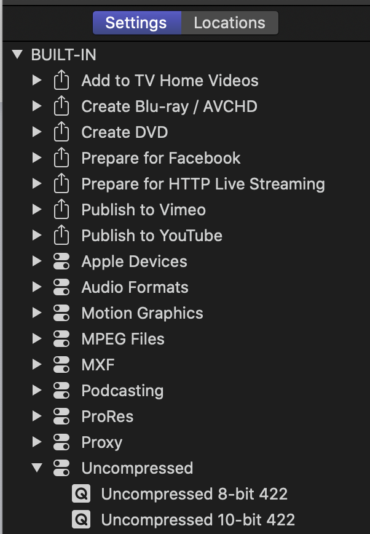
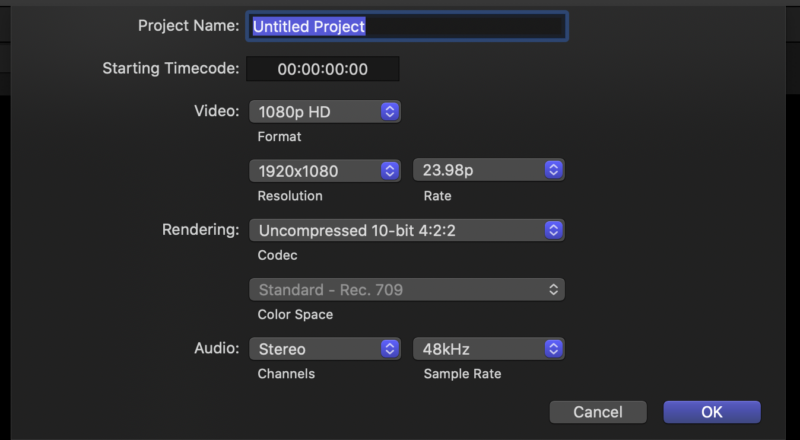
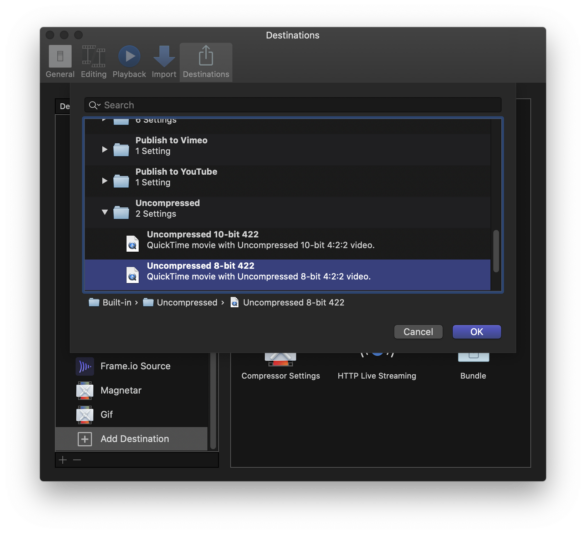
    8 & 10bit bit is still available in Compressor(see attached), and 10 bit is available in Final Cut (also attached) so if you ned 8bit, you can export via FCPX via a Compressor setting (attached).

    https://support.apple.com/guide/final-cut-pro/share-using-compressor-ver1ff89071/mac

  • Eric Grayson

    November 16, 2020 at 8:14 pm

    Sorry, 10 bit (I am using a couple of different programs that handle things differently.) I can get 10-bit to work, not 8-bit. It used to work, and since I’m doing 4K uncompressed, a 10-bit file uses a ton more space and takes more CPU time to run.

  • Eric Grayson

    November 16, 2020 at 8:16 pm

    Exporting via Compressor is great, but my point is that I can’t get FCP to USE something that was rendered 8-bit. It now has to up-convert to 10-bit, which takes forever and is unnecessary.

  • Jeremy Garchow

    November 16, 2020 at 9:00 pm

    Exporting via Compressor is great, but my point is that I can’t get FCP to USE something that was rendered 8-bit. It now has to up-convert to 10-bit, which takes forever and is unnecessary.

    That’s what is weird though, is that I can import 8but UC and it’s fine, which makes me wonder what codec it really is. Do you have a small sample of the footage that you can upload?

Page 1 of 2

We use anonymous cookies to give you the best experience we can.
Our Privacy policy | GDPR Policy