

-
MPEG 2 Compression issues… HELP!
Posted by Brandon Bentley on September 24, 2009 at 6:23 amI have searched frantically all over the internet for help with this, but to no avail. I do personal fan edits of movies and TV shows, and have come to the conclusion that I can never render them in a way that has minimal artifacting when compared to the source material. Even if it’s uncompressed AVI sourced, it still ends up having some artifacts here and there not previously seen. Even video footage made entirely by me through Vegas (text, media generators, effects, etc) end up having artifacting issues, sometimes even worse!
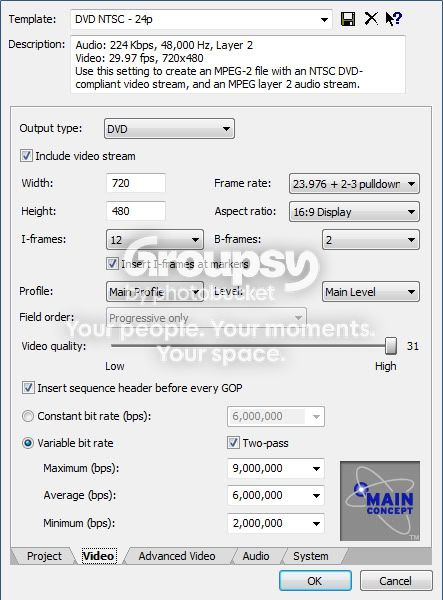
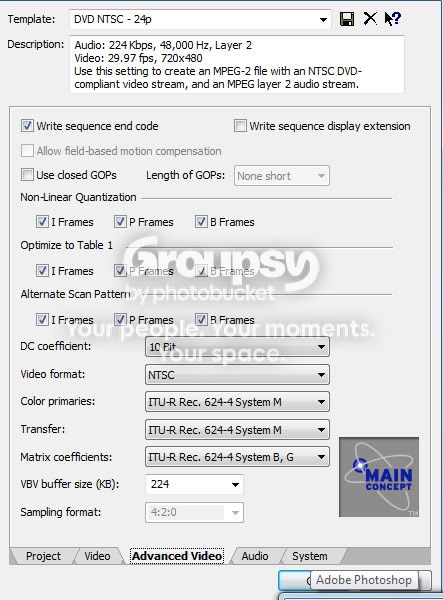
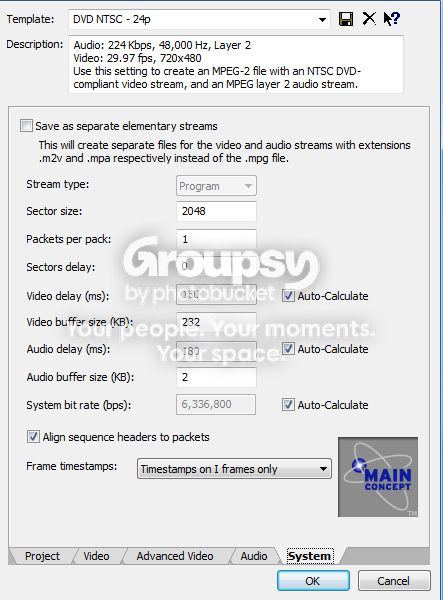
Anyway, here are the video, advanced video, and system settings I have for the majority of my projects:
Video:
Advanced Video:
System:
And an example of a shot completely created in Vegas having artifacting (look at the blockiness at the top and bottom of the screen… click for larger image):

Any help would be greatly appreciated!
Dave Haynie replied 16 years, 11 months ago 4 Members · 10 Replies -
10 Replies


-

John Rofrano
September 24, 2009 at 7:22 pmWhy don’t you just use one of the standard DVD Architect templates? I just rendered a video like yours using generated noise media and text and there was absolutely no macro-blocking like on your image. I have never seen this on any of the DVD’s that I produce with Vegas Pro.
~jr
http://www.johnrofrano.com
http://www.vasst.com -

Brandon Bentley
September 24, 2009 at 7:51 pmThanks for the heads up, but I just tried it, and got the same results. The video made use of the film effect FX, and I even did a test where I rendered it first as an uncompressed AVI (which of course looked perfect), then rendered that file as an MPEG-2, thinking bypassing the re-rendering of the FX would help… still had the same results.
-
Brandon Bentley
September 25, 2009 at 6:29 amAs with AVI, I could try a WMV test as well. As for that template, it was based on info I found online in regards to rendering with the best MPEG-2 quality. Even the DVD Architect template already in there gave me blocking issues though. Could it be a case of having things TOO high? I’ve read that could cause various issues too.
-

Mike Kujbida
September 25, 2009 at 12:55 pmI never let my MAX value exceed 8,000,000 so you could try that.
Another issue is that red has always been a difficult colour for video to reproduce.
Lastly, I notice that your rendering an embedded stream for authoring purposes.
Try doing separate MPEG-2 and AC-3 streams and see if that makes any difference.
I’m not positive but DVDA may re-encode an embedded stream which will further reduce the quality. -
Brandon Bentley
September 25, 2009 at 6:25 pmWell, tried knocking the max bitrate down to 8mbps and rendering as elementary streams… same effect. Sad thing is, I finally tried doing a WMV test… also looked better than MPEG-2 🙁 Is there just something “off” about the Main Concept MPEG-2 plug-in, or is there just something I’m missing?
Also, in regards to DVDA, if you have a DVDA compliant file, it won’t re-render the video, which I always try to make sure as well.
-
Brandon Bentley
September 26, 2009 at 7:55 pmWell, HERE’s a new one… I decided to try one more test:
1. I rendered the file I created in Vegas (background generator, text, etc) as an uncompressed AVI.
2. I loaded the file into another program (TMPGEnc 4)
3. Rendered as an MPEG-2 file (I believe all of the setting were about the same as Vegas)
4. MPEG-2 file had minimal artifacting. Despite the fluxuating lights in the video and the use of bright red, the compression artifacts were hardly visible unless you were blatantly looking for them. So, that leaves me wondering if the Main Concept MPEG-2 plugin is just a bit “faulty”?
-
Mike Kujbida
September 26, 2009 at 8:32 pm[Brandon Bentley] “So, that leaves me wondering if the Main Concept MPEG-2 plugin is just a bit “faulty”?”
You’re not the only person lately who has said that the TMPGEnc encoder is better than the one built into Vegas.
It’s getting a bit “long in the tooth” and needs to be replaced by a better one.
Until then, we either live with it or, like you discovered, use another tool. -
Brandon Bentley
September 26, 2009 at 8:46 pm*sigh* Oh well, looks like I just need to get used to an extra step. Thanks everyone for helping me out with this issue… and hopefully Sony can make a Vegas that had a better MPEG-2 encoder AND isn’t too buggy.
-

Dave Haynie
September 26, 2009 at 9:31 pmWell, damn, my post got lost somewhere.
The TMPGenc success may be easy to explain. First, I had a few points of advice. I’ll be more succinct this time…
The background… my guess was that you just had too much variation between DCT macrocells… what looks like high frequency information in one macrocell looks like low frequency information in the next. After the DCT and filter is applied, they no long mate. It’s a general failure of the way MPEG works.. it’s really tuned to work well for normal, fairly organic looking video. Not so much for crazy computer backgrounds.
The only other question I had .. is the background moving (animated)? If so, it’s probably making things dramatically worse, because the I-Frame computed will have very little to do with the next 15 frames, whereas in real video, they would.
My first suggestion: apply a Gaussian blur to the background, until the DCT blocks went away. At that point, see if you have a problem with the look of the video or not.
My second suggestion: if the background is animated, slow it down. That’ll encode into MPEG-2 much better.
My third suggestion.. if the background is a blown-up JPG (eg, something in lower resolution), using a modern rescaling algorithm to get it organically upscaled, rather than full of chunky, high frequency pixellated edges — which are bad news for MPEG. You can sometimes get this on the cheap — in your favorite photo editor, try a succession of 5-10% upscales, until you get to the size you want.
TMPGenc, as mentioned, is perhaps a hint. Back in the early days, when many of use were hacking VideoCD or something else that might play on our DVD players, MPEG-1 encoding was really tricky to get right, and most encoders did terribly. The best was Panasonic’s, the second best (arguably) was TMPGenc, which at the time was free.
Both had one thing in common — they did analysis of visible DCT blocks, and allowed a mode that would gradually apply a low-pass filter (eg, a blur) to each frame. That lowers the instance of high frequency information before the DCT is done, which makes it much less likely for the transform’s own filter to exceed its inherent bit budget and create these DCT block images.
The last suggestion… use pristine video. If you have compression noise (like JPEG… that’s why I asked about JPEG in the background) or other odd sources of noise in the video, the MPEG-2 algorithm will do it’s best to preserve some of that noise, at the expense of losing quality over all. Best to filter the noise… a global LPF, like a mild Gaussian filter, does just that. TMPGenc just did it algorithmically, so, if you were willing to wait for it, it could optimize different parts of the video, looking for exposed DCT virtual lines (there are rarely actual lines, you just see an abrupt change in color from one DCT block to the next).
-Dave
-
Dave Haynie
September 27, 2009 at 5:33 amYou get visible macroblocks because, for whatever reason, the boundaries of each don’t line up.
MPEG-2 works by chopping everything into blocks, usually 16×16 pixels. It then runs a DCT (discrete cosine transform) on it, which converts the spatial information into frequency information. Next, based on various parameters, some of the high frequency information is cut out (low pass filtered.. this is the lossy part), then the result huffmann encoded.
When you reverse the process, ideally there’s an imperceptible (or at least acceptable) loss of fine detail, but in a visually organic way. Hopefully. The problem is, when colors in one macro block are low frequency, but that same one in the next macroblock is high frequency, you may see the “seam” between blocks emerge, as a compression artifact.
So that’s the way. One possible way to fix this is to pre-filter. Try a mild Gaussian blur on that background, turn it up until the macroblocking disappears, and see if you like the look of it.
Another thing.. where’s the background from? If it’s a JPEG, you may already have bits of compression artifacting in there, which are thrown off the MPEG-2 compression. Just like noise in an analog video tape converted to MPEG… the compression algorithm doesn’t know noise from content, so it’s spending some of the per-frame “bit budget” to preserve the noise, at the expense of the quality of the good stuff. You can find special filters (for VideoDub or AVISynth, I suspect) that are designed to undo DCT noise.. you might try that on the background, if this is the issue.
Another thing.. is the background moving, frame to frame. MPEG no likely — remember, you’re only encoding one I-Frame out of every 15. The rest are motion vectors based on what you need to change the former and/or next frame into the current one. Slow down that movement, if it’s actually moving, and it might look better.
Another thing.. was this “blown up”? What’s the original resolution of the image? If you blow up a small bitmapped image, you can get lots of sharp edges and pixellations, none of which are particular good for MPEG. You might try better resizing algorithms (eg, expand it yourself, if you’re just letting Vegas do the resize). A repeated application of 10% or so separate expansions will sometimes look better than simply expanding once. Another option is a program like Genuine Fractals.
-Dave
Reply to this Discussion! Login or Sign Up