Creative Communities of the World Forums

The peer to peer support community for media production professionals.

Activity Forums Adobe After Effects Mocha Pro mesh tracking with difficult shadow

  • Mocha Pro mesh tracking with difficult shadow

    Posted by Stephen Pickering on April 18, 2026 at 12:06 am

    Hi there,

    I don’t see a forum for Mocha Pro, so I hope it’s ok to post here.

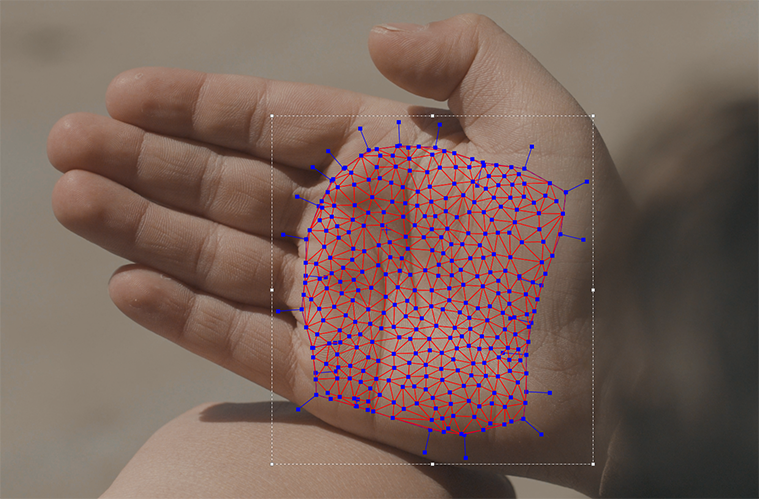
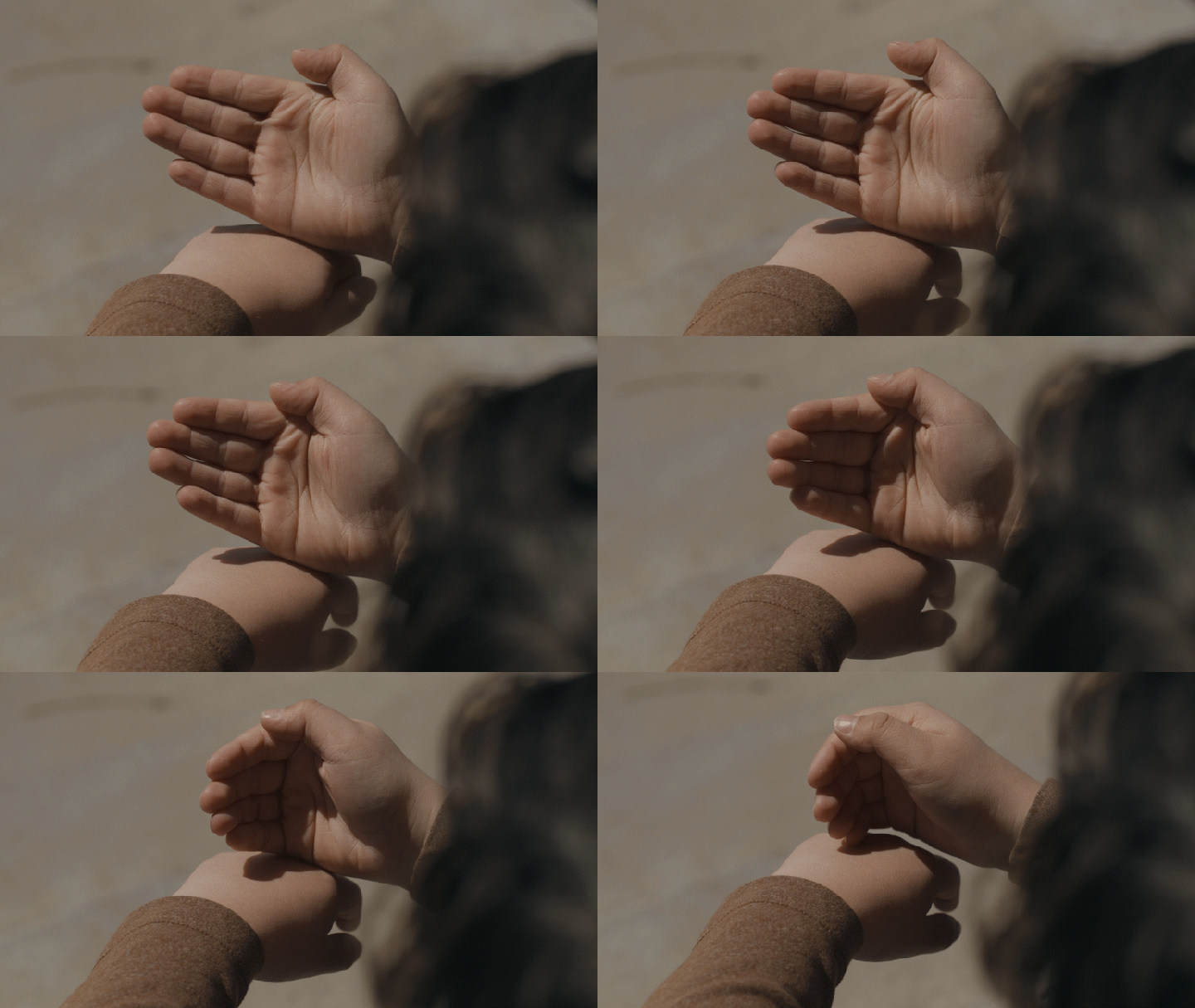
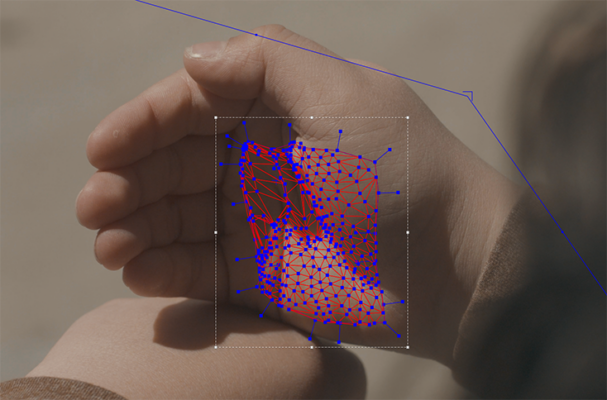
    I have a shot of a hand that I am trying to track with Mocha Pro 2023 (inside AE) and would like to use the mesh track feature to be able to attach a texture to the hand. However, there is a harsh shadow that I just can’t figure out how to work around. It seems the perimeter is tracked, but the inside of the hand follows the shadow, and it becomes unusable. Screenshots are below (the start with the hand open and the end with the hand partially closed).

    Are there any work-arounds you can suggest?

    Thank you so much!

    Stephen Pickering replied 3 weeks, 3 days ago 2 Members · 10 Replies
  • 10 Replies
  • Stephen Pickering

    April 18, 2026 at 12:52 am
  • John Martin

    April 18, 2026 at 4:28 am

    Hey Stephen, the frustration is close to an end! Send me the raw footage, i’ll record a custom tutorial showing my own technique to solve stuff like this! I guess you wanna apply stuff like a tattoo to the inner hand, right?

  • Stephen Pickering

    April 18, 2026 at 4:04 pm

    Yes, that’s exactly it. I want to have writing on his palm, but I need to be able to modify the writing. My thought was to track it, then I have a pre-comp with the writing that I can modify as needed.

    Here’s the file: https://drive.google.com/file/d/1IXsO425KN-0XxeDG0hopLEHT151c9SVJ/view?usp=sharing

    Thanks for any suggestions!

  • John Martin

    April 20, 2026 at 9:11 am

    here’s my technique, lemme know if you like it and i record a tutorial on how to achieve it with any word you desire!

  • Stephen Pickering

    April 20, 2026 at 1:43 pm

    Hey John, that looks great. Ideally I would like it centered on the hand, but I’d love to know how you’re doing it. Thank you!

  • John Martin

    April 20, 2026 at 4:21 pm

    here it is, i hope you like it or helps even by a little bit!

    https://youtu.be/1C6YGKeTM40

  • Stephen Pickering

    April 20, 2026 at 6:37 pm

    I really appreciate it. I’m watching the tutorial right now!

  • Stephen Pickering

    April 20, 2026 at 9:33 pm

    I appreciate your help on this. Unfortunately, I’m getting very unreliable generations, even following your prompt exactly. I’m using the cloud version. Here’s one of the examples:

  • John Martin

    April 21, 2026 at 3:11 am

    let’s figure it out, maybe you are one click from getting better results, first of all, make sure you downscale the video to 720p before uploading it as input, and check the output res matches 720p,
    second, there is a trick to tryout many different results very quickly; in the “length” parameter, put it to “1”, this way it will intantly generate 1 frame so you can quickly test, when you find one that starts to work, LOCK the seed value to “fixed” at the bottom or put it to “increment” or “increment”, then start to increase the “Length” value back and you should start to get mroe consistent results until one of those will simply be perfect

  • Stephen Pickering

    April 21, 2026 at 12:15 pm

    Thank you. I’ll try the 1 frame trick. That’s what was frustrating me- waiting for a full video only to find that the character is now wearing a plastic sleeve andd tattoos all over.

We use anonymous cookies to give you the best experience we can.
Our Privacy policy | GDPR Policy