

Activity › Forums › Apple Final Cut Pro › Add keywords to a project upon creation
-
Add keywords to a project upon creation
Posted by Bruce Byker james on February 26, 2026 at 3:57 pmDoes anyone know if there’s a way to add a keyword to a project when you create it? I find it frustrating to have to go find the project I just created in the browser to add the keyword that keeps it organized with the footage I’m using. I realize I can just go to the smart collection, but it seems like I should be able to do this when I create the project.
Thanks!
Doug Metz replied 6 months, 2 weeks ago 6 Members · 7 Replies -
7 Replies
-

Pablo Rivasplata
February 26, 2026 at 4:37 pmYes, you can do it. Select your new Project > Click on the small Key icon below the main menu bar > enter your keywords in the window that opens upon your click.
Hope this helps,
Pablo
-

Bruce Byker james
February 26, 2026 at 4:59 pmThanks Pablo, I understand that method, but what I’m looking for is something where I don’t even have to go to the browser. Like if I could click in the project timeline and add a keyword there. I realize it’s a small step to go to the browser and select my project, it’s just one I’d like to figure out if there’s a way to avoid.
-

Devrim Akteke
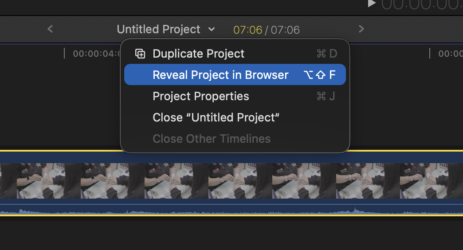
February 27, 2026 at 4:20 amYou add keywords to a project. That is how it works. If you are struggling to find the project in browser in complex libraries, you can use ”Reveal Project in Browser” command to easily find it on timeline.
-
Bruce Byker james
February 27, 2026 at 2:28 pmThanks, yeah, I’ve done that as well. It just seems like something that would make sense to be able to add in the popup screen where you specify its properties. It seems that it is not possible, but maybe I’ll see if I can learn enough about Command Post to find a way using that tool.
This is partially just about developing habits and preferring to keep a group of clips and projects open in the browser and not have to come back to them.
-

John Fishback
February 28, 2026 at 4:17 amFor me, my basic keywords are related to my folder organization for each job. On my external edit SSD, I start with a job folder that contains subfolders: Day 1 original footage, Day 2 original footage, etc., stock footage, VO, music, SFX, etc.
After I create my Library, I import all those folders at once into the event created with the Library, which creates keyframes based on the folder names. I may create more Events in the Library if I want ones for different episodes, or whatever.
From there, if needed, I can add folders in the browser to contain groups of keywords. And as I review all my assets, I will create more keywords (CMD-K) to make it easier to find things. It’s not a one-click process, but it keeps me organized.
-

Ben Balser
March 1, 2026 at 9:50 pmUnfortunately, you can’t create keywords from the Project timeline. You can select a clip, Shift+F to highlight the original in the Browser, then keyword there. But that’s an FCP limit Apple has imposed upon us.
-

Doug Metz
March 2, 2026 at 10:47 pmHey Bruce,
You can submit feedback here: https://www.apple.com/feedback/finalcutpro/
I’ve just submitted this as an Enhancement request for the New Project dialog, where a new Keyword dropdown menu would auto-populate with any keywords in the selected Event for the new project.
Feel free to add to the chorus if you haven’t already!

apple.com
Apple wants to hear from you. Send us your comments and feedback about Final Cut Pro.
Reply to this Discussion! Login or Sign Up