-
Combine multiple paths into 1 path
Hello everyone,
Who could perhaps help me explain how to convert three paths into one?
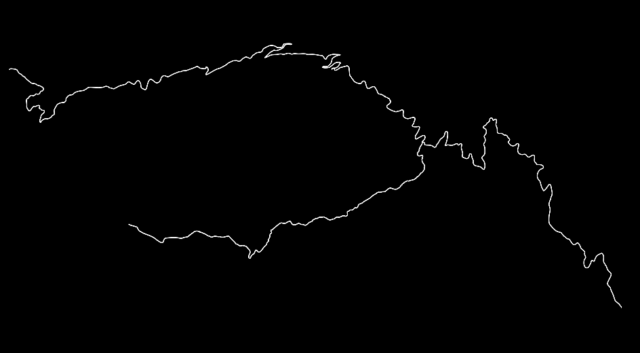
What you see below are the three roads leading to the summit of the French mountain, Mont Ventoux. Using three PNG images of each route/climb and the “auto-trace” function, I created three separate masks, which I then converted into shape layers and added both a path and a white stroke.
I duplicated this with a blue stroke and added the trim paths effect.
Using trim paths, a section of the blue line moves from the beginning to the end of the path in question, remaining 100% visible.
I could apply these options to all three paths, but then either the length of the blue stroke isn’t the same or the speed at which it moves isn’t the same. I’m also messing with the overlap between paths 1 and 2, etc. As soon as the trim path start of path 1 is at 100%, path 2 should start, and this should be the same at the trim path end. However, the transitions aren’t smooth.
Now, I want that blue stroke to first go from the left bottom to the top (the mountaintop), then to the left, then all the way to the right, back to the summit (with part overlap), and then down to the startpoint again.
This is the route I’m going to cycle (Cinglé du Mont Ventoux) for a fundraising event (cancer research).
I also want to use this video in a promotional video for my campaign.
So could someone please explain to me how I could do this or if this is not a problem for you, could you possibly do it?
Thank you replied 9 months, 3 weeks ago 2 Members · 5 Replies