


Vaqa Video Editor Enters Free Public Beta: AI-Driven Offline Tool Streamlines Subtitling, Multi-Camera Sync, and Content Repurposing for Windows Users

Vaqa, an independent software developer based in Kazakhstan, today announced the public beta launch of Vaqa Video Editor, a Windows-based video editing application that combines offline AI speech recognition with professional-grade subtitling and multi-camera synchronization capabilities. The tool is designed for editors, content creators, and video journalists who require efficient, privacy-conscious workflows without cloud dependencies.

AI-Enhanced Workflow, Entirely Offline
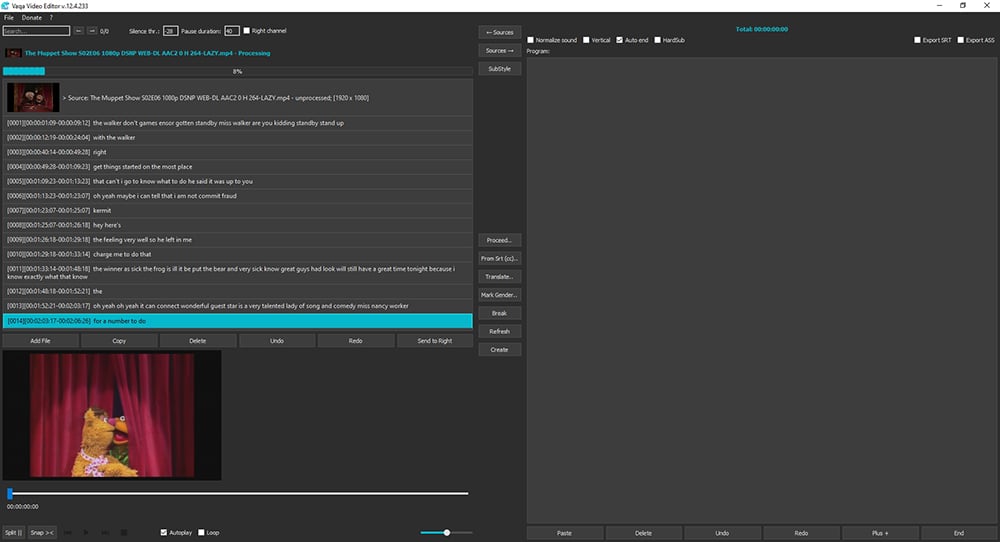
Unlike most AI-powered video tools that require constant internet connectivity and cloud processing, Vaqa Video Editor runs locally on Windows systems, ensuring complete data privacy and predictable performance. The software integrates two leading open-source speech recognition engines—OpenAI’s Whisper (104 languages supported) and Vosk (23 lightweight models pre-installed)—allowing users to transcribe, edit, and export subtitles in .srt and .ass formats while maintaining full control over their media.
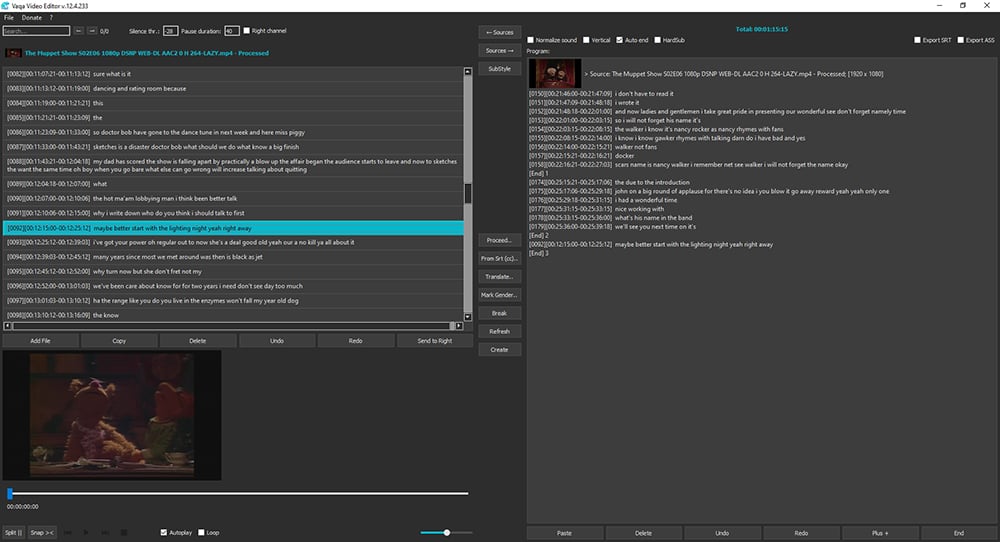
The application’s unique dual-pane interface enables a non-destructive editing workflow: the left panel handles video import, transcription, and phrase segmentation, while the right panel collects selected segments for batch export into one or multiple output files. This approach simplifies content repurposing for social media, educational modules, and interview highlights.
Key Features for Professional Workflows
- Intelligent Subtitling: Create, edit, style, and export subtitles; import existing
.srtfiles; embed hard-coded subtitles directly into video exports - Multi-Camera Audio Sync: Automatically synchronize footage from multiple cameras using audio waveforms (effective for start time differences up to 3 minutes)
- Voice Pattern Analysis: Distinguish between male and female speakers for interview and dialogue editing
- AI-Powered Search: Identify similar phrases across clips using clipboard content, streamlining content logging
- Smart Segmentation: Automatically split video by silence detection, with adjustable thresholds from -20dB to -50dB
- Batch Translation: Translate transcripts into dozens of languages via cloud API (beta feature; network required)
- Flexible Export: Merge selected phrases into a single video or split them into separate files with automatic naming
Technical Specifications & System Requirements
- Platform: Windows (portable application, no installation required)
- Processor: Intel i3 or higher recommended
- Memory: Minimum 4GB RAM
- Free disk space: 20GB
- Dependencies: FFmpeg codecs (must be pre-installed)
- Distribution: 23 lightweight Vosk models included; Whisper models downloaded on-demand
- Licensing: Fully compliant open-source stack (see detailed license list below)
- Package weight: 2.2GB
Beta Program & Availability
The public beta began on October 10, 2025. Users can download the portable application directly from vaqa.io. The beta phase focuses on gathering feedback from professional editors to refine performance, model accuracy, and user experience ahead of the commercial release. All core transcription and editing features are fully functional offline; translation and cloud-dependent features are clearly marked as beta.
Open-Source Foundation & Transparency
Vaqa Video Editor is built on Python 3.8 and integrates only established open-source libraries, ensuring long-term reliability and community accountability:Table
Copy
| Component | License |
|---|---|
| MoviePy | MIT License |
| PyDub | MIT License |
| Hugging Face Transformers | Apache 2.0 |
| PyTorch | BSD 3-Clause |
| NumPy | BSD 3-Clause |
| PySide6 (Qt for Python) | LGPL-2.1 |
| Matplotlib | BSD-like |
| FFmpeg | LGPL-2.1+ |
| Python 3.8 | PSF License |
| Visual Studio Code | MIT License |
| Gender Recognition Model (alefiury/wav2vec2) | MIT License |
| LibriSpeech Dataset | CC-BY 4.0 |
| Whisper (OpenAI) | MIT License |
| Vosk | Apache 2.0 |
| Google Translate API Wrapper | MIT License |
Quick Start Guide for Creative COW Readers
- Model Selection: Choose Vosk for speed; Whisper for professional-grade accuracy subtitles
- Transcribe: Add files (Ctrl+A) → Process (F5)
- Render Episodes: → Send phrases to right panel (→) Create (F6) → Files will saves to the Quotes folder in exect path
- Search: Find exact matches (Ctrl+F) or use clipboard-based similarity search (Ctrl+Q)
- Subtitles: Import
.srt(From Srt[cc]..) or export styled.assor.srtfiles - Sync: Right-click → [Replace Synchro] to align multi-camera footage
- Split/Join: Use Ctrl+B to AI-split phrases, Ctrl+J to merge, Ctrl+S to split at pauses
(Full hotkey reference and advanced settings available at software help menu).
About Vaqa
Founded in Semey, Kazakhstan, (in march, 2025) Vaqa is a bootstrapped software company focused on building privacy-first media tools for global creators. We believes that professional video editing should not require sacrificing data sovereignty to cloud providers.
Enjoying the news? Sign up for the Creative COW Newsletter!
Sign up for the Creative COW newsletter and get weekly updates on industry news, forum highlights, jobs, inspirational tutorials, tips, burning questions, and more! Receive bulletins from the largest, longest-running community dedicated to supporting professionals working in film, video, and audio.
Enter your email address, and your first and last name below!


Responses