

-
Media Generator window is not fully expanding
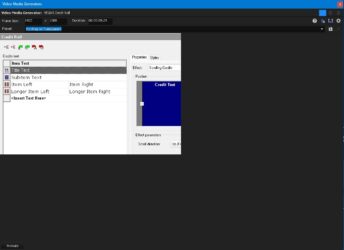
Posted by John Hon on September 14, 2025 at 8:15 pm<strong data-start=”69″ data-end=”145″>Hi, the Video Media Generator window is not fully expanding in VEGAS Pro 20. See attached picture.<br data-start=”145″ data-end=”148″> Could you please advise me on how to fix this issue?
Derek Moran replied 11 months, 1 week ago 2 Members · 6 Replies -
6 Replies
-

Derek Moran
September 15, 2025 at 1:29 amHi John
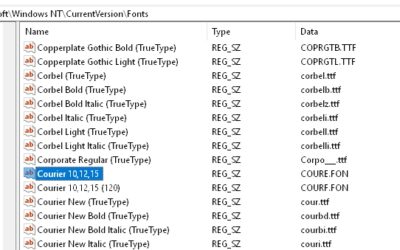
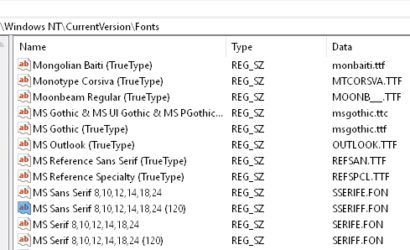
There are many different things you could check, but I am going to guess what the actual cause is. This is going to sound weird, but your computer is probably missing some fonts in the Windows Registry. The main font in question is MS Sans Serif 8,10,12,14,18,24.I posted a solution for this on my own forum here:
https://www.moviestudiozen.com/forum/vegas-pro/2916-vegas-18-shows-only-portion-of-video-media-generators-window-when-creating-credit-roll#14667There are steps on how to check your Windows Registry, to see if Fonts are missing.
I created small file that will fix problem OR you can manually find and install missing fonts yourself.If you are unsure, make sure to Create a System Restore Point before installing my tiny font file for the registry. Then you can take your computer back in time if something goes wrong – but it won’t.
The problem was widespread back in 2020-2021.
Regards
Derek -

John Hon
September 15, 2025 at 1:43 pmHi Derek,
Thank you for the advice, but unfortunately it didn’t help.
Please see below everything I’ve checked. John
1. My Windows 11 Display Scaling is set to 100%Scale and Layout is 100% (Recommended)
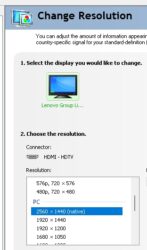
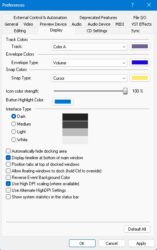
2. Nvidia Control Panel – Display Resolution is set to the Native resolution3. Vegas Pro – Options/Preferences/Display – DPI scaling is turned on
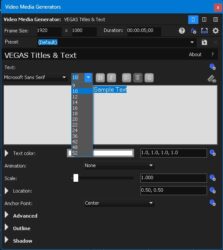
4. MS Sans Serif 8,10,12,14,18,24 is NOT missing
-
John Hon
September 15, 2025 at 7:09 pmI also checked my second PC. I have two fully updated computers running Windows 11 (a desktop and a laptop), and I’m experiencing the same issue in Vegas Pro 20 on both. The fonts are installed.
-
Derek Moran
September 15, 2025 at 10:49 pmYes, I am aware that you have just told me the fonts are present, however, the problem goes a little deeper on some folks computers. Apparently there are different versions of the same fonts. You need to get the really old version installed, then it should be fixed.
You can read about the rabbit hole here, on the official VEGAS Pro forums. Some people get the problem fixed immediately, and others need to go an extra step.
Steps to resolve problem:
1. Try installing the tiny font registry file from my forum, which I have already told you about. If you download then un-zip my file, you can inspect it with Notepad and see I am not trying to trick you with something malicious. Re-boot computer after install.
2. If that does not work, go to this page and download [sseriff . fon] and install.
http://www.dll-found.com/download/s/sserife.fon -
John Hon
September 16, 2025 at 1:28 amHi Derek,
NO, Steps to resolve problem did not work for me.
1. I installing the tiny font registry file from your forum and Re-boot computer after install.
2. I download [sseriff . fon] and install. -
Derek Moran
September 16, 2025 at 7:36 amThere is only one last thing I recommend you try. I think you should do a full program reset for VEGAS Pro. It’s something that needs to be checked off the list. If you don’t know how to do a full program reset, I have instructions here on my site:
https://www.moviestudiozen.com/free-tutorials/doctor-zen-faq/how-to-reset-sony-software-to-default-settings#a1If you read the “rabbit hole” thread on the official VEGAS Forum, you will hear from various users with the same problem as yourself. Not everyone was able to fix with the same instructions, but it appears that everyone did finally work it out. You may find some info in that thread I overlooked?
https://www.vegascreativesoftware.info/us/forum/solved-my-ui-is-very-messed-up–102907/I experienced the exact same problem as yourself, many years ago now. The problem is being caused by Windows. In VEGAS Pro, the Credit Roll plugin is one of the oldest parts of code in the program and hasn’t been update in years. It must need older parts of Windows (registry) to work properly.
At this stage you’re probably asking why is it only affecting me? I will guess it has to do with the history of Windows Updates on your computer. When this problem affected myself (long time ago), I installed the missing Fonts and it was fixed. Years later I reinstalled Windows 11 about 7 months ago and the problem did not return with a fresh install of Windows 11. I have the same version of VEGAS Pro you are using on Windows 11 Pro 24H2 – no problems.
I am now out of ideas. Maybe you should ask on the official VEGAS Pro forum and post in that same thread I showed you. Make sure to explain all the steps you have already tried. Maybe someone else knows of another solution??

Reply to this Discussion! Login or Sign Up