Creative Communities of the World Forums

The peer to peer support community for media production professionals.

Activity Forums Maxon Cinema 4D New C4D Symmetry issue

  • New C4D Symmetry issue

    Posted by Fred Ovitche on August 17, 2025 at 9:08 pm

    Hello,

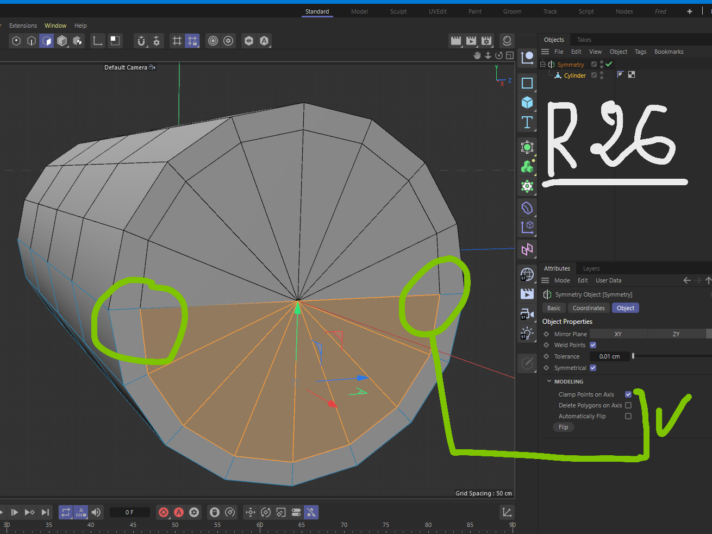
    I have encountered a small but annoying issue in the new cinema 4d symmetry plugin, in short the issue is due to the removal of this 2 option from the symmetry:

    1- Clamp points on axis.

    2- delete polygons on axis.

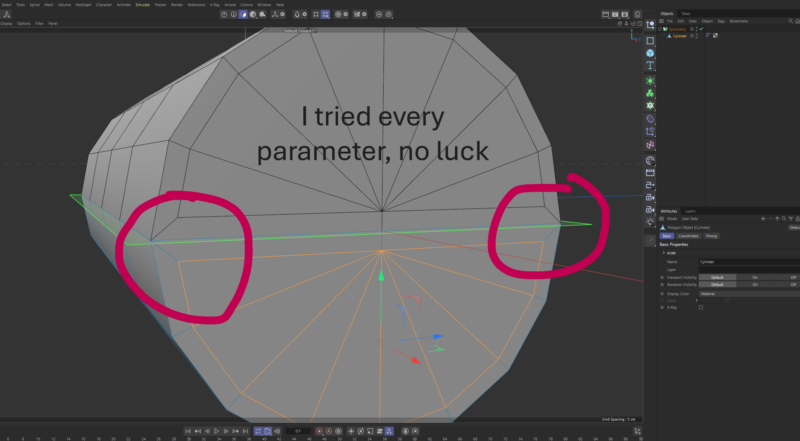
    When try to inset a mirrored face, they become 2 separate halves, not one face (assuming you select Preserve groups). Unlike the old symmetry (R26 version) we have that 2 options i motioned above which makes the mirrored faces behave as single group or single face.
    So, is there any alternative for that 2 options? or a fix?.

    Kouraib Abdmalek
    replied 9 months, 3 weeks ago
    2 Members · 5 Replies
  • 5 Replies
  • Kouraib Abdmalek

    August 18, 2025 at 7:50 am

    Hi Fred,

    In the new symmetry tool you could choose Crosses Plane from the Weld setting, and by using the Cute Along Plane and Remove Outside options, you could do all the operating that you were doing using the two options that were in the old version. I have put a screen recording below that shows some of that. I hope this is useful to you.

  • Fred Ovitche

    August 18, 2025 at 10:13 am

    Thanks for your reply, but i faced is: Try this

    1- Create a cube or cylinder and make it editable.

    2- Delete half of that object, and put the other half in symmetry.

    3- Try to inset the faces, you will see that the origin faces never inset as a single one with the mirrored faces.

  • Kouraib Abdmalek

    August 19, 2025 at 8:38 am

    You are welcome, Fred! You could fix this by playing with the tolerance value, but you’re right, it doesn’t look as practical as the option in the previous version, so it’s better to do the symmetry in mesh mode instead of the model mode, as in the screen recording below. You are not the only one who’s upset about the removal of the previous tool, and Maxon has already brought back some options based on user requests. You can do the work in mesh mode only if you need to remove the second half, you’ll have to do it yourself, so make sure to keep the object on the axis to make it easier for you. I hope this helps you.

  • Fred Ovitche

    August 19, 2025 at 11:35 am

    Thank you sir, this really helpful, it’s true in complex scenes will make your brain boiling 😂, but i hope they will do something in the near future.

  • Kouraib Abdmalek

    August 19, 2025 at 1:17 pm

    You’re welcome, Fred! glad you found this helpful, and I hope with you this deficiency will rectified soon.

We use anonymous cookies to give you the best experience we can.
Our Privacy policy | GDPR Policy