-
3D Image Carousel Rig – Perspective Not Working
Hi there,
I’ve been following this tutorial on how to create a 3D image carousel:
https://www.youtube.com/watch?v=_-V05j8Nwtg
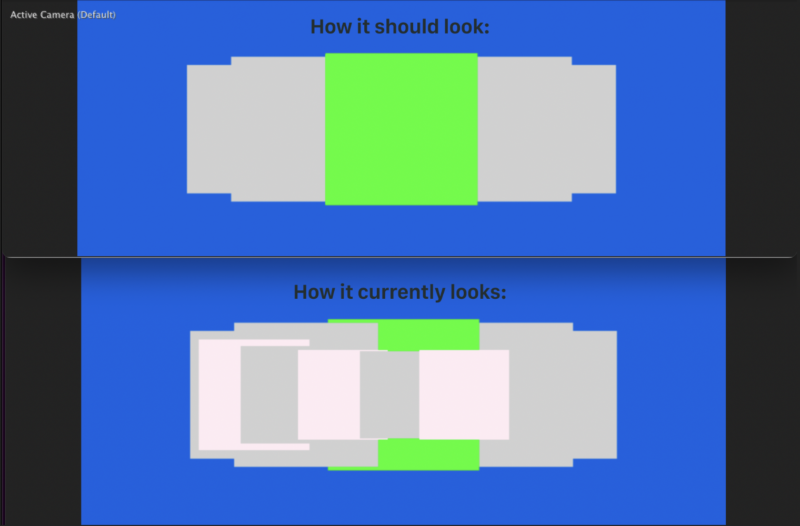
All of the expressions are working just fine but for some reason I have a weird perspective glitch with the cards from behind are showing up on top of the cards which positioned at the front even though on the Z depth axis they are rotating behind.
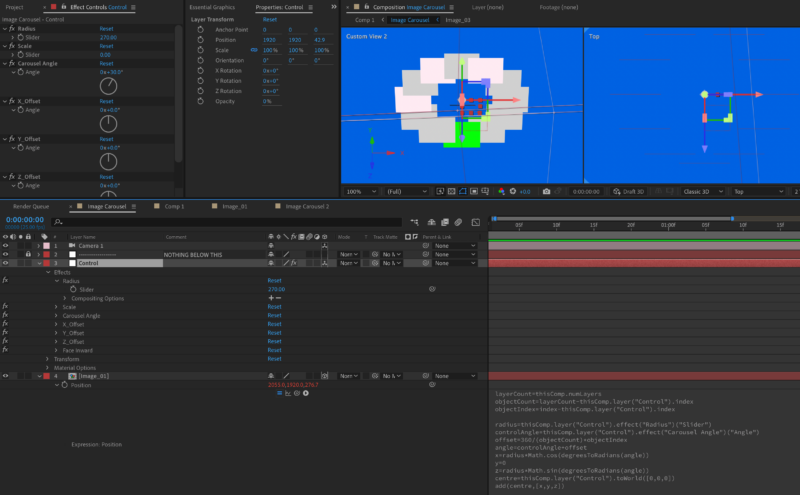
Any ideas as to how to fix this? Been scratching my head trying to figure out why it’s doing this so any help will be greatly appreciated! Screenshots below of the Image layer expressions which are connected to the Control Null layer which have slider controls for Radius, Carousel Angle, XYZ Orientation Offset etc.
Currently using CC 2024.
 Some contents or functionalities here are not available due to your cookie preferences!
This happens because the functionality/content marked as “Google Youtube” uses cookies that you choosed to keep disabled. In order to view this content or use this functionality, please enable cookies: click here to open your cookie preferences.