

Activity › Forums › Apple Final Cut Pro › Best Final cut pro music settings
-
Best Final cut pro music settings
Posted by Eddie Valentin on April 10, 2025 at 11:30 pmWhat would be final cut pro best codec for music to upload on YouTube?
Some say it’s apple ProRes 422 but I want uncompressed highest quality with best sound quality.
Ben Balser replied 12 months ago 3 Members · 18 Replies -
18 Replies
-

Devrim Akteke
April 11, 2025 at 7:17 amHi,
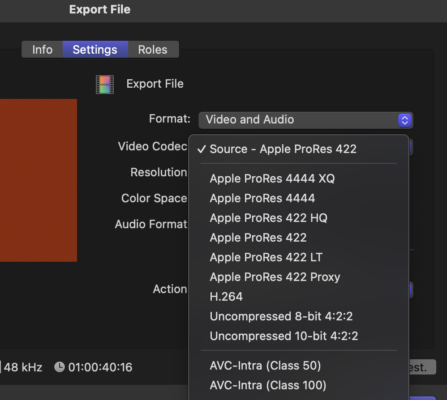
Prores flavors or H264 are video codecs, they don’t affect your audio quality. But of course in Final Cut Pro when you select H.264 export it gives you the AAC codec for audio and when you choose any one of the Prores codec you get Linear PCM. To have better audio quality, before export, you should check your project settings, your timeline setting for audio should be 48 and not 44.1. Honestly, I don’t believe you will have too much difference when you play your video on a laptop or a TV if you choose H264-AAC or Prores-PCM but to have the best quality in FCPX you should choose the Prores 422-Linear PCM option. There is no difference between Prores 422 and Prores 4444 regarding audio quality.
-

Eddie Valentin
April 12, 2025 at 9:18 pmOne more question do I need to select audio and video for best quality or something else?
-
Devrim Akteke
April 12, 2025 at 11:55 pmWhen you export you will choose Video and Audio and one of the Prores options.

-
Eddie Valentin
April 13, 2025 at 9:14 pmI apologize Devrim but apple sells fcp compressor for $50 it is used to compress or not have compression of any kind from what I read? Heres the linkhttps://discussions.apple.com/thread/3284897 It’s my first time ever thinking about buying fcp that’s why I asked.
discussions.apple.com
Exporting lossless from FCP X - Apple Community
Exporting lossless from FCP X - Apple Community
-
Devrim Akteke
April 14, 2025 at 4:17 amHi, Compressor is a very helpful application. It enables you to set up many different export options for almost any kind of codec and aspect ratio pixel sizes and batch export options. As you can see on the screenshot there is an Uncompressed option you can use in FCP. It wasn’t there before and actually, I don’t remember in which version it started to allow uncompressed export. That link you sent, those are the talks from 2014.
On this latest info page, you can search for uncompressed and there are 4 times it says about uncompressed options. Looks like some of them are new. https://support.apple.com/en-la/102825
You can try the latest version, FCP11.1 with a trial version download and that may help to figure out if it works without buying FCP and Compressor.
support.apple.com
Final Cut Pro release notes - Apple Support
Learn about current and previous updates for Final Cut Pro on Mac.
-

Ben Balser
June 30, 2025 at 3:18 pmH.264 and you’ll have about as good as YT will get. YT re-encodes everything, ProRes takes longer to encode, larger files, and you won’t really see or hear any improvement. H.264 all the way, period.
-
Eddie Valentin
September 5, 2025 at 9:15 amSo I’ve been using final cut pro for months now and I noticed an improvement in audio quality in my still image video when using transcoding without even knowing that audio will sound much better with transcoding media. Is there tutorials or can you guys give me a tutorial or a video especially for beginners in music. I hear a lot of people that make music videos and the sound quality is superb
-
Devrim Akteke
September 6, 2025 at 11:58 amHi,
Can you explain the process you used by using Transcode Media to have a better quality?
I didn’t get it. I mean, if you are using music from a stock music site, it is better to download a WAV version. If it was recorded on camera, then you have your camera’s recording codec option. From where to where did you transcode?
-
Eddie Valentin
September 6, 2025 at 9:06 pmSo what I do is import image and audio and export it to a still image music video just with the album cover and music and upload it to YouTube tips in how to enhance video? What does background render do?
Reply to this Discussion! Login or Sign Up