Creative Communities of the World Forums

The peer to peer support community for media production professionals.

Activity Forums Adobe InDesign Book page layout..

  • Book page layout..

    Posted by Suzin Daly on January 14, 2025 at 7:59 am

    I’m learning to do a book. When I Justify left, (over just using left) the paragraphs line up perfectly spaced correctly (like in a professional book) except for the last sentence in the pharagraph that will take three words spread them out like a full sentence…

    Example….soft bill effort.

    I’m following an excellent tutorial, When I follow the tutorial, -in the tutorial it works perfect in the sample. I keep thinking its simple once I know what to fix.

    If there is anyone who could help it would be I be grateful.

    Suzin Daly replied 1 year, 3 months ago 2 Members · 2 Replies
  • 2 Replies
  • Oscar Polanco

    January 14, 2025 at 7:33 pm

    Hi,

    It seems you’re forcing the full paragraph to align as a full block as in the attached screenshot1, is that correct?

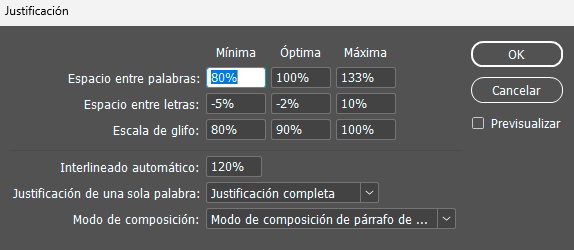
    If so, you need to adjust the paragraph justification so the last line will align properly instead of leaving big gaps between the words.

    Open the paragraph menu and then click on the paragraph menu options. Select “Justify” options and put the top values as in the attached screenshot (sorry it’s in Spanish but you got the idea). That should fix the alignment of the last line as well.

  • Suzin Daly

    January 16, 2025 at 11:45 am

    Thank you for taking the time, your suggestion was helpful.

We use anonymous cookies to give you the best experience we can.
Our Privacy policy | GDPR Policy