Creative Communities of the World Forums

The peer to peer support community for media production professionals.

Activity Forums Maxon Cinema 4D retopology in cinema please HOW ??

  • retopology in cinema please HOW ??

    Posted by Mauricio Barrientos on September 12, 2024 at 11:02 pm

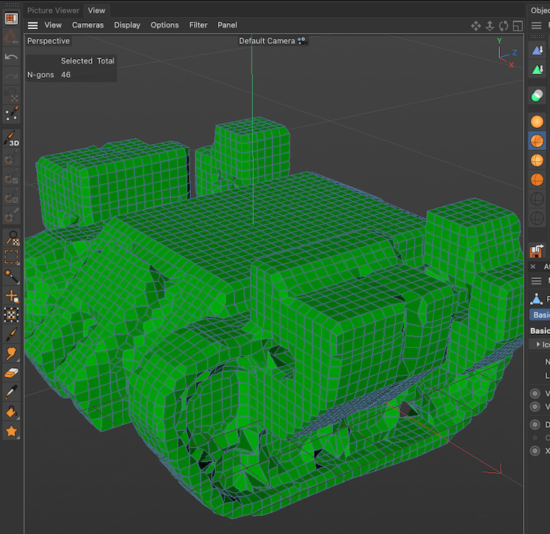
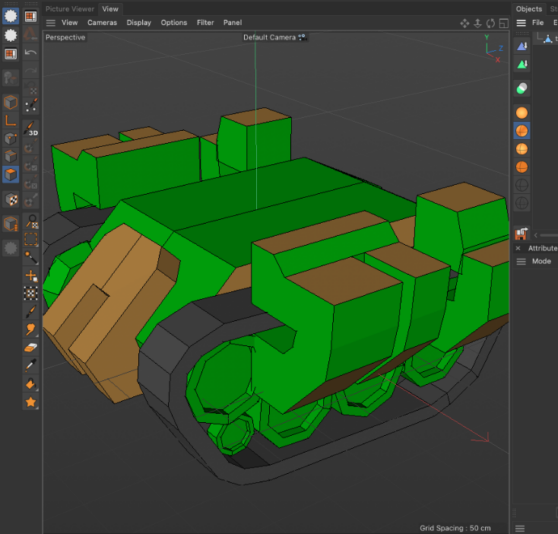
    Hello again… yesterday I was using Cinema and, unintentionally, this happened to me… the whole mesh became gridded… and I didn’t know Cinema could do this, and every time I need to do it, I have to export it to ZBrush, do it there, and bring it back to Cinema… So I’m leaving two photos: one of how the mesh was and the other of how the mesh ended up gridded, changing the topology of the mesh… but I don’t know how I did it… could someone help me by telling me how to do it again but with a specific configuration? … I really appreciate your help, as always.

    Mauricio Barrientos replied 1 year, 10 months ago 2 Members · 5 Replies
  • 5 Replies
  • Kouraib Abdmalek

    September 13, 2024 at 11:29 am

    Hi Mauricio,

    You could do this via the Volume Builder tool through the Voxel Size option as in the tutorial below, let me know if this is what you are looking for.

    https://www.youtube.com/watch?v=d7Yt8iSfQpM

    Some contents or functionalities here are not available due to your cookie preferences!

    This happens because the functionality/content marked as “Google Youtube” uses cookies that you choosed to keep disabled. In order to view this content or use this functionality, please enable cookies: click here to open your cookie preferences.

  • Mauricio Barrientos

    September 13, 2024 at 1:17 pm

    WOW awesome ….. !!!!!

    I’ve already managed to do it, thanks… but after I’ve made my model with VolumeBuilder… how do I make it editable in polygons?

  • Kouraib Abdmalek

    September 13, 2024 at 1:45 pm

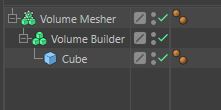
    You could do this by making the Volume Builder under a Volume Mesher and then making the Volume Mesher editable, let me know if this works for you.

  • Kouraib Abdmalek

    September 14, 2024 at 9:25 am

    I’ve explained the method in the screen record below, let me know if that works.

  • Mauricio Barrientos

    September 22, 2024 at 9:37 pm

    thansk

    thankls

    thanks

We use anonymous cookies to give you the best experience we can.
Our Privacy policy | GDPR Policy