Creative Communities of the World Forums

The peer to peer support community for media production professionals.

Activity Forums Adobe After Effects Expressions Connect/select the xPosition, yPosition within nested comp

  • Connect/select the xPosition, yPosition within nested comp

    Posted by Mac Morgan on May 27, 2024 at 7:24 pm

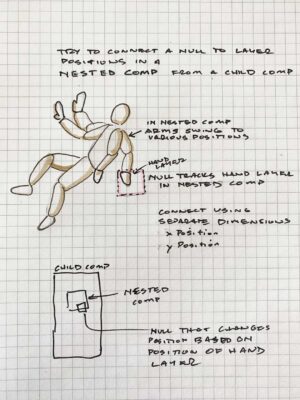
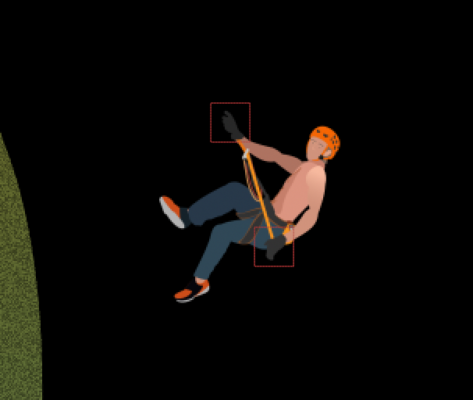
    I want to connect/select the xPosition, yPosition of animated character’s hand layer within a nested comp using a null in my overall composition. So, when the character in the nested comp moves his hands, the null moves in sync and position. See diagram.

    Upstream Comp within is called “rappeller”. Containing comp of “rappeller” is called “rappeller and zip total comp”. I tried this expression on the null in “rappeller and zip total comp”:

    I get a syntax error on this experimental expression to reach through the rappeller comp to the hand.

    P = comp(“rappeller”).layer(“man hand lf”);

    thisComp.layer(“rappeller”).toComp(P.toComp(P.transform.xPosition));

    Still doing my own research on how to do this but would love some higher knowledge. Thanks, Mac

    Mac Morgan replied 2 years, 1 month ago 2 Members · 3 Replies
  • 3 Replies
  • Dan Ebberts

    May 27, 2024 at 8:19 pm

    I think it would be like this for the x position:

    L1 = comp("rappeller").layer("man hand lf");
    p1 = L1.toComp(L1.anchorPoint);
    L2 = thisComp.layer("rappeller");
    p2 = L2.toComp(p1);
    p2[0]
  • Mac Morgan

    May 27, 2024 at 10:09 pm

    Thank you Dan. I will give it a try. The one thing you recognized that escaped me was the need to anchor the relative positions within the rappeller precomp. His composition is 1200 x 804px and the comp he is imported into is 1200 x 2400 so the rappeller precomp exists at 20% scale.

    See attached rappeller man comp.

    As always, so appreciative of your help and guidance.

    Thank you,

    Mac

  • Mac Morgan

    May 28, 2024 at 10:47 pm

    Hi Dan,

    Here is what I ended up with to adjust for hand anchor position versus where I will attach his rappelling rope to the null. Also used the same basic expression for the top hand.

    Thank you,

    Mac

    /* Left Hand xPosition */

    L1 = comp(“rappeller”).layer(“man hand lf”);

    p1 = L1.toComp(L1.anchorPoint);

    L2 = thisComp.layer(“rappeller”);

    p2 = L2.toComp(p1);

    p2[0]-5

    /* Left Hand yPosition */

    L1 = comp(“rappeller”).layer(“man hand lf”);

    p1 = L1.toComp(L1.anchorPoint);

    L2 = thisComp.layer(“rappeller”);

    p2 = L2.toComp(p1);

    p2[1]+5

    /* Right Hand xPosition */

    L1 = comp(“rappeller”).layer(“man hand rt”);

    p1 = L1.toComp(L1.anchorPoint);

    L2 = thisComp.layer(“rappeller”);

    p2 = L2.toComp(p1);

    p2[0]-5

    /* Right Hand yPosition */

    L1 = comp(“rappeller”).layer(“man hand rt”);

    p1 = L1.toComp(L1.anchorPoint);

    L2 = thisComp.layer(“rappeller”);

    p2 = L2.toComp(p1);

    p2[1]-8

We use anonymous cookies to give you the best experience we can.
Our Privacy policy | GDPR Policy