Creative Communities of the World Forums

The peer to peer support community for media production professionals.

Activity Forums Adobe After Effects Expressions Expression to index Position on previous Shape group layer

  • Expression to index Position on previous Shape group layer

    Posted by Benjamin Callaert on May 14, 2024 at 7:11 pm

    Hi Everyone,

    I wanted to say thank you in advance for all the knowledge you guys are sharing here.

    I’m trying to index the Position (only Y axis) from a previous shape layer Group and apply that expression on all the other shape group Position so I only have to animate one layer once.

    What I try to achieve is a pile of book falling on the ground, the idea is to animate the first book falling and index the other to follow with a delay. X Position doesn’t change.

    I manage to do it on another more simple shape group but now I have a way more complex set and I’m completely lost with the Shape subgroup index.

    So I manage to do it with this expression but on a simpler shape group (Contents > 4x group) :

    “var thisPropGrpIndex = thisProperty.propertyGroup(2).propertyIndex;

    y = thisLayer(“Contents”)(thisPropGrpIndex+1)(“Transform”)(“Position”).valueAtTime(time-0.2)[1];

    x = value[0];

    [x, y-8];”

    The Y-8 is to offset them otherwise they pile up on each other.

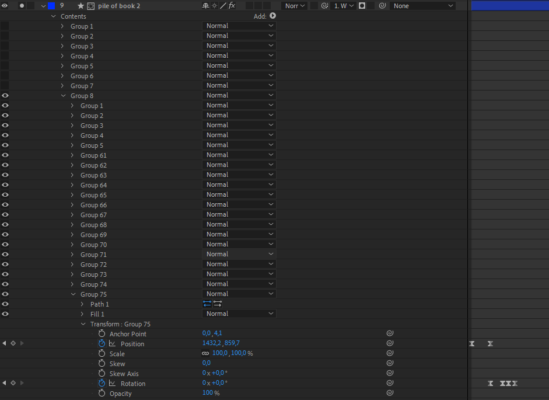
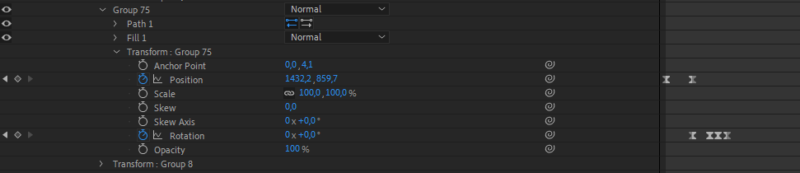
    But now I have a way more complex Shape layer that have 8 main group, 19 sub group. I tried this expression but I can’t get the second book to move :

    var thisPropGrpIndex = thisProperty.propertyGroup(3).propertyIndex;

    y = content(“Group 8”).content(“Group 75”).transform.position.valueAtTime(time-0.2)[1];

    x = value[0];

    [x, y];”

    My apologies it is a messy expression, not yet there when it comes to expressions.

    Any idea?

    Thank you for you help and time in advance.

    Brie Clayton replied 2 years, 2 months ago 3 Members · 12 Replies
  • 12 Replies
  • Dan Ebberts

    May 14, 2024 at 10:27 pm

    It’s not clear what you’re trying to link together. Maybe you could describe that a little better? A diagram that shows what needs to be linked to what would be helpful.

  • Benjamin Callaert

    May 15, 2024 at 6:15 am

    Hi Dan,

    Thank you for replying, I will try to explain a bit better.

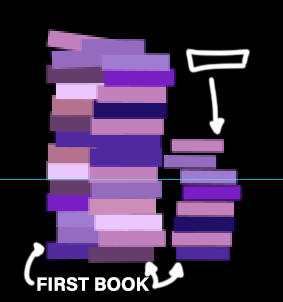
    So I’m trying to create a pile of falling books from the sky,

    the idea is to animate the first book (the one who will touch the ground first), so a Position from let say 100(sky) > 800 (floor) on the Y axis with an ease, and a small rotation.

    Than I’m trying to link the next books Position to his Position so they will follow the same animation with a small delay (pilling up on him).

    I was trying to use the index because they have to fall one after the other.

    I attached a Gif I did by hand quickly, by hand I mean I put animation key on all the books and sequence them, but now I have way to many to do it like that so I’m trying to find a shortcut so I don’t have to do them one by one.

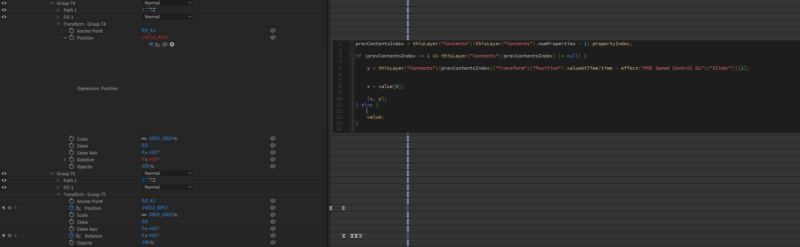
    In One of my screenshot you can see I tried using “prevContentsIndex” but not sure what I’m doing here. I also linked the ValueAtTime Value to a slider so I can control the delay.

    Maybe not the right direction :s.

    Hope it’s clearer.

    Thank you in advance.

    Have a nice day.

  • Dan Ebberts

    May 15, 2024 at 4:08 pm

    I was hoping for more info about how your book stacks are structured, but I’ll just make some assumptions. Let’s say that Group 75 is the bottom book for one stack and that the books in that stack are all in Group 8. If a Transform/Position expression for one of those books wants to reference the bottom book’s position, it would be like this:

    numBooks = thisProperty.propertyGroup(3).numProperties;
    bottomPos = thisProperty.propertyGroup(3).property(numBooks).transform.position;

    and the difference in indices between the book with the expression and the bottom book would be:

    dIndex = numBooks - thisProperty.propertyGroup(2).index

    and you could use that to calculate any delay between the animation of the bottom book and the one with the expression. Something like that. The key is to map out (I used a text layer) what the different levels of propertyGroup() are.

  • Benjamin Callaert

    May 15, 2024 at 5:00 pm

    Hi Dan,

    Thank you so much for your help,

    sorry for the miscommunication, I attached a txt with the layer structure…is that the kind of infos you need?.

    I will wrap my head around your solution, thank you so much for your time.

    I will get back to you.

    Ben.

  • Dan Ebberts

    May 15, 2024 at 5:06 pm

    So Group 1 through Group 8 are each a pile of books? And Group 56 through Group 75 are the books in the Group 8 pile (with Group 75 being the book on the bottom)? If so, then I think what I posted applies to your situation.

  • Benjamin Callaert

    May 15, 2024 at 5:11 pm

    Yes it’s that :).

    Thank you again (never enough), I’m trying your solution now.

  • Benjamin Callaert

    May 15, 2024 at 6:12 pm

    Hi Dan,

    I tried to added but I get an error on the bottomPos :

    " Error : TypeError: ThisProperty.propertyGroup(...).property is not a function ".

    I wrote the expression like this :

    thisProperty.propertyGroup(2).index;
    numBooks = thisProperty.propertyGroup(3).numProperties;
    bottomPos = thisProperty.propertyGroup(3).property(numBooks).Transform.Position;

    Any idea?

    Ben.

  • Dan Ebberts

    May 15, 2024 at 6:30 pm

    I’m not sure what you’re doing with that first line.

    Edit: Ah, I see, hang on–let me take a look.

  • Dan Ebberts

    May 15, 2024 at 6:47 pm

    Ok, sorry, bad syntax on my part. This should give, for a position expression on one of the other books (not the bottom one), a delayed version of the position:

    numBooks = thisProperty.propertyGroup(3).numProperties;
    bottomPos = thisProperty.propertyGroup(3)(numBooks).transform.position;
    dIndex = numBooks - thisProperty.propertyGroup(2).propertyIndex;
    bottomPos.valueAtTime(time - dIndex*.01);
  • Benjamin Callaert

    May 15, 2024 at 6:59 pm

    Wow Thank you Dan ! it solved the error.

    I did a small change to add a gap on the Y otherwise they stack over each other:

    numBooks = thisProperty.propertyGroup(3).numProperties;
    bottomPos = thisProperty.propertyGroup(3)(numBooks).transform.position;
    dIndex = numBooks - thisProperty.propertyGroup(2).propertyIndex;
    bottomPos.valueAtTime(time - dIndex*.01);
    y=bottomPos[1]
    x= value[0];
    [x,y-8]

    But it works fantastically, thanks so much :).

Page 1 of 2

We use anonymous cookies to give you the best experience we can.
Our Privacy policy | GDPR Policy