

-
Buttons Disappear in After Effects Scripting: Solutions?
Hi everyone,
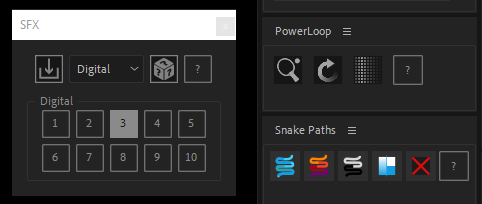
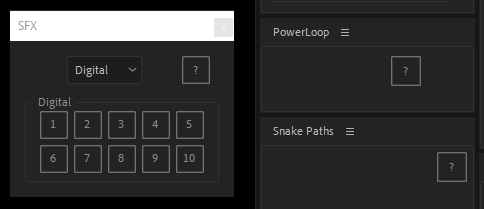
I’ve recently encountered an issue with scripting in After Effects where buttons seem to disappear unexpectedly. I’ve been working on a script that involves creating custom buttons for user interaction, but I’ve noticed that sometimes these buttons vanish without any apparent reason.
I’ve meticulously checked my code and ensured that the event listeners are properly attached, the image paths are correct, and the button setup is executed in the correct order. Despite these efforts, the buttons still disappear sporadically.
Here’s a snippet of the code I’ve been using:
function myScript(thisObj) {
function myScript_buildUI(thisObj) {
var myPanel = (thisObj instanceof Panel) ? thisObj : new Window("palette", "SFX", undefined, { resizeable: true, closeButton: true });
var project = app.project;
var comp = project.activeItem;
var res = "group{orientation:'column',\
groupOne: Group{orientation:'row',\
},\
panelOne: Panel{orientation:'column', text: 'Woosh',\
panelOneGroupOne: Group{orientation:'row',\
},\
panelOneGroupTwo: Group{orientation:'row',\
},\
},\
}";
myPanel.grp = myPanel.add(res);
////////////////// BUTTON ONE STYLE //////////////////
var icons1 = { normal1: "\u0089PNG\r\n\x1A\n\x00\x00\x00\rIHDR\x00\x00\x00\x1C\x00\x00\x00\x1C\b\x06\x00\x00\x00r\r\u00DF\u0094\x00\x00\x00\tpHYs\x00\x00\x0B\x12\x00\x00\x0B\x12\x01\u00D2\u00DD~\u00FC\x00\x00\x00\u00F7IDATH\u0089\u00ED\u00D6\u00B1m\u00C4 \x14\u00C6\u00F1/\u0091\x05\u009D\u00AB\u00D7\u00B1\x07\u00DD\x1B\x02*\u00E6\u00F1B\f\u00C1,\u00EE\u00DE\x02TI\u0091
\u00E9\u00CE\u00F8\u008C}\u00F8\u00A4D\u00F7\u00AF,l\u00F85 \u00FC1M\u00D3\x17^\u00D8\x00\x00)%\u0088\u00C8\u00A5\x10\x11\u0081\u0099\x7F@\x11\u00C1<\u00CF\u0097\u0082\u00A5\u00CF3\u0093\u00AC\u00B5\u00B0\u00D6\u00FEc\u00F0\u0099\u00DE\u00E0\x1B\u00FC\u0083 \x11\u00C1\x18\x03\u00AD\u00F5\u00CD\u00F88\u008E\u009B\u008B\u00DC\u00BF\u00D3Z\u00C3\x18\x03\"\u00DA\x07\u0099\x19\u00CE\u00B9\u00D5\u00C7!\u0084\u00EA\x02D\u0084\x10\u00C2j\u00CC9\x07f\u00DE\x07\u00B7RJ\u00C1{\x7F\u0083\x12\x11\u00BC\u00F7PJ\u00B5.\u00D3\x0E\u008A\u00C8\u0082\u0096\nv\u00E4\u00A6i\x06c\u008C\x0BZ*X\u008C\u00B1?\u0098s^\u00D0R\u00C1r\u00CE\u00FD\u00C1{\u00F4\f\x06\u00FC\u00DE\u00F8g\u00D0\u00F2|\u00B4\u00C3\u00E0Yh\x17\u00AC\u009D\u00B9\u00D6\x1E\u00CD\u00DD\x04k\u0087\u00B6G+\u00B0\u00E7\u00DF[m\u00AD\x15\u0098R\u00EA\x06\u00D6z\u00F9m1\x00\u00CFm\u0090\u00D6\u008A1\x00\u00D7m\u0090Z\u00DF\u00BB\x03\u008B\u00C3[#\u00D8\x00\x00\x00\x00IEND\u00AEB\u0082", </p><p>disable1: "\u0089PNG\r\n\x1A\n\x00\x00\x00\rIHDR\x00\x00\x00\x1C\x00\x00\x00\x1C\b\x06\x00\x00\x00r\r\u00DF\u0094\x00\x00\x00\tpHYs\x00\x00\x0B\x12\x00\x00\x0B\x12\x01\u00D2\u00DD~\u00FC\x00\x00\x00\u00F7IDATH\u0089\u00ED\u00D6\u00B1m\u00C4 \x14\u00C6\u00F1/\u0091\x05\u009D\u00AB\u00D7\u00B1\x07\u00DD\x1B\x02*\u00E6\u00F1B\f\u00C1,\u00EE\u00DE\x02TI\u0091\u00E9\u00CE\u00F8\u008C}\u00F8\u00A4D\u00F7\u00AF,l\u00F85 \u00FC1M\u00D3\x17^\u00D8\x00\x00)%\u0088\u00C8\u00A5\x10\x11\u0081\u0099\x7F@\x11\u00C1<\u00CF\u0097\u0082\u00A5\u00CF3\u0093\u00AC\u00B5\u00B0\u00D6\u00FEc\u00F0\u0099\u00DE\u00E0\x1B\u00FC\u0083 \x11\u00C1\x18\x03\u00AD\u00F5\u00CD\u00F88\u008E\u009B\u008B\u00DC\u00BF\u00D3Z\u00C3\x18\x03\"\u00DA\x07\u0099\x19\u00CE\u00B9\u00D5\u00C7!\u0084\u00EA\x02D\u0084\x10\u00C2j\u00CC9\x07f\u00DE\x07\u00B7RJ\u00C1{\x7F\u0083\x12\x11\u00BC\u00F7PJ\u00B5.\u00D3\x0E\u008A\u00C8\u0082\u0096\nv\u00E4\u00A6i\x06c\u008C\x0BZ*X\u008C\u00B1?\u0098s^\u00D0R\u00C1r\u00CE\u00FD\u00C1{\u00F4\f\x06\u00FC\u00DE\u00F8g\u00D0\u00F2|\u00B4\u00C3\u00E0Yh\x17\u00AC\u009D\u00B9\u00D6\x1E\u00CD\u00DD\x04k\u0087\u00B6G+\u00B0\u00E7\u00DF[m\u00AD\x15\u0098R\u00EA\x06\u00D6z\u00F9m1\x00\u00CFm\u0090\u00D6\u008A1\x00\u00D7m\u0090Z\u00DF\u00BB\x03\u008B\u00C3[#\u00D8\x00\x00\x00\x00IEND\u00AEB\u0082",pressed1: "\u0089PNG\r\n\x1A\n\x00\x00\x00\rIHDR\x00\x00\x00\x1C\x00\x00\x00\x1C\b\x06\x00\x00\x00r\r\u00DF\u0094\x00\x00\x00\tpHYs\x00\x00\x0B\x12\x00\x00\x0B\x12\x01\u00D2\u00DD~\u00FC\x00\x00\x01\rIDATH\u0089\u00ED\u00D6Mj\u00C30\x10\u0086\u00E1\u00AF\u0095C\u0091\u00A1\u00F4\x02\u0086\u00EE\u00B4\u00EB\u0089r\u00A5^#g\x12H\u00AB \u0083\x16]\u0094 \u00D0\u0080\u008Bh\x17\u00C9\x18\x1C\u00FF%\u00AA\x1Dh\u00C9\u00BB22\u009A\x07\f\u00B6\u00FC\u00F0\u00F6\u00FE\u00F1\u008D\x1BV\x00\u00C0\u008B\u00D9a\x13\u00F6\u00ABB_\u00CF\u00AF8\u00A8\u00ED\x11\u00DC\u0084=\u009E>\u00F5\u00AA \u00F7\u0098\u00B3\u00C9{\x0F\u00EF\u00FD?\x06\x7F\u00D3\x1D\u00BC\u0083\x7F\x10$\"\u0084\x10\u0090R\u00EA\u00AC7M3:\u00E4\u00FC^J\t!\x04\x10\u00D1<\u00E8\u009C\u0083\u00B5\x161\u00C6\u00CE\u00BA\u00D6zp\x00\x11A\u00EB\u00EEg1\u00C6\bk-\u009Cs\u00F3\u00E0X)%\x18c:(\x11\u00C1\x18\u00D3{\x1AS]\fJ)[\u0094cLJ\u00B9<\u00A8\u0094jQ\u008E1\u00A5\u00D4\u00F2\u00A0\x10\u00A2E9\u00C6\u0084\x10\u00CB\u0083\u00E7h\x0E\x06\u009CN\u00FC\x1C\u0094\u00AF\u00AF\u00EDj0\x17\u009A\x05\u0087\u00DE\u00B9K\u009B\u00DA;\n\u00D6u\u009D\rN\u00D5\x03\u00CB\u00B2\\l\u00F8\u00D0\u00AC\x1EXU\u00D5b\u00E0P7?-\n\u00E0\u00F8\u0093\u00BAvl\x14\x00pP\u00DB\u00D5A\u00EE\x07\u00CF\f|\u0082\u00A2\u00E1L2\x00\x00\x00\x00IEND\u00AEB
\u0082", </p><p>rollover1: "\u0089PNG\r\n\x1A\n\x00\x00\x00\rIHDR\x00\x00\x00\x1C\x00\x00\x00\x1C\b\x06\x00\x00\x00r\r\u00DF\u0094\x00\x00\x00\tpHYs\x00\x00\x0B\x12\x00\x00\x0B\x12\x01\u00D2\u00DD~\u00FC\x00\x00\x00\u00D5IDATH\u0089\u00ED\u00D51\x0E\u0083 \x14\u00C6\u00F1\u00AFM\x13.\u00C0u<\x04W\u00F24Lp\b6\u00EE\u00C1\u00F6&7X\u00DA\tS\x05\u008B(\u00B1\u00D1\u00F8\u009F\f\u00E2\u00FBM/>\u00FA\u00BE\x7F\u00E3\u00C0\u009EGb\u00E7\x01\u00AD\u00B5\u00B0\u00D6^\x18\u00DC\u00D3\r\u00DE\u00E0\tA\"\u0082s\x0E\u00DE\u00FB\u00C9\u00F90\f\u008BC\u00E6\u00EF\u00BC\u00F7p\u00CE\u0081\u0088\u00CA\u00A01\x06Z\u00EB\u00E4\u00B2\u00942;\u0080\u0088 \u00A5L\u00CE\u00B4\u00D60\u00C6\u0094\u00C1\u00A5B\bPJMP\"\u0082R\n!\u0084\u00B5c\u00D6\u0083\u009C\u00F3\x11\u008DE\u008Cs\u00DE\x1E\x14B\u008Ch,bB\u0088\u00F6 clDc\x11c\u008C\u00B5\x07\u00E7\u00E8\x16\f\x00^U\u00B7\u00BF\u00D0\u00F8\\[5\u00B8\x15*\u0082\u00B9\u009D[\u00DB\u00AFo\x17\u00C1\u00DC\u00D2\u00B6(\x01kv\u00AATnV\x02v]\u00D7\f\u00CC\u00F5\u00FF\u00BF\u00C5\u00E5\u00C0\x0F\x1C%k\u00B1q3J\u00DF\x00\x00\x00\x00IEND\u00AEB\u0082",};
var importButton = myPanel.grp.groupOne.add('button');
importButton.size = [28,28];
var roll1 = ScriptUI.newImage(icons1.rollover1);
var norm1 = ScriptUI.newImage(icons1.normal1);
var down1 = ScriptUI.newImage(icons1.pressed1);
importButton.image = norm1;
importButton.margins = buttonMargins;
importButton.spacing = buttonSpacing;
importButton.onDraw = function (state) {
this.graphics.drawImage(this.image,0,0);
}
var mouseEventHandler = function(event) {
switch (event.type) {
case 'mouseover':
event.target.image = roll1;
break;
case 'mouseout':
event.target.image = norm1;
break;
case 'mousedown':
event.target.image = down1;
break;
case 'mouseup':
event.target.image = roll1;
break;
default:
event.target.image = norm1;
}
event.target.notify("onDraw");
}
importButton.addEventListener('mouseover', mouseEventHandler, false);
importButton.addEventListener('mouseout', mouseEventHandler, false);
importButton.addEventListener('mousedown', mouseEventHandler, false);
importButton.addEventListener('mouseup', mouseEventHandler, false);
myPanel.layout.layout(true);
return myPanel;
}
var myScriptPal = myScript_buildUI(thisObj);
if (myScriptPal != null && myScriptPal instanceof Window) {
myScriptPal.center();
myScriptPal.show();
}
}
myScript(this);
I’m wondering if anyone else has encountered similar issues with scripting buttons in After Effects and if there are any known solutions or workarounds. Could it be related to how the After Effects scripting engine handles UI elements, or perhaps there’s a specific condition that triggers this behavior?
Any insights or suggestions would be greatly appreciated. Thank you in advance for your help!

Sorry, there were no replies found.