

Activity › Forums › Maxon Cinema 4D › Align Null to Multiple Points Central Position
-
Align Null to Multiple Points Central Position
Posted by Joe Obuchowski on January 22, 2024 at 5:53 pmHi,
I have a cloth simulation of a tube using a bunch of wind modifiers and turbulence to get the look I am after. I’m finally at a point where I think it’s looking good.
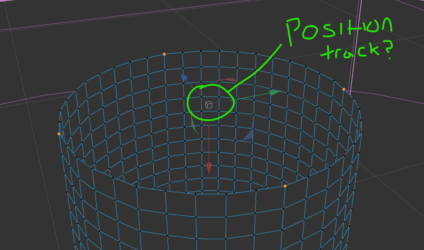
I need to attach an object to the top of the tube, but still have it track with the wild turbulent movement. Does anybody know a way to grab the position of for example 4 points and link that to a null so it tracks?
See attached image. In green is essentially what I want the Null to be, but for it to continue to stick between those points as the simulation is active.
Any help would be very much appreciated!
Thanks,
JoeKouraib Abdmalekreplied 2 years, 6 months ago 2 Members · 8 Replies
-
8 Replies
-

Kouraib Abdmalek
January 23, 2024 at 12:08 pmHi Joe,
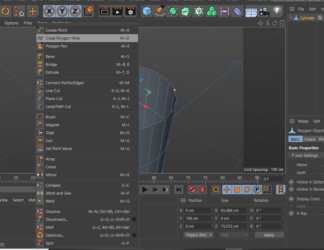
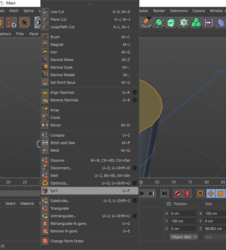
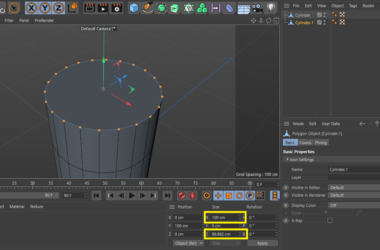
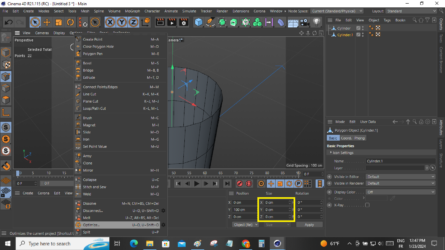
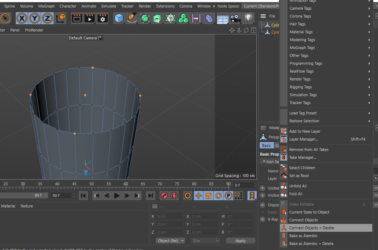
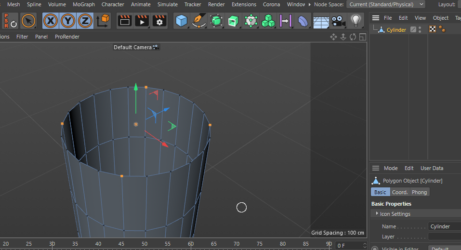
You could create a point in the center of multiple points and at the same level by closing the hole of the cylinder using Close Polygon Hole, then selecting the emerging polygon and right-click, then Split. The cap will become an independent element. Then delete the cap from the original cylinder, select all the points of the cap, and set all the size values at the bottom to zero. You will have now one point. right-click, then Optimize, then select the two elements, right-click, Connect Objects & Delete, now you can align the Null to the center point using Snap as in the attached screenshots.
I hope this is what you are looking for.
-

Joe Obuchowski
January 23, 2024 at 4:07 pmHi Kouraib,
Thanks for the quick response!
Thanks to the info you gave me, I have successfully created the point at the centre of the top of the tube. Do you know how I would then go about attaching a Null to that point? I’ve had a google, been messing with constraint tags and attempted expresso – but cannot work out how to get it to connect and stay connected.
I have the point as a ‘set selection’ tag also, it’s just getting a seperate Null to grab that position and stay tracked.
Best,
Joe
-
Joe Obuchowski
January 24, 2024 at 4:08 amSlight update.
I’ve gotten the position to track exactly as I need, but cannot figure out how to get the rotation to follow.
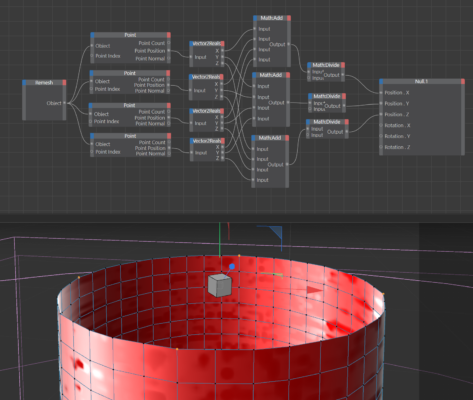
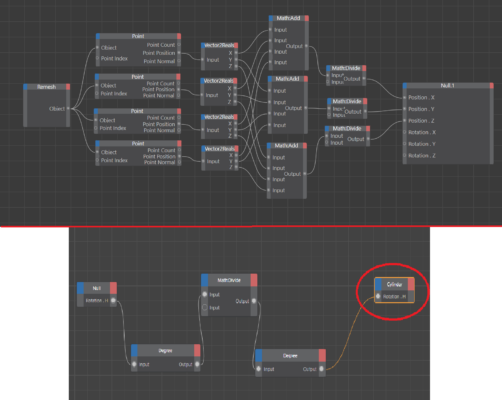
Method used for position: Xpresso ‘Point’ node is taking the positions from 4 points using point index > Pushing those into Vector2Reals to split into X, Y and Z > Adding up all values from each axis then dividing them by 4 (4 points) > And that’s giving me my position values.
Screenshot should illustrate this well.
I’m just still having trouble getting the rotation link up, any suggestions?
Thanks,
Joe

-
Kouraib Abdmalek
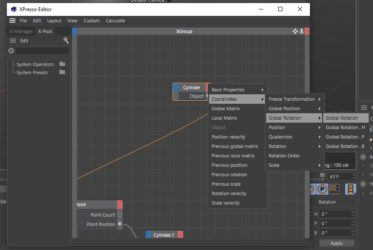
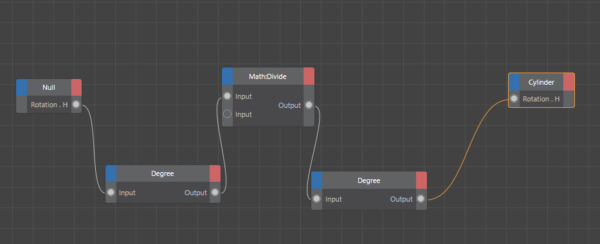
January 24, 2024 at 10:40 amI’m not entirely sure what you want to achieve in terms of rotation, but I think applying Global Rotation to the cylinder object and linking it to the Null will do that.
-
Joe Obuchowski
January 24, 2024 at 2:26 pmThank you Kouraib,
For more context, the cloth simulation tube waves around and needs to have a sort of object aligned to the top of it while it moves about.
Here, this may help get my idea across more: https://drive.google.com/file/d/1Mhbp4nlyvb-jQmX-stv2CZHbLQLUbRo4/view?usp=sharing
See how the cube is positionally tracked perfectly using my xpresso system – just can’t get the rotation to follow.
Thanks,
Joe
drive.google.com
Cinema 4D 2024.2.0 - [Untitled 2 _] - Main 2024-01-24 14-16-10.mp4
Cinema 4D 2024.2.0 - [Untitled 2 _] - Main 2024-01-24 14-16-10.mp4
-
Kouraib Abdmalek
January 25, 2024 at 11:54 amHi Joe,
Maybe you will get the rotation to follow like this.
-
Joe Obuchowski
January 29, 2024 at 9:26 amHi,
Thanks but this was not suitable as it’s a cloth animation that needs to be followed.
I did however figure out a way for anybody interested.
I used the 4 points to get my central position null. I then attached nulls to the front and side points. I then used a target tag on my middle position null so it would track the side null, finally I put that inside another Null with a target facing the front null. (lots of nulls)
But this resulted in a central null that follows the central position of the tube points, while also keeping the correct rotation.
Now I do have one more issue where objects are tracking about 1 frame behind when I render, but I’ll make a new post on that as it’s not relevant to this posts issue.
Best,
Joe -
Kouraib Abdmalek
January 29, 2024 at 11:33 amHi,
Sorry, perhaps I did not explain the proposed method well. I meant that you can use the same principle to follow the rotation of an object in the points following using Expresso, as you did previously with tracking the movement. In any case, I’m happy that you got solved and thank you for sharing this with us.
Reply to this Discussion! Login or Sign Up