Creative Communities of the World Forums

The peer to peer support community for media production professionals.

Activity Forums Adobe After Effects Sprite Colorize not found on After Effects using Trapcode Particular

  • Sprite Colorize not found on After Effects using Trapcode Particular

    Posted by Marcel Balastegui on October 3, 2023 at 5:37 pm

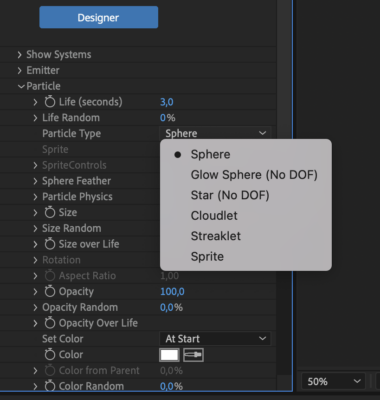
    Hi there, seems that my Particular plugin don’t want to show me the different options I could choose on the “Particle Type” options. I can just see some of them and I would like to add some colours on my sprites.

    It is strange for me because I could usually choose more options than these ones.

    Hope some of you can help on this!

    Brie Clayton replied 2 years, 9 months ago 3 Members · 5 Replies
  • 5 Replies
  • Andy Kiernan

    October 3, 2023 at 6:53 pm

    I think they changed it in recent versions, I think you just select sprite, assign from the drop-down or designer, then use the colour gradient/ random colour.

    I could be wrong, I do spend a lot of my life trying to figure out how that darn plug-in works!

  • Andy Kiernan

    October 3, 2023 at 7:04 pm

    …also set colorize to 100, or to taste, then use particle colour settings

  • Marcel Balastegui

    October 4, 2023 at 7:58 am

    Oh thank you! Didn’t notice the “colorize” setting. So that’s why I couldn’t find it, I was going crazy finding why.😭

    Was fixed with the “colorize” setting to 100%. Thanks a lot!

  • Andy Kiernan

    October 4, 2023 at 8:00 am

    youre welcome! glad its sorted. Happy trapcodeing 😀

  • Brie Clayton

    October 5, 2023 at 2:49 pm

    Thank you for the solve, Andy!

We use anonymous cookies to give you the best experience we can.
Our Privacy policy | GDPR Policy